Last week, two of our members from the Hackers group were at the BT Young Scientist & Technology Exhibition, where they presented their projects. Luke, who goes to Clarin College in Athenry, presented a project called “Relax and Reward”, … Continue reading →
This week in the Hackers group, Kevin led the way in completing the work on the principles of the soldering iron station. While our relay can switch on/off a 220V device like the soldering iron, we tested it with a … Continue reading →
In Hackers, we started work on a short project for a temperature-controlled soldering station. As shown on the whiteboard above, the basic idea is:
A temperature sensor is connected to an Arduino (analog input)
A soldering iron, with its tip located near the sensor, is wired to the mains via a relay switch
The Arduino can control the relay switch to turn the soldering iron on/off
This is the basis for a simple bang-bang controller: we have a target temperature (e.g. 200 degrees) and a tolerance (e.g. ±10 degrees), then you turn it on if the temperature is below 190 degrees and turn it off if above 210 degrees.
We noted that since there will be space between the soldering iron tip and the temperature sensor, the temperature it will read will be lower than the tip temperature.
As the whiteboard shows, this project also involved discussion of: wiring for the thermocouple; how breadboards are wired; normally-open vs normally-closed relay switches.
One group used a LM35 temperature sensor – here are its specs, and the group found it interesting to see how detailed and useful these data sheets are: http://www.ti.com/product/LM35
The other group used a potentiometer to simulate temperature, so they could test it working over its full range, as shown here:
Below is the code for reading and displaying the temperature. Next steps will be to integrate it with the relay.
// Michael Madden, CoderDojo Athenry
// Reading a temperature sensor.

// The temperature sensor is an LM35 - here are its specs: http://www.ti.com/product/LM35
// THe temperature range is -55 to 150 degrees celcius.
// Its output voltage pin is connected to an analog input on the Arduino (A1),
// from which we read a value in the range 0-1023, so we convert them.

void setup() {
  // Just needed for print statements to work
  Serial.begin(9600);
}

void loop() {
  // Read the temperature sensor: get a value in range 0-1023
  int val = analogRead(A1);

  // From the analog input, we get a value in the range 0-1023
  // and we need to convert it to a temperature in the range -55 to 150 degrees.
  // The two lines below achieve this in differnet ways and give the same result.
  int temp1 = (val/1023.0)*205 - 55;
  int temp2 = map(val, 0, 1023, -55, 150);

  // Print out the raw value and converted temperature
  Serial.print("Sensor value = ");
  Serial.print(val);
  Serial.print("\tTemperature 1 = ");
  Serial.print(temp1);
  Serial.print("\tTemperature 2 = ");
  Serial.println(temp2);

  // Wait 100 milliseconds before reading the sensor again
  delay(1000);
}
We had a small but dedicated team of Hackers for our first week back at CoderDojo Athenry last Saturday.
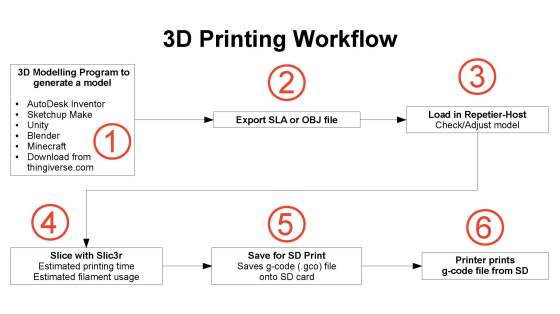
To begin, we started working on 3D printers. 3D printers are a fantastic technology for turning 3D computer models into physical objects. Here are Kevin’s notes on how to set up a 3D printer: 3d-printer-setup (PDF)
And here also is a diagram Kevin prepared, showing the 3D printing workflow:
In addition to setting up software for the 3D printers on group members’ Windows and Linux machines, we started planning potential projects for this year.
One possible project is to build an 8-bit PC from individual components. It was mentioned that it’s Turing complete, which led to a discussion of some concepts that are named after Alan Turing:
Turing Complete: a computer system is Turing Complete if it has the core features that mean it can run any algorithm. For a modern programming language, this means in practice: memory (variables); decisions (if statements); repetition (loops). However, this does not consider things like how data is input and output (file handling, displays, networking, etc), those secondary capabilities are a lot of what make computers useful.
A nice flip side of Turing Completeness is that if you are learning a new programming language, and you can figure out how to handle variables, decisions and loops in that language, you have mastered all the basics!
The Turing Test is a different concept that Alan Turing came up with, when he was thinking about early concepts of Artificial Intelligence (which was impressive considering how computers barely existed!) Rather than thinking about creating computer intelligence by replicating the functions of the human brain, he imagined an experiment where a human would communicate with either another human or a computer (selected at random); in the conversation, the asker could ask whatever they liked, and the human or computer answerer could try to deceive if they wished. If the experiment is repeated and askers cannot determine accurately whether the answerer is a human or computer, we should conclude that the computer is behaving intelligently.
Incidentally, Google’s recent Duplex demo, where an AI system can phone businesses to make appointments, is arguably an example of an AI system passing the Turing test, asn the people receiving the phone calls thought they were talking to a human:
Thanks to everybody who came along for our information session last Saturday the 15th September 2018.
Michael introduced us to the CoderDojo movement and spoke about CoderDojo Athenry and what we have planned for 2018/2019. His slides are here: CoderDojoAthenry-InfoSession-2018-Sept (PDF).
Martha then spoke about our shop, where we sell tea/coffee with biscuits for €2.00 or €1.50 if you bring your own cup, with all profits going towards equipment etc. for our CoderDojo.
Julie then talked about our loaner laptops where we provide laptops for people who don’t have their own. Speak to Julie or any of the mentors for more information.
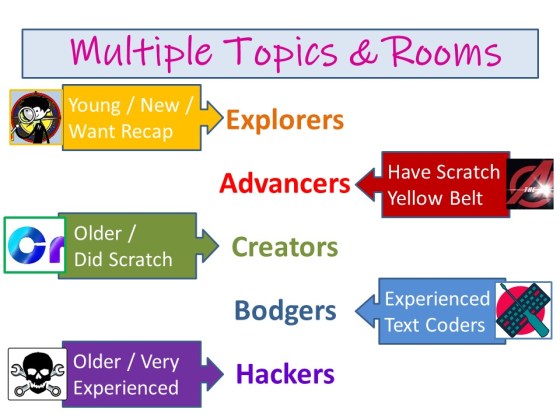
This year, we have 5 different rooms with different topics in them, for different levels of experience and age.
Advancers- led by Oliver for kids who have already been through Explorers. Here are Oliver’s slides Advancers2018.
Creators- led by Kieran and Mark for older kids who have been through Explorers and Advancers or have other coding experience. Here are Kieran and Mark’s slides Creators-2018-Intro.
Bodgers- Led by Declan also for older kids who have also been through Explorers and Advancers or have other coding experience. Here are Declan’s slides bodgers_introduction.
Hackers- led by Michael for older teenagers who have been through Creators and Bodgers. Here are Michael’s slides Hackers-Intro
Our Hackers Group at CoderDojo Athenry made great progress last week on Project SABRE (Small Autonomous Battling Robotic Entities), in which two teams (Team DJARS and Team MEASAM) are building battlebots to compete with each other.
Here is a first test of the driving and steering of one of the bots, operated via a 2.4 GHz remote control with DSM2 protocol and an LemonRX receiver interfaced with an Arduino:
(The two teams worked together on the driving/steering code, which they will share.)
Team MEASAM’s bot has a flipper weapon, and they managed to get the actuator operating via the remote control last weekend also:
Meanwhile, Team DJARS have been working on their vertical spinner/grinder, which they are now controlling via a relay switch using the remote control also:
This project is proving to be a great and engaging learning experience!
25 March 2018 is the deadline if you would like to enter Coolest Projects, which will take place in Dublin on 26 May. You can find out information and register here: http://coolestprojects.org/
We have had lots of great participation from CoderDojo Athenry at Coolest Projects in the past few years, from our youngest members to our oldest, in all of our groups. People who enter find it a fun and rewarding day.
Here is a presentation from 2 years ago about entering:
At Hackers on Saturday, the two teams developing robots collaborated to make progress on combining the code to read the signals from the remote controller with the code to drive motors.
Here is their first test:
Looking forward to lots more exciting developments in the coming weeks!
In the Hackers group this week, we took a large step forward in our Project SABRE (Small Autonomous Battling Robotic Entities), when we started working with remote controllers for our robots.
Components
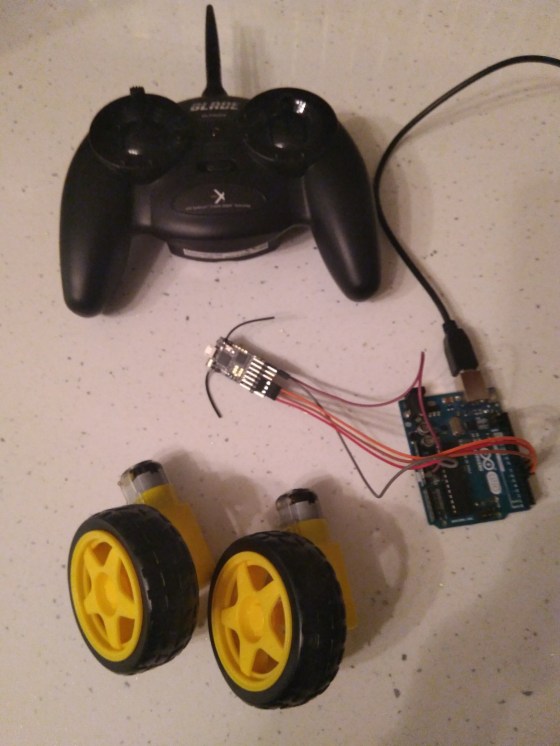
From what the group has read, it looks like the most widely-used controllers are Spektrum-compatible DSMX or DSM2 ones. Therefore, we bought 3x Lemon RX DSMX/DSM2 receivers and one MLP4DSM Blade transmitter (as shown in the photo).
There was a lot of excitement when people were able move the joystick on the transmitter and have it change the value being printed out in the Arduino console!








 CoderDojo Athenry