
This week the creator crew learned some of the most important things for coding and we managed to build quite a useful app while we were at it! For those that missed this week, we handed out two sheets which … Continue reading
This week the creator crew learned some of the most important things for coding and we managed to build quite a useful app while we were at it! For those that missed this week, we handed out two sheets which … Continue reading
Hi everyone,
Can you believe the crowds we had again last week, another record 251 Ninjas and Parents attended Coderdojo Athenry last week.
We were adding to and improving our game from last week. We added a sprite that would catch the fish and decided what could or would happen when this occurred.
We discussed how to make a game more fun we have to add some complexity to it….we need to make it harder to play!! so to this end we used some code from our operator palette to add some randomness.

I also introduced Variables and how we can use them to keep track of things like Score or Lives.

I am attaching the notes from last week as PDF CDA-S6-Week_03-FirstGame_Part2
See you all this Saturday again. We will be starting a new game and Ill need your help.
Martha

We’ve been busy the last two weeks covering the basics of Unity. Among the topics we’ve touched on are:
Additionally Mike kindly filled in and talked about the basics of object oriented programming, classes and class diagrams. There is a post from last year that covers this well for those who’d like to read it.
Additionally, the basics of the C# language that we discussed are covered in both that post which we have already linked to above and another which can be found here. The topics we touched on were:
The up-to-date project file can be found here. Please note it will require Unity 4.5.1 or later.

This topic continues from ModderDojo Topic 6: JavaScript Operators and ScriptCraftJS Drone Functions.
Sharing a Server:
In previous weeks before we stopped for Christmas, some people struggled to make progress through no fault of their own: they were hampered by CanaryMod crashing a lot on some people’s computers.
To work around this, everyone can connect to my computer as the Minecraft server, and I will also create a shared folder on the computer so you can drop your mods into it.
Please review these notes from several weeks ago: Topic 2: Connecting to Each Other’s Servers.
This Week’s Challenge:
This week (and for the next week or two), your challenge is build a substantial mod in ScriptCraft that, when you run it, will create an impressive-looking structure!
A key step to success here is planning and design: as I have said before, a programmer’s most important tools are paper and pencils, for figuring out what you want to create before you write code for it.
You should review the following:


This week builds on ModderDojo Topic 4, when we learned a bit about the basics of ScriptCraft and saw how it handles loops, decisions and variables compared to Scratch: https://cdathenry.wordpress.com/2015/11/11/modderdojo-topic-4-moving-from-scratch-to-javascript/
This week, our goal is to build a first structure mod in ScriptCraft. Ideally you should work in pairs. This to achieve this goal will involve:
During the session, I will ask people to load their mods onto my computer, demo them to the group, and explain how their code works. To get things started, at we can take a look at some mods from last year and how they work: https://cdathenry.wordpress.com/2013/11/10/modderdojo-athenry-our-scriptcraftjs-minecraft-mods/
Practical notes:
Hello Everyone
Great to see so many of you there on Saturday, 85 Ninjas!. Hope you had a good time. And a special welcome to our new Ninjas.
This week we created a Ghostcatcher game. We used the paint editor in Scratch for the first time. As I said on Saturday, It makes things easier if you think in shapes.

Using the code we have learned so far, we moved the Ghostcatcher with the mouse and the Ghosts randomly. We also added sounded and score.

For those of you who would like to add more complexity, I have a couple of ideas at the end of the notes. Give it a go and if you need any help, just ask one of the mentors at the beginning of the next session.
From next week the Scratch Beginners Group will be given by Julie. I won’t be too far away, so you will see me around! We have a new session this year called Unity. It is a games platform and we expect a large number of the kids will take it so I am going to help out in that room with Kieran.
A big THANK YOU to Julie for taking over for me.
Here are this weeks notes in PDF. CDA-S5-Week_03-Ghostcatcher.pdf
Hello Everyone
Hope you are enjoying the Halloween break.
Great to see so many of you there on Saturday, especially since it was a bank holiday weekend.
This week we created a Ghostcatcher game. We used the paint editor in Scratch for the first time. As I said on Saturday, It makes things easier if you think in shapes.
Using the code we have learnt so far, we moved the Ghostcatcher with the mouse and the Ghosts randomly. We also added sounded and score.
For those of you who would like to add more complexity, I have a couple of ideas at the end of the notes. Give it a go and if you need any help, just ask myself or one of the mentors at the beginning of the next session.
P.S. No session next week, hope you have fun over the Halloween and we will see you back on the 8th.
Here are this weeks notes in PDF. CDA-S4-Week_03-Ghostcatcher.pdf
Today the Python Games group continued working on our adventure game. We looked at some tools which are useful for planning out our games, flowcharts, storyboards and pseudo code.
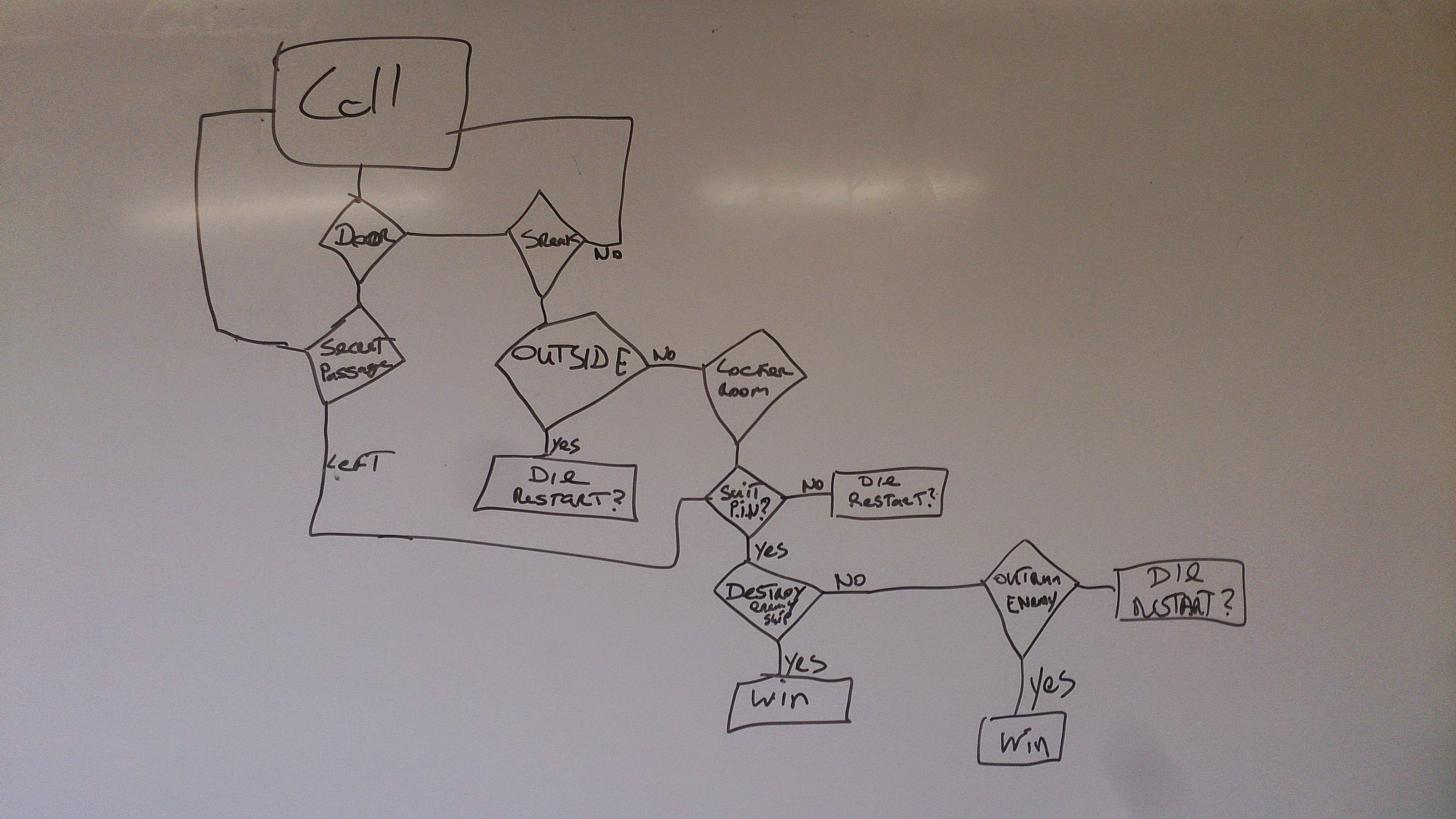
Our flow chart from today

Some of today’s pseudo code
My slides from today are available here python session_3
This week we have one main goal: build a substantial mod in ScriptCraft that, when you run it, will create an impressive-looking structure! This will include:
https://github.com/walterhiggins/ScriptCraft/blob/master/docs/api.mdYou might find it helpful to work in pairs on designing and coding your mods. During the session, I will ask people to load their mods onto my computer, demo them to the group, and explain how their code works. To get things started, at the top and bottom of this post are pictures of mods created by Ruaidhri and Luke. We will take a look at how they work.
Practical notes:
Hi everyone,
Thanks to everyone that showed up today. Again, a big thank you to Julie for taking the session last week.
This week, we built a new game which we were calling “Ghostcatcher” We used code that we have learnt over the last two weeks and again used variables. We will continue to do this over the next couple of weeks, we will make new games but will continue to go over the basic programming concepts each week.
This was our first time creating our own Sprite rather than using one from the library. The paint editor can be great fun and you should experiment with it, creating lots of new Sprites.
Remember ! think in shapes, like we did with the ghost.

A pdf version of the full notes from todays session can be found here: CDA-S3-Challenge03-GhostCatcher.pdf
Try adding your own variables, the code is there for you to look at but why not have a go at it yourself first.
No Coderdojo Athenry next week but hope to see you all back the following Saturday the 27th.
Enjoy the Halloween break!

 CoderDojo Athenry