Advancers: P5 js continued – Robot Draw!!

Today we continued our look at P5 and javascript.  We mostly practiced what we learned last week.

This time we did our work online using the awesome website “codepen” rather than a local text editor.  This website is a place for web developers to play with web code and share it with others.  Using it allowed us to work without getting bogged down with install problems on people’s PCs.  It is great for smaller sketches, but if you want to develop something really big like a complex game it will be much easier to use a local text editor like we did last week.  If you get a chance and have an email address (or your parent has one), sign up for a codepen account.  This will allow you to create and share your own sketches – I’ll link any and all of them on the coderdojo athenry website!

Today we basically just fooled around with it and tried to draw our own picture just with code.  We mostly drew robots as they are fairly easy to draw with rectangles and ellipses!

What we covered:

  1. We watched the neat introduction video from the authors of p5: http://hello.p5js.org/ 
  2. We looked at the P5 reference page which has great instructions and examples for all P5 functions: https://p5js.org/reference/.  Every good library you ever use will have a similar reference page – this is a great example of one.
    1. Similar to how scratch has blocks in different categories (sound, movement, control, etc), p5 groups all its functions into different categories – color, maths, shape, sound, etc.
  3. The canvas, resizing and changing the color using the createCanvas function
  4. Using colours in P5 – We used the following functions to set colours:
    1. background: to set the background color
    2. fill: to set the fill color
    3. stroke: to set the line color
    4. In all cases, colors can be either:
      1. one number in which case it’s a shade of grey from 0 (black) to 255 (white) e.g. background (0) sets the background to black.
      2. three numbers separated by commas, in which case each colour is a shade of RED, GREEN and BLUE – e.g. background(255, 0,0) sets the background to red, background(255, 255, 0) mixes red and green to make yellow.  You can make every colour by mixing red, green and blue!
      3. four numbers separated by commas, in which case it is RED, GREEN, BLUE, TRANSPARENCY. e.g. fill(0,0,255, 100) will make any shape you draw see-through shade of blue.  This is like the ghost effect in scratch.
  5. Some drawing functions in P5:
    1. strokeWeight to set how thick the lines are – e.g. strokeWeight(10) gives thick lines
    2. point to draw a point e.g. point(100, 100) draws a point at 100, 100.
    3. line to draw a line e.g. line(0,0,200, 150) draws a line from 0, 0 to 200, 150.
    4. rect to draw a rectangle – e.g. rect(0,0, 100, 100) will draw a square 100 wide, 100 high at point 0,0.
    5. ellipse to draw an ellipse – e.g. ellipse(0,0, 100, 100) will draw an ellipse 100 wide, 100 high (i.e. a circle) at point 0,0.
    6. triangle to draw a triangle – e.g. triangle(0,0, 100, 100, 200, 200) will draw a triangle between (0,0), (100, 100) and (200, 200).
    7. One other function we used was random.  This can be used in a few ways, but the way we used was to give it one number, in which case it picked a random number between 0 and that number.  E.g. random(255) picks a random number from 0 to 255.  So fill(random(255)) will set the fill to a random shade of grey.

We played about with the all the above to draw a (pretty poor) robot with flashing eyes that fires lasers – the sketch we did is below.  Play around with this and build on it to do something cooler!!

Advancers – Text based coding with p5.js

This week we tried something different with some text based coding.  We learned that for text basoslcyofed coding, we need a good text editor.  The text editor we picked was called “Atom” as it’s a free, powerful text editor that works on Mac, Linux and Windows.
Unfortunately.. with some network and pc problems.. it took longer than I hoped to get things installed on people’s PCs, but even then we managed to make a great start on some code and actually built some quite cool stuff.

For anyone that missed last week.. it would be great if you could run through the steps below and we will be ready for the next stage!

Continue reading →

Creators – Adding Sound

This week we spent some time adding sound to our game.

Recording

We needed a rolling noise and a falling pin noise. I worked on these sound at home.

img_3119

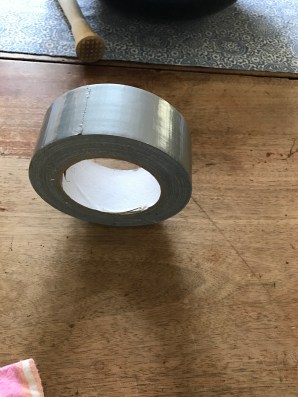
To get a rolling sound, I recorded several different objects rolling, but settled on a roll of duct tape rolling across a wooden table top. It had the pace and tone I was looking for.  For the falling/impact sound, I recorded a wooden muddler (visible above the duct tape above) falling over on the same wooden table.

The original sound files are available here.

Updating Our Sound Files For Game Use

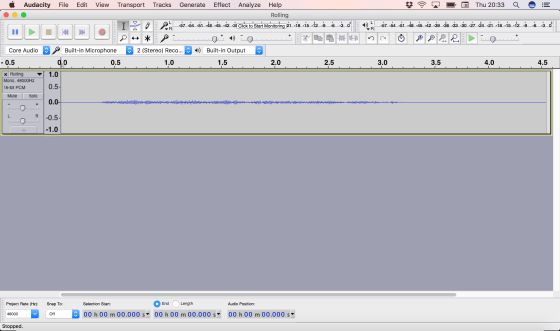
We first loaded the rolling sound into Audacity.

Screen Shot 2016-10-27 at 20.33.20.png

The sound clearly had quiet portions at either end and the sound ramped up and down either side the relatively steady portion in the middle. We selected a reasonably steady central portion of the sound and removed the rest.

This sound was intended to loop seamlessly. Normally the start and end of a sound don’t line up well and there’s a clear point at which the loop starts again.

A useful property of this rolling sound is that sounds much the same backwards as forwards. We were able to take advantage of that to produce a smoothly looping sound. We copied the sound, pasted it to a new track, reversed the new track and mixed them together. This meant that either end of the new sound was identical and the looping was seamless.

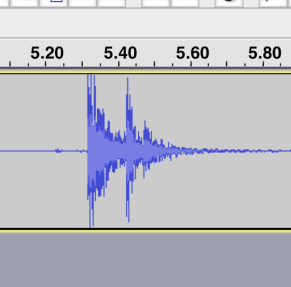
With the impact sound, the process was simpler. The recording had a lot of silence at either end and an impact noise with two peaks:

screen-shot-2016-10-27-at-20-49-35

This had resulted from the muddler bouncing after the initial impact and coming down a moment earlier to hit the table a second time.

Since we only wanted a single impact noise, we just cut the sound to exclude the first impact.

In both cases these audio files were exported from Audacity as WAV files for use in Unity and we placed them in an Audio subfolder of our project. The edited files are here.


Adding The Sound Files To Our Game

We first worked on adding the rolling sound to our sphere. We wanted two things:

  • The sound should be louder as the sphere rolls faster
  • The sound pitch should rise as the sphere rolls faster

To provide a place for the sound to play from, we added an AudioSource component to our sphere and assigned the Rolling sound to it’s AudioClip property. We also made sure that the volume was set to zero and the “Play on Awake” and “Loop” options were both selected.

In our existing PushSphere script, we added two new public properties:

   public float VelocityVolumeFactor = 0.1f;
   public float VelocityPitchFactor = 0.1f;

these are used to relate the sphere’s speed to the sound’s volume and pitch.

We also added a private AudioSource property and got it in the Start() method:

   private AudioSource audioSource;
 
   // Use this for initialization
   void Start () 
   {
     :   :   :
     audioSource = GetComponent<AudioSource> ();
   }

Finally, in the Update() method, where it will be called every frame, we set the AudioSource’s pitch and velocity based on the sphere’s speed (a.k.a. the magnitude of the velocity):

   void Update () 
   {
     :    :    :
     audioSource.volume = rb.velocity.magnitude * 
                          VelocityVolumeFactor;
     audioSource.pitch = rb.velocity.magnitude * 
                         VelocityPitchFactor;
   }

We then tested the game. We found that the rolling sound is pretty quiet and isn’t always that apparent, but I was able to clearly hear it at home.

For things that make a sound when the sphere impacts them, we created a new script called SoundOnImpact. The code in this is very similar to the new code we added to PushSphere and it’s here in its entirety:

 using UnityEngine;
 using System.Collections;
 using System.Collections.Generic;
 
 public class SoundOnImpact : MonoBehaviour 
 {
   public float VelocityVolumeFactor = 0.1f;
   public float VelocityPitchFactor = 0.1f;
 
   private AudioSource audioSource;
 
   // Use this for initialization
   void Start () 
   {
     audioSource = GetComponent<AudioSource> ();
   }
   
   void OnCollisionEnter(Collision collision)
   {
     audioSource.volume = collision.relativeVelocity.magnitude * 
                          VelocityVolumeFactor;
     audioSource.pitch = collision.relativeVelocity.magnitude * 
                         VelocityPitchFactor;
 
     audioSource.Play ();
   }
 }

Note that the code assumes that the game object this is attached to has both an AudioSource component and a collider of some kind. When a collision is detected, the sound is played. The volume and pitch of this sound are proportional to the impact velocity, in a manner similar to before.

We attached this script, and an AudioSource component, to both the walls and the pin prefab.

Project  Files

The full project files can be found here.


Week 6 – Explorers– Finishing off our Ghostcatcher game

Hi everyone,

We finished off our Ghostbusters game this week, there are no new notes, last weeks notes contain all the code you will need. I hope you will continue with your game that you started on Saturday, I would love to see them all when we come back after our Halloween break. Here is a link to the Cheat Sheets I gave out if anyone wants them. cheatsheet.pdf


See you all on the 5th of November

Martha

02


Week 5 – Explorers– Improved Ghostcatcher game

Hi again everyone,

This week we improved on our Ghostcatcher game from last week.

We introduced a new concepts which we haven’t used before, animation and next week we will start another new concept which is broadcasting.

Using a simple technique of changing between costumes and having a waiting time we can animate our Sprites. In our case, we animated the Ghosts so they were blinking or sticking out their tongue. You could of course use this technique to have a sprite look like they are walking etc.

animation

Hope you all enjoyed the session and we will be using animation and broadcasting over the next couple of months.

Here are this weeks notes in PDF  cda-s6-week_05-betterghostcatcher.pdf

Hope to see you all again next week

Martha

Welcome to the 2016-17 Season at CoderDojo Athenry!

coderdojoathenry-infosession-2016-sept

We had a great first day back at CoderDojo Athenry on 17 September 2016, with about 205 young people and their parents attending the first day.

In case you missed the session, you can review the introduction notes here:
1-coderdojoathenry-infosession-2016-sept (PDF)

This year, we have renamed our groups:
  1. Explorers, led by Martha, was formerly the Scratch Beginners group, as well as Scratch, it will include graphics packages and stop-motion animation — overview notes here: 4-explorers-wk1_information-session (PDF)
  2. Advancers, led by Mark and Oliver, was formerly the Scratch Advanced group, and will feature more advanced projects Scratch and packages such as GameMaker — overview notes here: 5-advancers-coderdojoathenry-kickoff-sept2016 (PDF)
  3. Bodgers, led by Declan, was formerly the Raspberry Pi group and will involve hardware and electronics projects — overview notes here: 6-bodgers-coderdojoathenry-info-sept2016 (PDF)
  4. Creators, led by Kieran, was formerly the Unity group and will involve 3D game development in Unity, complemented by 3D modelling and sound effects — overview notes here: 7-creators-coderdojoathenry-kickoff-sept2016 (PDF)
  5. Hackers, led by Michael, is a new group, and is a hacker space for CoderDojo Athenry, with more in-depth projects building on technologies learned in other groups, as well as new ones — overview notes here: 8-hackers-coderdojoathenry-infosessoin-2016 (PDF)

We encourage people to work through the groups in the order listed above. Creators and Hackers are aimed at young people in secondary school.

For the Bodgers group, Declan has also posted additional notes about getting started: Bodgers-Setting up our laptops.

See you all next week!

Congratulations CoderDojo Athenry Members at Coolest Projects 2016!

Congratulations to everybody from CoderDojo Athenry who participated in the CoderDojo Coolest Projects on 18 June 2016.

12 children from CoderDojo Athenry presented their group or individual projects at Coolest Projects in the RDS Dublin – this is the annual competition organised by CoderDojo, and had over 700 projects from Ireland and internationally.

We are very proud of everybody who participated, including 5 of them who won prizes: Shane won top prize in the Hardware category for his Flood Gauge project, Roy won a runner-up prize in the Games category for his Pretendo arcade game project, and Ruaidhri, Luke and Oisin won a runner-up prize in the Games category their Broken Island game written in Unity.

Congratulations to over 100 CoderDojo Athenry ninjas who earned belts on 28 May 2016!

Belts2016

Congratulations to all of our ninjas of CoderDojo Athenry who earned belts on Saturday 28 May and then joined in our party with pizza and chips.

Here are some photos of the day, posted on our Facebook page: https://www.facebook.com/CoderDojoAthenry/posts/1141076832579849

We awarded a total of 102 belts to young people who have mastered a wide range of programming technologies:

  • White belts for being actively involved in the dojo: 10
  • Scratch Beginners: 34 yellow belts
  • Scratch Advanced: 7 yellow and 21 blue belts
  • App Inventor: 3 blue belts
  • Raspberry Pi: 4 blue belts and 1 orange belt
  • Minecraft JavaScript: 7 green belts
  • Unity C#: 1 yellow, 5 green and 9 orange belts

Well done, everyone! We are very proud of you all.

We are very grateful to our supporters –thanks to them and all of the time given for free by our mentors, CoderDojo Athenry is entirely free of cost for all of our participants:

  • Clarin College Athenry and its principal Ciaran Folan, for generously hosting us every week and providing sponsorship towards our belts
  • The Galway-Roscommon Education & Training Board, for an annual youth club grant
  • Medtronic for a Volunteering Grant via mentor Declan Fox, recognising the many hours he puts into CoderDojo Athenry.

And we are very grateful to our special guests from this year: Niall of Colmac Robotics, Chris Tierney with his drone, and Brenda, Donovan and John Romero.

CoderDojo Athenry is now closed for the summer and will resume around mid September. We will notify you all by email when it is restarting.

Have a great Summer!

Michael and the CoderDojo Athenry mentors.