Creators – Random Dungeon

This week we took a look at a technique for generating random dungeons. Although never mentioned on the day, this technique is often called “marching squares”. It looks at the four corners of a space at a time, some of which are open and some of which are closed, and picks a shape that blocks off the closed corners.

There are sixteen possible combinations of corners on and off. All of these can be covered with these five shapes (or a rotation of them) to represent the closed off areas:
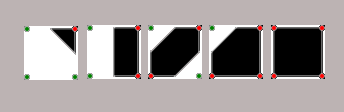
marchs

Generating the Dungeon

We generated a 2D array (a list of lists) to store our dungeon layout. At each point we used a 2D Perlin noise value (using the noise() function) to calculate a value. The point was deemed to be either open or closed based on whether this value was higher or lower than a threshold value we specified. Varying this threshold value can make the dungeon more open, or more closed in.

Drawing the Dungeon

To draw these shapes we first defined each of them as a list of x, y points defining the shape.

We then used beginShape()vertex(), and endShape() functions to draw them at the correct size, location and orientation by scale(), transform() and rotate().

Once we were able to draw the shapes, we just needed to loop over our grid, inspecting each set of four adjacent corners in turn and drawing the appropriate shape.

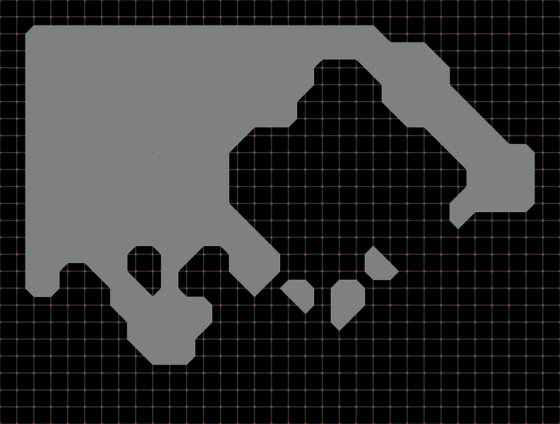
Here’s a screenshot of one random dungeon. Dots (green for open, red for closed) are drawn to show the grid and the lines between the individual shapes are also shown for clarity:
d2

and here is is without these overlays:

d1

Download

The files for this week can be found on our GitHub repository.

Congratulations to our Ninjas at Coolest Projects 2019

Congratulations to everybody from CoderDojo Athenry who participated in the CoderDojo Coolest Projects International in the RDS Dublin on 04 May 2019.

We had three projects which all sparked a lot of interest with the public at the event. Adam presented his game “The MegaMaker”, David and Michael presented “FidoFinder” and “Go With The Flow” was presented by Mark.


Special congratulations to Adam who was runner up in the Games category and the Go With The Flow team represented by Mark who were runners up in the Hardware category.


Creators – Quiz and Hacking

Screenshot 2019-05-02 at 00.23.50.png

This week we had a quiz. There were three rounds on Technology, Creators 2019 and Pop Culture. There was a very high proportion of correct answers on all questions. The quizes can be found here, for anyone that wants them:

Creators 2019

Pop Culture

Technology


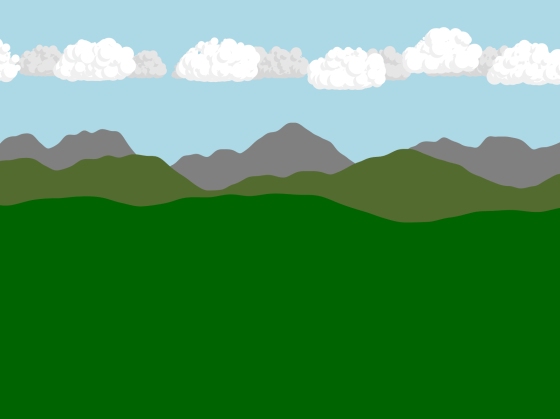
After that we set everyone a programming challenge: make an animated scene. People got busy and there was some good progress. We will continue with that next week. Mark and I (Kieran) got in on the action figuring out how to draw clouds. My attempt is shown in the image at the top of this post. The code can be found, as always, on the CoderDojo Athenry Creators 2018 GitHub.

Explorers Week 10 – Scrolling Backgrounds

Hi everyone

Thank you to everyone who came on Saturday.

We did scrolling backgrounds and this is very useful in any type of game and can add an extra dimension to your game whether its a driving game or a flying game.

We were scrolling horizontally so we were using the xpos but remember you can just as easily scrolling vertically by just using the ypos

Here are the notes in PDF form

CDA-S8 Week_10-scrollingbackgrounds.pdf


Enjoy the long weekend and we will see you all the week after.

Martha

Julie, Eoin and Ruaidhrí

Bodgers – Cool Projects

Hello again everyone.

In the Bodgers group we’re starting to put our projects together for the Coolest Projects Showcase.

“Coolest Projects International is a world-leading showcase for young innovators who make stuff with technology. If you’re up to 18 and you’re making something with technology for fun, to solve a problem, or as a creative outlet, then we want you to come out and share your project with us! This free event will take place in the RDS Main Hall, Dublin, Ireland on 5 May 2019.”

Find out more here: https://coolestprojects.org/

If you have any questions you can contact me at coderdojoathenry@gmail.com.

Don’t forget we’re off for the next 2 weeks, we’re back on 27-Apr-19.

see you all then.

Declan, Dave and Alaidh

Creators: Drumtown!

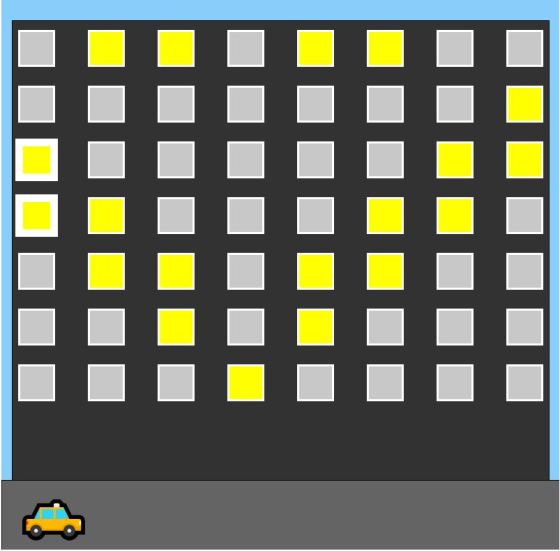
Today in Creators we played a bit more with sound and built a type of musical instrument using Javascript.  The project was called “Drum Town” because it was based on the idea of a music mad building and when you wake up one of the resident’s by clicking their window, they would play a particular sound every time some traffic cruised past.  Each floor consists of people with the same instrument.  What else would they do?

Play the finished Project by clicking here! – Make sure to TURN UP THE SOUND!!

drumtown

How did we build it?

The awesome thing at this stage is that the group has become so competent at javascript that as soon as we had the idea, some people put their heads down and started building without a whole lot of direction!!  I won’t go into the ins and outs here, but the code is up on our repository and you can go through it!

Interesting bits!

Some of the interesting bits of the project are:

  1. Classes:
    As usual we needed a few classes – this time we used classes for the Car and the Window.  The basic idea was to have a car moving at a constant speed left to right and to have windows that play a sound whenever the car goes past.
  2. Unicode Sprite Characters!
    We learned that now text is getting more and more graphical – we can see it on our phones with emoticons.  There are a large amount of emoticons in standard fonts and if you enable the windows keyboard (right-click taskbar and choose “Show Keyboard” you get on onscreen keyboard that can type all sorts of characters – we used these for our cars:  and could write crazy looking code like:  this.carList= [🚗, 🚚, 🚛, 🚕, 🚜]; .  This will make it REALLY easy for us to write games with nice looking costumes without messing with images.
  3. Sounds:
    I handed out some sounds for us but you can put whatever sounds you like in your own version.  I got my sounds from this website here which has TONS of free instrument sounds!  We named the sounds 0-6.wav to make it easier to use loops to reference them.

That’s it!  Take a read through the code, I finished it off a little before pushing (mainly added a title).  It would be great to make your own version with a different them and a different set of sounds perhaps.  Also – maybe this can give you ideas for other types of musical instrument that you can create, perhaps with a completely different model. Have fun with the emoticons too 📯🎷🎺🎸🎻!

Bodgers – RFM69 Radio Modules


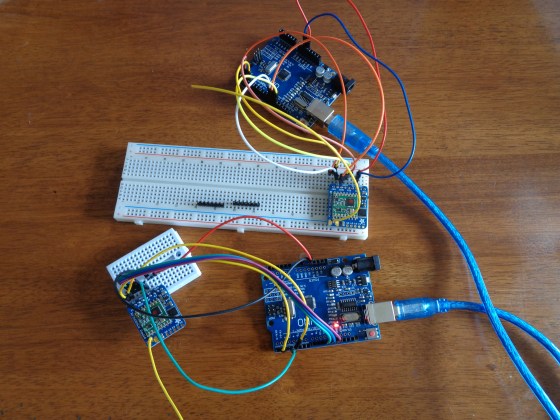
DSC00227

Hello again everyone.

This week we looked at the Adafruit RFM69HCW Radio Module, these modules allow us to send messages between Arduinos without using Wifi or Bluetooth.

Adafruit have a tutorial here on setting up the module. The basic steps are:

  1. Solder on the header pins.
  2. Solder antenna or wire cut to the the proper length for the module/frequency
    • as our frequency is 433 MHz  we cut the wire to 16.5 cm.
  3. Wire up modules to your Arduinos
  4. Download the RadioHead library to your Arduino IDE.
  5. Load the RadioHead69_RawDemo_TX code from this library to the Arduino you’re using to transmit.
  6. Load the RadioHead69_RawDemo_RX code from this library to the Arduino you’re using to receive.
  7. Test

Next Saturday we will be putting all of the different components from our projects together and testing out how they work.

see you all then.

Declan, Dave and Alaidh

Creators – Flying Over Dynamic Terrain


This week we creating a game where a tiny plane flies over dynamically generated terrain picking up as many boxes as possible. The player scores a point for every box, but that also makes the plane fly faster, making the game more challenging.

Perlin Noise

Normal random-number generators produce values that jump around all over the place. Perlin noise is different. It is also random, but it varies smoothly. This makes it great for mimicking the sort of randomness we see in nature.

1D Perlin Noise Landscape

Our smooth and changing landscape is generated using a one-dimensional Perlin noise value generated by the P5.js function noise(xoff).

We start with a loop that goes across from 0 -> width across the screen. We’re looking to generate a set of [xy] points that define our shape.

We use these values:

  1. xstart: A starting value for xoff
  2. xinc: An amount to increment xoff by for every new location
  3. ymin: The smallest y value we want for our landscape – something a little below the top of the screen
  4. ymax: The largest y value we want for our landscape – something a little above the bottom of the screen

Each call to noise() generates a single value in the range 0-1. We use the P5.js function map() to change this value in the range 0-1 into a value in the range ymin-ymax.

Changing the size of xinc controls how choppy or smooth the landscape is. We tune it to a value that gives approximately two peaks and two valleys across the screen, and looks right for our game.

Moving the Landscape

Moving the landscape is achieved by changing the starting value of xoff (aka. xstart) each time we update the screen. By making it a little larger each time, the effect is that the landscape seems to scroll from right to left.

Other Parts of the Game

The other parts of the game are very standard. We define a simple plane shape (drawn using rect() calls)  that can move up or down in response to the arrow keys.

We define “cargo” containers that are randomly generated on the surface of the landscape and move right-to-left at the same speed.

The cargo containers have an active property that is false if they move beyond the left-edge of the screen or get sufficiently close to the plane to be “picked up”.

We added a function to the landscape class (Ground.js) that checks for a given [x, y] location to see if that point us under the ground by checking what the height of the landscape is at that x value. If the plane is below the ground we consider it crashed.

We added a simple scoring mechanism that tracks how many boxes were collected and makes the plane move faster (really – the ground scroll faster) every time a box is collected.

Download

The files for this week can be found on our GitHub repository.

Bodgers – Texts & Emails

This week we looked at sending texts and emails from our python scripts.

To send text messages you will need to set up an account on Twilio which is a platform that allows coders to make and receive phone calls, send and receive text messages from their programmes. You then install the Twilio python library which will allow us to send texts from our script using code like this.


# Download the helper library from https://www.twilio.com/docs/python/install
from twilio.rest import Client

# Your Account Sid and Auth Token from twilio.com/console
# DANGER! This is insecure. See http://twil.io/secure
account_sid = 'your account_sid'
auth_token = 'your auth_token'
client = Client(account_sid, auth_token)

message = client.messages \
                .create(
                     body="Hello Bodgers",
                     from_='+440123456789',
                     to='+353123456789'
                 )

print(message.sid)

To send an email we use smtplib which is an email library that’s built into python and which works well with Gmail. We need to change our Gmail setting to allow insecure apps and then we can use the code below to send our message.


import smtplib

server = smtplib.SMTP('smtp.gmail.com', 485)
server.starttls()
server.login("my.email@email.com", "myPassword")

msg = "Hello World"
server.sendmail("my.email@email.com", "some.email@email.com", msg)
server.quit()

See you all on Saturday

Declan, Dave and Alaidh