Advancers – Spirals

This week Eoin led the Advancers group, we looked at drawing in Scratch, using the Pen blocks and some simple maths to draw some patterns.

As always, we started with a Plan:

A Plan

  1. A Button Sprite – to start the drawing.
  2. A Simple Sprite to do the drawing.
  3. Some maths to make it draw a Spiral

We started by drawing a square, to draw a square in Scratch we used the Pen down, Turn and Move blocks.

To get a spiral effect we had to make sure that we moved a little bit further each time we drew our square.

We also decided that we should be able to make spirals with different shape so we  needed some variables to help:

  • Shape – This would tell us how many sides the Spiral should have
    • We made this in to a Slider on the screen so it was adjustable.
    • Min value was 3 and Max value was 100
  • Degrees – This would tell us how much extra to turn, this made the patterns a lot more interesting.
    • Again, we made this one into a Slider so we could adjust it.
    • Min value was 0 and Max value was 360
  • Size – This was an internal variable, which we used to keep track of how many Steps to move each turn, we also added a little bit to it each turn to make the Spiral pattern.

The drawing Sprite

This was the Sprite that did all the work. To work out how far we should Turn each time, we divided 360 by the number of Sides, we then added the degrees value to get the strange effects working.

The code ended up looking like this:


The Button Sprite

We used this sprite to start drawing, we used a broadcast so out button sprite could “talk” to out drawing sprite.

Oliver will be back next Saturday.

See you all then Declan and Eoin

Modellers – Week 1

blender-socket

Hi folks and welcome to our new group, Modellers. This year we’re going to be mainly looking at the 3d modelling package Blender Version 2.80.

Blender can be installed from: www.blender.org. Please note that it requires OpenGL Version 3.3 or higher and as a result may not work on some older machines


This week we learned:

  1. The 3D viewport and moving around in it:
    1. Middle mouse button: Orbit
    2. Shift + Middle Mouse Button: Pan
    3. Scroll Wheel: Zoom
  2. Selecting objects with the left mouse button
  3. The toolbar tools for moving, rotating and scaling objects
  4. Deleting objects with ‘x’
  5. Adding new mesh objects from the “Objects” menu
  6. Adding a new material slot and a new material and assigning a colour to it
  7. Putting the 3D Viewport into “Look Dev” mode so that material colours can be seen

We also gave out copies of a very convenient Blender Infographic which can be found here.

Screenshot 2019-09-25 at 23.43.52.png

Explorers Week 01 – Getting to know Scratch

Hello everyone

Welcome to Coderdojo Athenry and the Explorers group! It was great to see so many new faces on Saturday and of course I’m always delighted to see those you are back for another year!

We just spent a short time familarising our self with Scratch and where we can find the code and some small examples od how we can use them. We will start a new game this coming week and will jump straight in using variables, loops and decision statements.

Here are the notes from last week. CDA-S8 Week_02-YourNameinLights.pdf

Martha

&

Julie, Iseult, Cara, Ruaidhrí and Eoin

CoderDojo Athenry Information Session, Sept 2019

Thank you to everyone who came along for our information session yesterday Saturday 14-Sep-2019.info_session

Michael introduced us to the CoderDojo movement and then talked to us about CoderDojo Athenry and what we have planned for 2018/2019. Michael’s presentation is here:CoderDojoAthenry-InfoSession-2019-Sept .

Julie then spoke about our loaner laptops where we provide laptops for people who don’t have their own. Speak to Julie or any of the mentors (we’ll be wearing blue t-shirts) for more information.

Martha then spoke about Health & Safety and our shop, where we sell tea/coffee with biscuits for €2.00 or €1.50 if you bring your own cup, with all profits going towards equipment etc. for our CoderDojo. The H & S and Coffee Shop slides are here: HS-and-Coffee .

info_session1

This year, we have 4 different rooms with different topics in them, for different levels of experience and age.

Explorers- led by Martha for Beginners from around age seven. They use the Scratch programmimg language to build games, quizes and animations. Here are Martha’s slides: CDA-Explorers-S8-Information-Session .

Advancers- led by Oliver is for kids who have already been through Explorers. They tackle more complicated programming concepts, during the year the Avancers group will investigate various topics like gravity, music and even what happens when water boils using Scratch.

Modellers- led by Kieran is for older kids who have been through Explorers and Advancers. The Modellers group will concentrate on making 3D game resources using apps like Blender and Gimp. Here are Kieran’s slides: CoderDojoAthenry-Modellers-KickOff-Sept2019.

Hackers- led by Michael for older teenagers who have been through Creators and Bodgers. The Hackers group themselves usually decide what topics they will cover with many of them working on their own projects. Here are Michael’s slides: Hackers-Intro-Slides.

Kids are free to move between rooms until they find a topic that suits them.

To find our schedule for the 2019/2020 sessions click on the schedule button at the top of this page.

If you have any questions or if you need any help, please talk to me or any of the mentors.

See you all next Saturday.

Declan and the CoderDojo Mentors

CoderDojo Athenry Returns on 14 September 2019!

return

CoderDojo Athenry is starting back with an information session on 14 September 2019 in Clarin College Athenry (“the Tech”) at 12:00 noon. All new and existing members are welcome to come along to find out what we have planned for this season.

Regular weekly sessions will start the following week, 21 September 2019, 12-2pm in the same venue.

New members are always welcome. If you are aged between 7 and 17, just come along on the first day and fill out a registration form. Young people aged 12 and under have to be accompanied by a parent/guardian for the whole session.

And don’t forget, CoderDojo Athenry is run by volunteers and is completely free for participants — no membership fees, no weekly contributions. You should bring a laptop if you have one, but we have some loaner laptops if you don’t. There is more information on our About page.

We hope you can join us. You are welcome to invite your friends along too!

Congratulations to all our ninjas who received belts in Summer 2019!

On 2 May 2019, at our final CoderDojo Athenry session of the 2018-19 year, we awarded a total of 75 belts to our ninjas for their great individual achievements in acquiring and demonstrating coding and computing skills. And then we had a party with pizza!

Here is a link to our presentation from the day: CoderDojo Athenry Belts Day 2019

We are very grateful to Clarin College Athenry and the principal, Ciaran Folan, for their enabling CoderDojo Athenry by making the school and its wifi available to us.

We are also very grateful for the sponsorship and support we have received this year:

  • Galway Roscommon Education and Training Board, who provide us with an annual Youth Club Grant
  • Medtronic, employer of our mentor Declan Fox, who provide us with a grant to match Declan’s excellent volunteering
  • HP Enterprise, employer of our mentor Mark Davis, who provide loaner laptops that we make great use of
  • Boston Scientific, employer of our mentor Kevin Madden, who provide us with 3D printers.


Thanks also to everyone who supported us by buying tea or coffee!

Because of these supports, no child or parent/guardian ever has to pay to participate in CoderDojo Athenry.

And of course we must thank our mentors, who volunteer their time and expertise entirely without charge week after week, to make CoderDojo Athenry the success that it is.

Here is the full list of belts we awarded:

  • Explorers:    34
  • Advancers:  25
  • Bodgers:     8
  • Hackers:      5
  • Creators:     14
  • Black Belt:   2

Special mention must go to Eoghan McGuinness and Ruaidhri Madden, who received their black belt awards. Both have been in CoderDojo Athenry for several years, working their way up through the groups, and this year started Mentoring. Well done, Eoghan and Ruaidhri!

CoderDojo Athenry is now closed for the summer. See you all in September!

Explorers Week 11 – Pacman

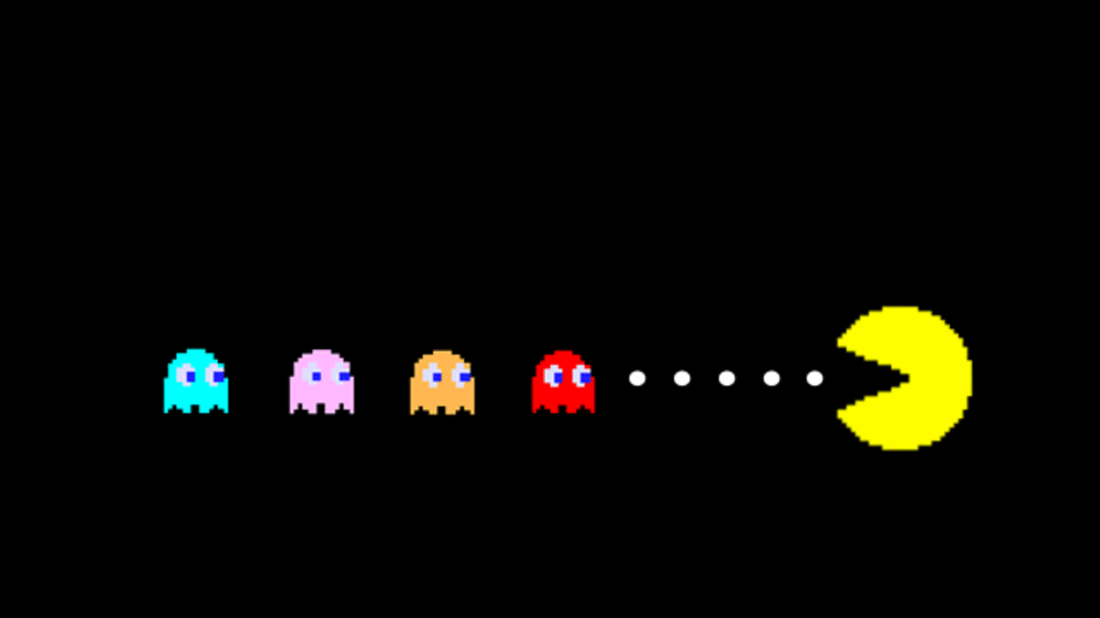
For the last week we worked on a Pacman type game. We tried to put in all the code we have learned over this year and all the games were brilliant and all so different.

This week is our very important week, our last week but the week we award our belts for all your great work during the year. There also might be some Pizza and the odd sausage.

Remember if you haven’t been in the last couple of weeks that doesn’t matter, come along we would love to see everyone.


Here are the notes in PDF CDA-S8 Week_11-PACMA.PDF

See u Saturday

Martha

Julie, Ruaidhrí and Eoin

Creators: General Zod 3D!

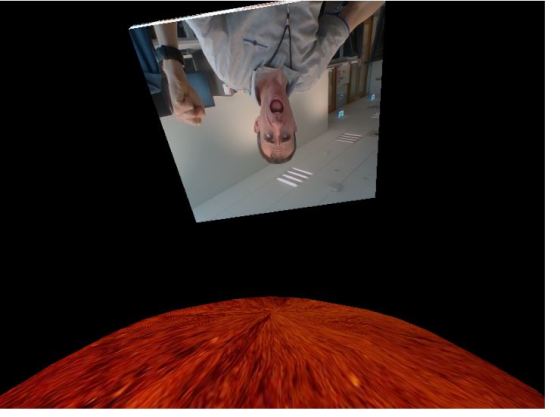
This week in Creators we explored 3D and build an animation or two using it.  The final one was a “General Zod” simulation where we recreated a scene from a classic movie

Check it out here!

general-zod

This scene used the following elements:

  1. 3D Canvas! Our canvas was set up to use WEBGL – enabling this means you can use the 3D capabilities and shapes of p5
  2. Shapes – just the two shapes here:
    1. a “Box” which is your floating “prison”
    2. an “ellipsoid” which represents Krypton
  3. Lights!
    1. We looked at the different types of lights in WebGL (ambientLights, pointLights and directionLights) and for this scene I went with a few directionLights to light things from various directions
  4. Action!
    1. Positioning and moving the shapes is performed by transforms.  We moved the rather large planet to the bottom with translate and made the prison rotate and vanish off into space with a few rotate statements.
    2. Note that with 3D stuff, we have the use of a rotateX, rotateY, rotateZ since we can rotate in lots of ways!  I also added a rotation to Krypton above to make it more realistic.
  5. Texture!
    1. Krypton: We looked at adding textures which is an image that you paste onto the object.  The sphere above is textures with an image of Mars I found – not sure what Krypton is like I but I picture it as kind of orang-ish.
    2. Prison: For texturing the prison we did the same thing, but with a difference!  It still is using an image as the texture but it’s using the p5.dom library to control the web camera and take pictures from that every frame.  This allowed us to place ourselves “live” in the scene.

It is pretty amazing the animations and effects you can create with very little code using the p5 webGL library.  Happy coding!

Bodgers –Magic Ball

This week in the Bodgers group we revisited Pygame Zero and worked on a fortune telling game based on a Magic 8 ball.

I gave the group some artwork I prepared in the Paint.NET graphics editor and we wrote some code to animate them.

I’ve added the code and images to Dropbox here.

See you all on Saturday for Belts and Pizza, don’t forget to bring drinks.

Declan, Dave and Alaidh.

Rock-Paper-Scissors for 1 and 2 Players

The Plan

Michael led the Advancers group this week, as Oliver was unavailable. Our plan was to work on 3 versions of Rock-Paper-Scissors:

  1. A one-person version where you play against the computer
  2. A two-person version where you and a friend play against each other on one computer
  3. A two-person version where you and a friend play against each other on different computers, using cloud variables (we did not get around to this)

We began by thinking about how the game works, and what we would need.

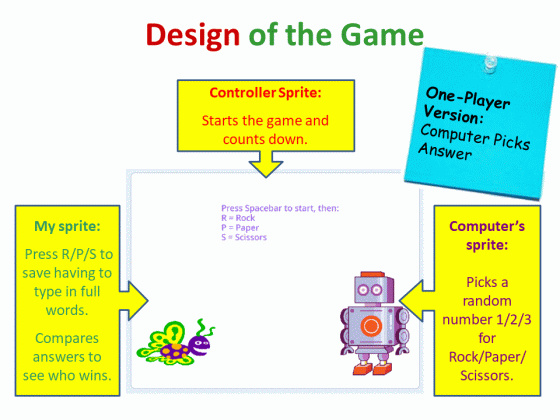
In our design, we need three sprites:

  1. My Player
  2. Opponent (either another player or the computer, depending on the version)
  3. Controller (a sprite that displays instructions, does the countdown, and uses broadcasts to sync the start and end

We also need several variables, the most important of which are:

  • my-pick: what I pick (rock/paper/scissors)
  • other-pick: what the opponent picks
  • result: based on the picks, will be set to “I win”, “I lose”, or “Draw”
  • number: a random number in the range 1-3 that the computer picks, which we translate into either a value for other-pick of “rock”, “paper”, or “scissors”

One-Person Version

Here is the logic:

1player

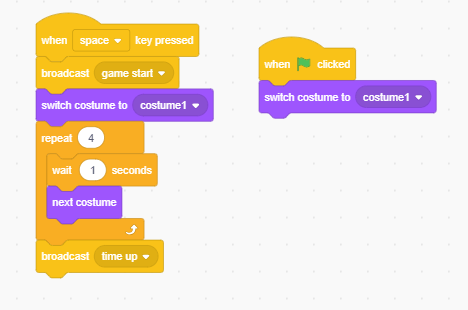
The controller has 5 costumes: one with instructions and four with big numbers 3,2,1,0 for the countdown.

The controller looks after the countdown, and broadcasts messages at the start and end of the countdown. Here is the controller’s code:

code1

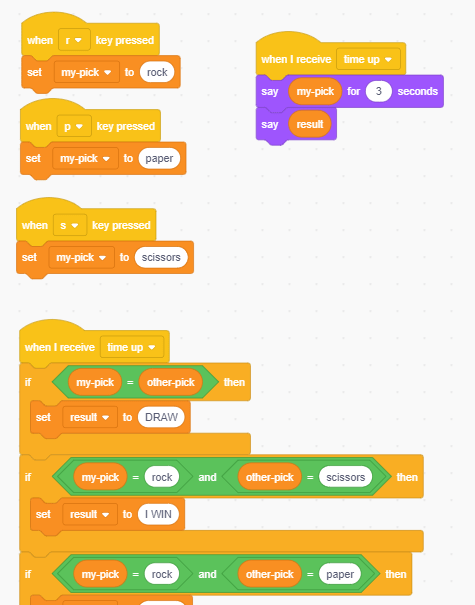
My sprite takes my keyboard input. When the countdown is over, it calculates who wins (result). Also, when the countdown is over, it says what I picked, waits 3 seconds, and then says who won.

Here is the start of its code – you will have to figure out the other combinations yourself!

code2

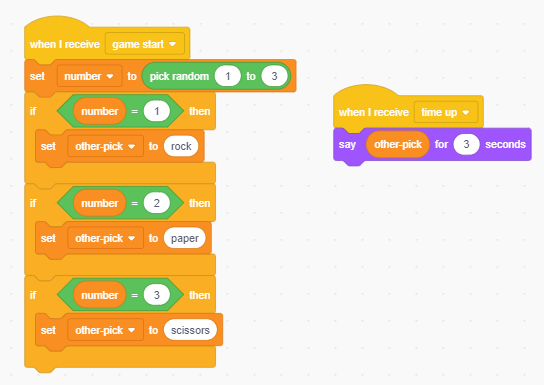
The opponent sprite is the computer. Its sprite picks a random number 1-3 and converts it into a word rock/paper/scissors. It also says what it picked when the time is up. Here is the code:

code3

Two-Person Version

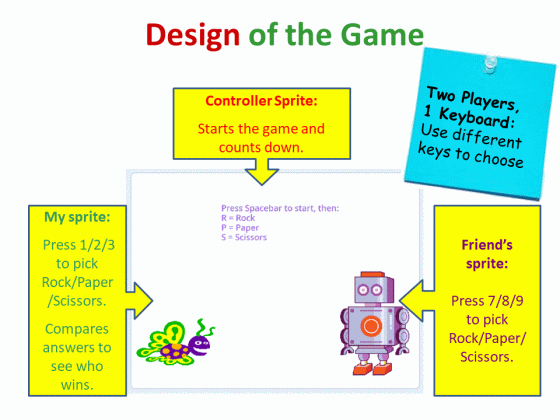
Here is the design:

2player

In this version, the Controller and My Sprite are the same as in the one-player version, except you might want to change My Sprite to use keys 1,2,3 for Rock, Paper, Scissors.

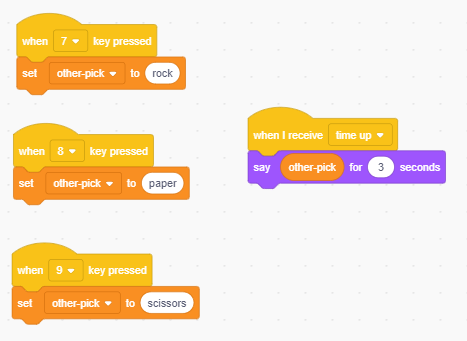
The Opponent Sprite code is different than before, but it is simpler: the opponent is your friend who will press 7, 8, 9 for Rock, Paper, Scissors, so you just need the code to read those key-presses:

code4

Possible Enhancements

Here are some ideas:

  • You could add sound effects, celebrations, and different costumes
  • You could find the rules for a more complex version and implement it: Rock-Paper-Scissors-Lizard-Spock
  • You could figure out cloud variables!