Information About Coolest Projects 2016

AboutCoolestProjects.jpg

At the start of the session on Saturday 27 Feb, we had an information session about the CoderDojo Coolest Projects contest.

I think it is well worthwhile to consider entering. There are multiple categories and the event is very impressive and interesting.

Special thanks to Aliadh who spoke very well about her experience at Coolest Projects last year.

The notes are here: AboutCoolestProjects.pdf

ModderDojo 2016: Planning a Large Collaborative Mod

DSC_0132

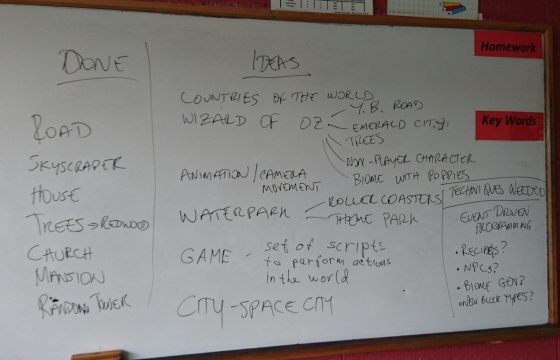
On Saturday, following on from the general information session about Coolest Projects, we started planning a large collaborative mod in the JavaScript/Scriptcraft ModderDojo stream.

We used my favourite planning and design tool – a big whiteboard and a couple of markers.

As the image above shows, we first identified what kinds of things we are already able to make, and we used these as a startpoint for brainstorming some ideas that could build on our capabilities. Finally, we reviewed some of our brainstormed ideas to identify some common threads and in particular some kinds of capabilities we don’t have – things that we will have to learn how to do in future weeks.

For example, we now know that we need to learn about event-driven programming, creating recipes, creating NPCs, creating new block types, and maybe generating biomes. Alex and I will help you to figure out some of these ideas in future weeks.

Since attendance was low, we did not finish the planning and make a final decision about what the theme of our mod is, since we would like more people’s input. But we have made a great start!

Reminder: on Saturday 5 March, there will be no ModderDojo stream as both Alex and I happen to be travelling.


Unity – Tanks Tutorial Part 1

Update: This post has been updated with a link to download the project. See the bottom of the post.
Screen Shot 2016-02-29 at 00.17.14

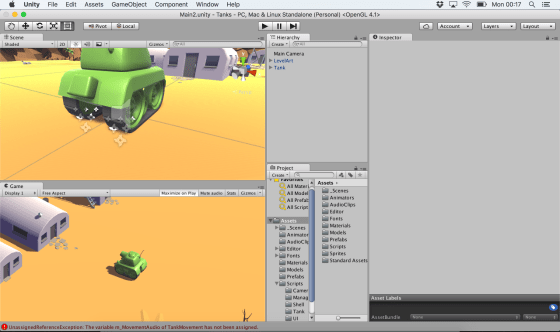
This week we started work on the Unity Tanks tutorial. This is a single-keyboard, two-player, tank game where users can complete in a number rounds against each other.

We began with downloading the tutorial assets from the Unity Assets Store. This tutorial comes with many lovely assets including 3d models and audio clips.

The assets, as downloaded, contained a “Completed” folder. We deleted this first, as it has a second copy of many of the scripts and assets in the project and had the potential to create confusion.

We created a new scene and deleted the default directional light as we wouldn’t be needing it. Then we added the provide “LevelArt” prefab. This prefab contains the entire playing area and also contains a directional light. We discussed the different types of lighting that we can have in a game: ambient, directional, point, and spotlight. The image below shows the same scene lit in each of these four ways, respectively.

lighting

We then set our camera to be orthographic. We described the difference between orthographic and perspective cameras. With perspective cameras, the space the camera sees in front of it is shaped like a pyramid and things that are further away look smaller (as in real life). With an orthographic camera, the space the camera sees in front of it is box-shaped and things do not get smaller the further away they get. For some game types, the less realistic orthographic camera is a good stylistic choice. We also removed the standard skybox and just changed the background to a solid colour, again a good stylistic choice for this game.

We then started to build our tank. The 3d model was pre-supplied, so we added it to the hierarchy. We then added a rigidbody, a box collider and two audio sources for the playback of sounds. We were able to add constraints on the rigidbody to prevent the tank from ever moving vertically, or from rolling or pitching. Applying these constraints both prevents unwanted movements and makes the physics engine’s job much easier.

Screen Shot 2016-02-29 at 01.02.07

Finally, we added two dust trail particle effects to the tracks of the tank. These were also pre-supplied as assets for the project.

We had just started to look at tank movement and that’s where we’ll pick it up again next week. The project can be downloaded here.

Remember that you should now be starting to plan and work on your own projects for the end of the year. Best of luck and we’re here to help in any way we can!

Beginners Scratch – Guessing Game

This week we decided to give everyone a little breather after the marathon that was last week!! The Guessing Game covers a lot of the same ideas as the Maths Game and reinforces the use of decisions and variables.

For this game we need: 1 sprite (to tell the player what to do and if their guess is correct or not), 2 backdrops and 2 variables (THE NUMBER and GUESS). The SPRITE holds most of our scripting.

FIRST: Scripting in the SPRITE, pick a random number and store it in the variable: THE NUMBER. Tell the player (use SAY block) that you are thinking of a number between 1 and 30….

CDA-S5-Challenge_11-Guessing Game-set random number

SECOND: ASK (yes, use the ASK block!) what the player’s GUESS is and store their guess in the Variable GUESS. !!!!NOTE: when you use the ASK command, the user input (their guess) is always stored in the variable ANSWER, until you reassign it to your own variable GUESS with the SET command in DATA)!!!

CDA-S5-Challenge_11-Guessing Game-ask for guess

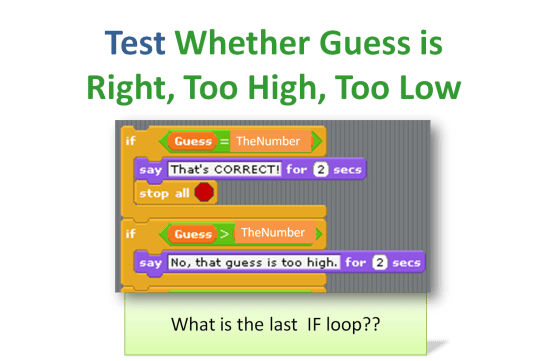
THIRD: TEST whether the GUESS is TOO HIGH, TOO LOW or CORRECT using the IF decision block and OPERATORS: >(greater than), <(less than) or =(equal to).Also, TELL the player (use the SAY command) if they are TOO HIGH, TOO LOW or CORRECT.

CDA-S5-Challenge_11-Guessing Game-test guess

FOURTH: LOOP IT!! Use a REPEAT 5 times to give your player 5 chances to get the guess right. Check your work!! Go through each of the possibilities one time to be sure you get the correct response. What if they get it WRONG 5 times?? Tell them what the number was!

CDA-S5-Challenge_11-final script with loop

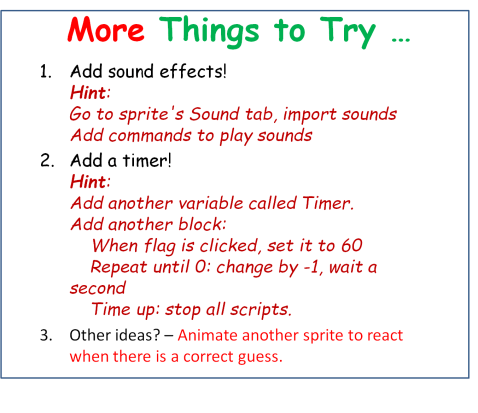
Use your own imagination to add new sprites that react to a broadcast you could send out after they guess the right answer or wrong answer. Get your backdrop to change after they guess correctly. (Hint: BROADCAST correct before STOP ALL and have the backdrop SWITCH costume when it RECEIVES the BROADCAST)CDA-S5-Challenge_11-Guessing Game-more to do

My copy of this game is up on http://scratch.mit.edu. Search for the cdathenry1516 coder name and check it out! Here is a copy of the notes: CDA-S5-Challenge_11-GuessNumbers.

We are taking a break for the next few weeks for mid-winter break! We will be back on February 27th! Happy Coding!

Julie


ModderDojo – Updated Scriptcraft Server

5 Feb 2016: I have compiled the latest version of Spigot (Version 1.8.8, 22 Jan 2016), which is a high-performancse server based on CraftBukkit, and added in the latest version of Scriptcraft (Version 3.1.12, 30 Dec 2015).

You can download it here: https://www.dropbox.com/s/9eg5e5j8j1ubr6w/2016-02-Spigot.zip?dl=0

The version of CanaryMod+Scriptcraft that we were running for the past couple of months was very unreliable, so hopefully this will be better!

Unity – Amazing Racer

Screen Shot 2016-01-28 at 9.03.52 p.m..png

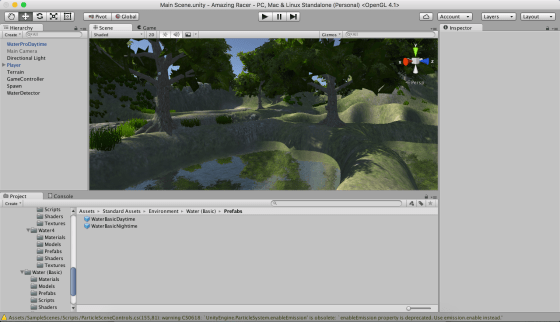
This week we worked on decorating our map with textures, trees and grass. We also worked on establishing a spawn point for our player and a trigger which would detect when our player had fallen in the water.

Some people have been having technical problems or have been lagging behind for one reason or another. We decided it would be a good idea if everyone had a copy of my project so that we could all move forward from the same point.

The first thing you will need to do is to:

Upgrade to Unity 5.3!

This is very important or you will have problems opening my project. When you start Unity it should prompt you if an upgrade is available. Failing that, you can use the “Check for Updates” option in the programs Help menu.

Once you have upgraded you can download my project from here:

Kieran’s Amazing Racer Project

Be warned, this file is quite large at almost 400MB. Please leave yourself enough time to download it, depending on your internet speed.

Extract the contents of this ZIP file into a directory on your machine. It won’t appear on the splash-screen list of recently opened projects when you open Unity – you’ll have to use the little Open button there to select the folder in question. Do also make sure you’re opened it at least once, as opening for the first time causes the assets to be reimported and this takes some time.

Please try to have Unity updated and the project copied to your machine before Saturday! Thanks and see you then.


Playing With Unity Physics and Wheel Colliders

Hi folks. This week we continued work on our Amazing Racer project. We explained what heightmaps are and we imported a standard heightmap into a terrain object. We also added water and trees to our game map.

Apart from that, I also showed two little fun experimental projects that I worked on over the Christmas break to test a couple of game ideas. I thought I’d upload them here so you can play with them yourselves; maybe even use them as the basis for a game idea?

PhysicsTest

The first project, called “Physics Test”, is just a Jenga-like tower of bricks, a ramp and a dropped sphere. The sphere and the bricks have custom physics materials to define their friction and bounciness. It can be downloaded from here.

WheelColliderTest

The second is called “Wheel Collider Test”. It uses Unity’s Wheel Collider on a simple vehicle made of a box and four cylinders. The whole thing is on a simple map made from a basic terrain with a flat interior and a raised edge (to keep the car in!). The awesome (cough) textures are from random Windows backgrounds. The Unity documentation for the WheelCollider can be found here. I note reading it that our project sets up the visual elements to represent the wheels differently to the method recommended in the documentation, but it seems to work OK. The project itself can be downloaded from here.

See you all next week!

Happy New Year 2016!

Happy-New-Year-2016c

CoderDojo Athenry will resume on Saturday 16 January 2016 at our usual time and place, 12:00 in Clarin College Athenry (formerly called Gairmscoil Mhuire / The Tech). See you there!

We are very grateful all of our members in CoderDojo Athenry for your involvement and enthusiasm during 2015. And of course we are hugely grateful to our mentors who are so generous with their time and expertise every week, and to the school for accommodating us.

We are looking forward to another year of fun coding and excitement learning about new technologies in 2016, and we hope you are looking forward to it too!

Unity – Week 7

unityssample

This week we started with a very short demonstration of some additional C# concepts, building on what we’d done last week.

After that, we continued with Roll-A-Ball.

We quickly finished off our walls and moved on to the Pick Up objects.

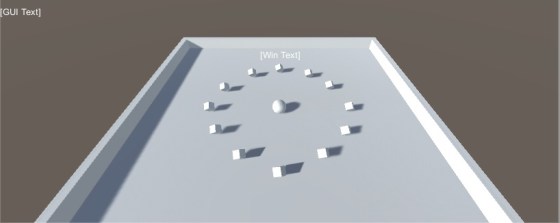
Pick Up objects are small cubes that float over the paying surface and that rotate to catch the user’s attention.

We added one Pick Up object and made it rotate. After that, we made it a “prefab”. Setting a property on one prefab object will automatically replicate that setting to all other prefabs of the same type. We didn’t take advantage of that this week, but we will next week.

We duplicated our Pick Up object and arranged twelve of them around our playing surface.

Next Week

Next week we’ll hopefully have enough momentum to finish off Roll-A-Ball completely.

After that we will start on some terrain modelling basics.

To be ready for terrain modelling basics, please be sure to have imported the standard assets package into a new empty project in Unity. To do this, follow these steps:

  1. Open Unity and create an empty 3D project, call it “Amazing Racer”
  2. Under the Windows menu in Unity, open the “Assets Store”
  3. In the “Assets Store” look for the “Unity Essentials” category
  4. Under “Unity Essentials”, find “Standard Assets” and import them

This process takes quite a bit of bandwidth and time, so you will need to have this done before coming to Dojo next week.

See you all then!