Information about the 2014-15 Season at CoderDojo Athenry

2014-overview

From Saturday 11 Oct 2014, we are starting a new season of CoderDojo Athenry, at our usual time and place. (The Saturday before, on 4 Oct, we will be having an introduction session for new mentors and other volunteers.)

Here is a the overview presentation (PDF): 1-CoderDojoAthenry-InfoSession-2014-Sept

This season, we will have the following streams:

We look forward to seeing you there!

–  Michael and the CoderDojo Athenry mentors.

CoderDojo Athenry Belts Awarded May 2014

BeltsMay2014b

We awarded a record number of 87 belts at CoderDojo Athenry in May 2014:

  • 3 White belts for ongoing participation
  • 55 Yellow Scratch belts for competent  coders
  • 15 Blue Advanced Scratch belts
  • 1 Yellow Python belt
  • 3 Blue Python belts
  • 10 Green Minecraft Modding belts for creating and ublishing Java/JavaScript mods online

In keeping with the CoderDojo ethos, these belts were earned by our young people meeting agreed standards in different coding disciplines. Belts are not for winning competitions against each other, but celebrate personal achievement, and are never given away without being earned.

Congratulations to all the young people who earned their belts!


Week 1, 2014 Scratch Beginners – Storytelling

Happy new year

We had a great turnout today for our first session of 2014. A very special welcome to our 14 new ninjas who joined us for their first coding session today. I hope you enjoyed your first visit to Coderdojo Athenry.

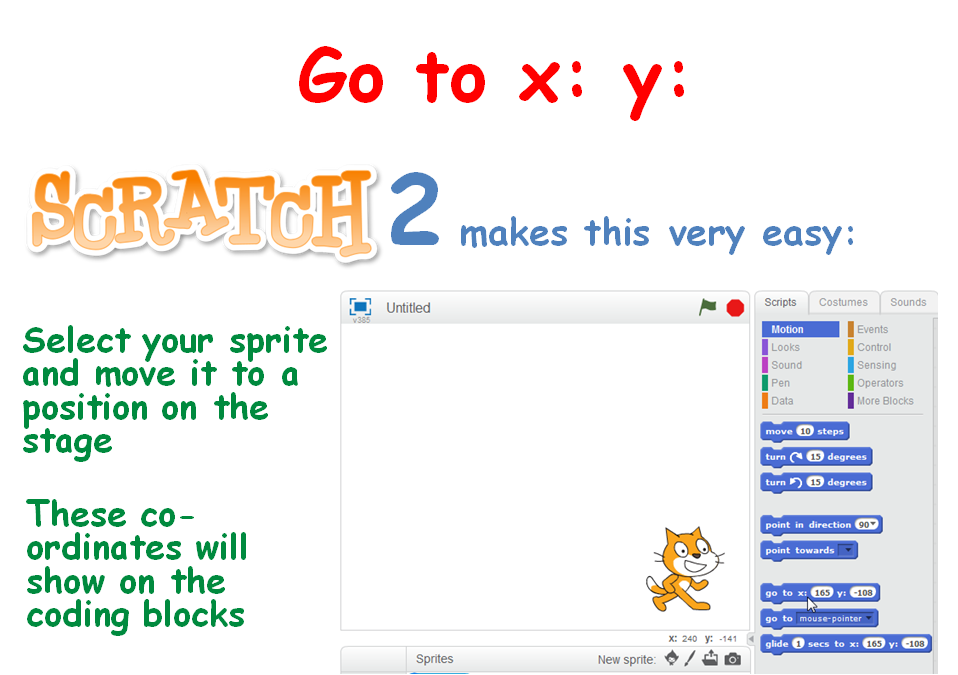
To ease everyone back in (including myself) we took a look at doing some storytelling. This involved again learning about the X, Y position of the stage, some movement of the sprites using the Glide command and of course testing our code to ensure that our timings were correct.

xy

We look forward to seeing you all next week, when we will be using scrolling backgrounds.

The PDF version of todays session are available to download here: CDA-S3-Challenge08-Storiestelling.pdf

Martha

Scratch Advanced – Week 5 – Cracking the Caesar Cipther

This week we began the task of cracking the following codeed message.

XUFHJ YMJ KNSFQ KWTSYNJW. YMJXJ FWJ YMJ ATDFLJX TK YMJ XYFWXMNU JSYJWUWNXJ. NYX HTSYNSZNSL RNXXNTS YT JCUQTWJ XYWFSLJ SJB BTWQIX, YT XJJP TZY SJB QNKJ FSI SJB HNANQNEFYNTSX, YT GTQIQD LT BMJWJ ST TSJ MFX LTSJ GJKTWJ.

All we know is this message is written in English. To crack this code we will use some common features of the English language.

  1. In the coded mesage look for single letter words. These words probably map to a or I
  2. In the coded message look for the most common three letter words. These words are the, and
  3. in the coded message look at the spelling of any other small word to see if we can figure out their original form.

How to crack Ceasar Cipher

The following link was the hand out provided to everyone. Each person used this handout to work through each stage of the decryption.

Can you decrypt this message (pupils notes)

The teachers handouts is available at the following link. This handout provides detailed steps of how to work through decrypting the message.

Can you decrypt this message (teachers notes)

Scratch Advanced – Week 4 – Cryptography the Caesar Cipther

This week we created on of the most famous ciphers the Caesar Cipher. This cipher is named after the Roman emperor Julius Caesar.

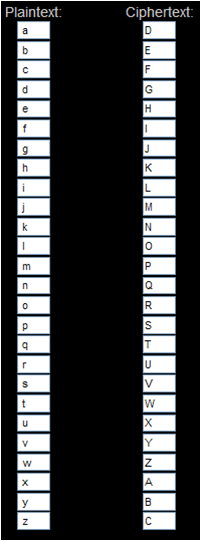
The Caesar cipher works by shifting each letter of the alphabet by a specific number.

In the example of the Caesar Cipher below the letters in the PlainText alphabet have been shifted by three places.

Cipher shift

The letter a becomes D, the letter g becomes J and so on.

Using a Caesar Cipher with an offset of three the words Coder Dojo Athenry would become FRGHU GRMR DWKHQUB

The notes for this session on how to create a Caesar Cipher using Scratch are here: Scratch Encryption project Ceasar Cipher

Scratch Advanced – Week 3 – Cryptography

Hope everyone enjoyed last week.

This week we began a series of sessions on Cryptography. We began by demonstrating why we might use Cryptography. What is Cyrptography

What created a Scratch project to Encrypt a single word or sentence using a Reverse Cipher. Notes for this Scratch project are at: Scratch Project Notes (Reverse Cipher)

We then improved the Scratch project to Decrypt the same word or sentence back to its original form.

We discussed the limitations of a Reverse Cipher and began the introduction of the next session where we will be creating a Scratch program to Encrypt and Decrypt a word or sentence using one of the most famous ciphers the “Caesar Cipher”. Named after the Roman figure Julius Caesar.

Scratch Advanced – Week 1 – Calculator.

Hi all and welcome back to what we hope will be an exciting year in Coder Dojo Athenry.

We will be using Scratch 2 this year. So the first thing that we need to do is install it.

There are two Applications that you need to install:

1. AdobeAir

2. Scratch2

I will have all the Versions that I can find on USB, which should cover both Windows and Mac. I have installed the Windows version, so I know that one works. I won’t have tested the Mac version though.

Scratch2 introduces the idea of making your own Blocks of code that you can then use in your programs. So for the first week we are going to try these out and see how they can help us write Code once but use it many times.

And for that we need a project to work on – A Calculator.

  • We will learn about Functions (Code Blocks in Scratch2)
  • We will learn about passing information into Functions

We are going to design and build a fully functioning Calculator that can Add, Subtract, Multiply and Divide. If you get really adventurous you can add some other functions as well – percentages maybe?

Like you I haven’t written it yet, so it going to be a bit scary tomorrow as we have to make it all up as we go along, but hey, you’re the advanced crowd, and should be able to handle that!

Once we have a fully working version I will update this blog with the full details of how and why we did what we did.

If we can get anything like the following picture, I think we are definitely Advanced…

Calculator

Everything that you see on this calculator is perfectly possible in Scratch2, we will start with the four basic options of Addition, Subtraction, Multiplication and Division.

Countdown to Pizza!

pizza

We have just a  few weeks left before we finish up in CoderDojo Athenry for the summer.

Here is a reminder of our upcoming schedule:

  • On 18 and 25 May, ninjas continue to work on solo/group projects towards earning belts/certs, with the support of the mentors
  • On 1 June, we won’t be open for the bank holiday weekend
  • 8 June will be our final week: we will award belts/certificates for your projects, and we will have pizza for everybody!

After that, we will close for the summer and resume in the Autumn.