Oculus Rift!

Oculus

It’s great that CoderDojo Athenry can sometimes give young people (and parents) the opportunity to learn about and experience leading edge technologies, such as the 3D printer that Cathal Egan demonstrated at CoderDojo Athenry a couple of months ago.

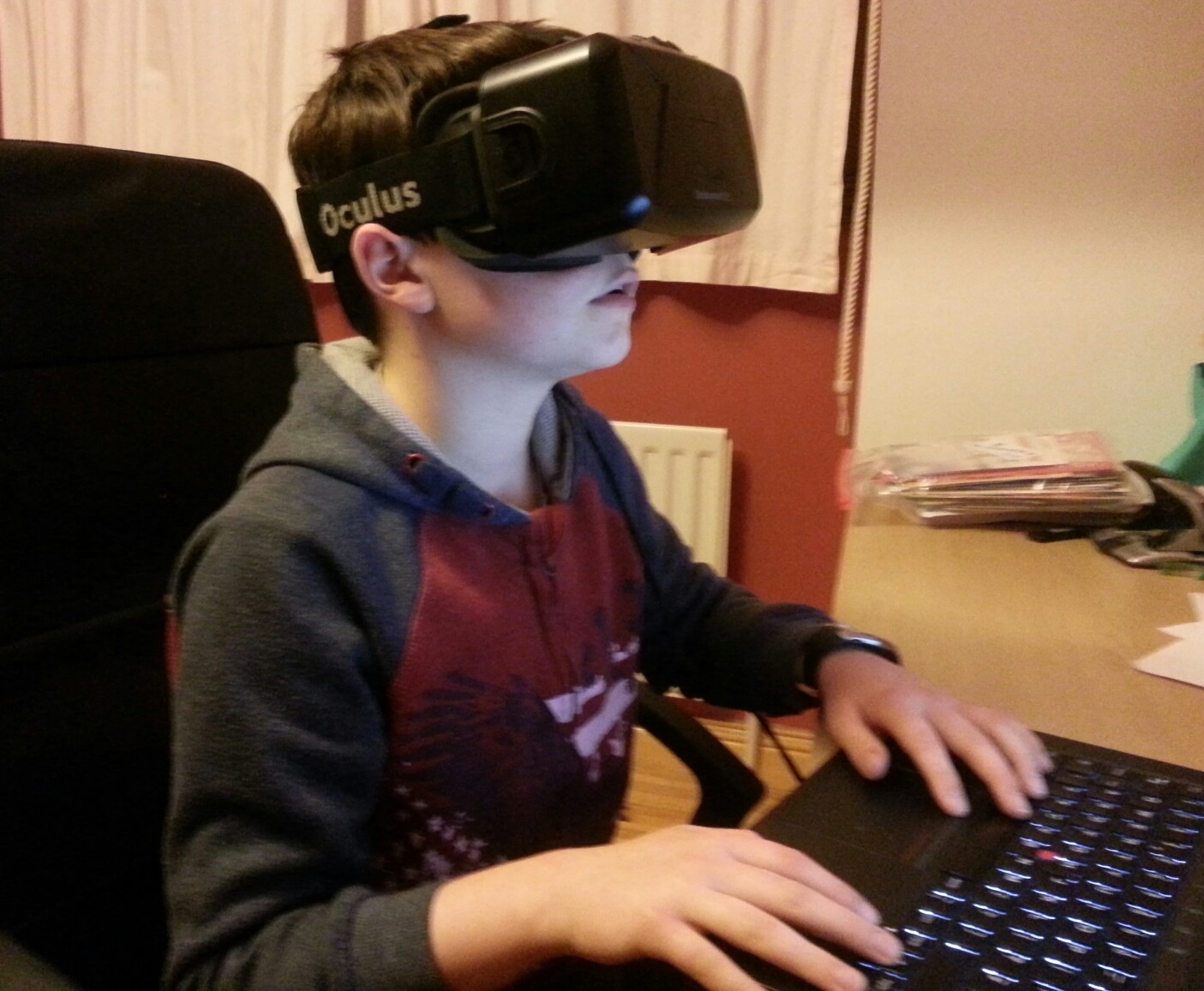
In January 2015, we have another such opportunity, to try out the Oculus Rift. This is a virtual reality headset that combines 3D graphics with movement tracking, to give you the sense of being fully inside a computer generated world. Wearing it, you can look around everywhere, even over your shoulder, to see the world in 3 dimensions in all directions, and you can even move around it.

The Oculus Rift DK2 (Developer Kit 2) is an early stage technology, only available to software developers rather than the general public, but the ideas are likely to have a big impact in the future in areas such as games, entertainment, and education.

Even though we keep the demos to 2 minutes per person, it will take 3 or 4 weeks for all groups to get to try the Oculus out, because we have so many members in CoderDojo Athenry, and it also takes some time to get it set up.

Thanks a million to Ruaidhri in the Minecraft Modders group who owns it!

Tips for Staying Safe Online

Slide1CoderDojo Athenry was one of the group of 12 dojos that were the first to adopt and align with the CoderDojo Foundation’s Recommended Practice. You can read more about it here:
https://coderdojo.org/news/2014/12/22/recommended-practice-pilot-complete/

Huge thanks to mentor Neil who led this effort!

At the start of our first session of 2015 on 10 January, all lead mentors gave a short presentation with 10 tips on staying safe online. You can see the first 5 above, the other 5 are below.

You can download the presentation in PowerPoint format here: 10 Tips for Staying Safe Online PPT CD Athenry Jan 2015

We also circulated a short information document to mentors, but anybody is welcome to read it: Online Safety for Mentors CD Athenry V1.1

Slide2

Photos from MineVention

Thanks to the organisers of MineVention for making a limited number of tickets available to the Minecraft Modders group in CoderDojo Athenry to demo their mods. All of our modders did a great job of explaining what we do in CoderDojo Athenry to visitors, and demonstrating their Forge Java mods and their JavaScript constructions.

Well done to Eoin, Eli, John, James, Ruaidhri, Luke, Emmet, Oisin, Darragh, Sean and Aidan, and special thanks to mentors Martha, Kieran and Julie.

A real highlight was the 3D printed house that Cathal Egan had prepared, which was a printout of the Stone House that Oisin from CoderDojo Athenry had created:
https://cdathenry.wordpress.com/2014/11/30/combining-scriptcraft-and-printcraft-write-code-to-build-minecraft-structures-and-3d-print-them/

At the end of the day, Dan the Diamond Minecart was kind enough to visit our booth and see some of our mods. Here are a couple of photos of him looking at mods from our group.
luke-tdm
ru-tdm

Combining ScriptCraft and PrintCraft: Write code to build Minecraft structures and 3D Print them

3DPrint2

I have bundled ScriptCraft and PrintCraft so that you can write JavaScript code to create objects in Minecraft and then generate 3D printable models with them.

https://www.dropbox.com/s/1adh02ri5w2bvff/printcraft_scriptcraft_1_6_4.zip?dl=0

The PrintCraft server is one created by Paul Harter of http://www.printcraft.org/, version 1.5.0 for CB 1.6.4. It has Paul’s default world with 36 building plots arranged in a clearing in the jungle.

The ScriptCraft plugin is created by Walter Higgins, available at http://scriptcraftjs.org/, version dated 2014-08-23.

How to install:

Just download the zip file from this link and unzip it: https://www.dropbox.com/s/1adh02ri5w2bvff/printcraft_scriptcraft_1_6_4.zip?dl=0

It is a Minecraft server that you run.

How to use:

  • Run the server with Run_windows.bat or the corresponding Linux/Mac files.
  • Make sure you are an admin: in the server window, type op <your_username>
  • In Minecraft, connect to the server by selecting Multiplayer – Direct connect and enter localhost
  • Go to one of the plots and press the button to Claim it.
  • Create an object with ScriptCraft code. For example, try /js stonehouse(), which was written by a member of CoderDojo Athenry.
  • Press the Print button to create a printable version of the object. You’ll get web link where you can download your model.

Notes:

  • Glass, doors, fences and other objects that are not basic blocks don’t render; you just get voids.
  • Many 3D printers are single-colour, so bear that in mind.
  • If you want to reset your world, copy the one in “BACKUP-world”.

The picture below shows the house created with /js stonehouse(). Follow this link to see its PrintCraft 3D model.

2014-11-29_21.54.40

ModderDojo Athenry: Planning for MineVention

mv

The Minecraft fans’ convention, MineVention, will take place on Sunday 7 December in the Radisson Blu Hotel, Galway. Tickets are completely sold out, unfortunately.

The organisers of the convention invited CodderDojo Athenry to participate, particularly as we do Minecraft Modding. We will have a booth beside the 3D printer.

Here is our plan for what we will do at our booth:

  • We will demonstrate Java mods written by our group
  • We will demonstrate structures created by people in our group using ScriptCraft
  • The 3D printer will print out a structure that we created in ScriptCraft, and we will show the structure itself
  • We will also show off any other cool Minecraft-related things our modders have done, e.g. their own YouTube videos, their own command blocks, and any interesting structures they have
  • We will also have information and demos to highlight the range of different things done in CoderDojo Athenry apart from Minecraft modding.

Any members of CoderDojo Athenry who have tickets are welcome to join us for some of the time.

ModderDojo Athenry Topic 6: JavaScript Operators and ScriptCraftJS Drone Functions

Our mods:

Download them here: https://cdathenry.wordpress.com/2013/11/10/modderdojo-athenry-our-scriptcraftjs-minecraft-mods/

Operators:

Operators in any programming language are used when you want to calculate something new: they operate on values. variables, or expressions to produce a new value.

Since ScriptCraftJS is built on the JavaScript langauge, it uses standard JavaScript operators. As it happens, many other programming languages (including C, C++ and Java) use the same operators or very similar ones.

JavaScript Operators

Drone Functions:

As we have seen before, in ScriptCraft you use a drone to do your building for you. The drone has functions that are part of it.

Here are some of the main drone functions that are useful when building your mods:

ScriptCraft Drone Functions

You can find lots more about these and other functions in the ScriptCraft API Reference:
https://github.com/walterhiggins/ScriptCraft/blob/master/docs/API-Reference.md

ModderDojo Topic 5: Moving from Scratch to JavaScript

GeneralFeaturesOfProgrammingLanguages

Reminder: JavaScript is a well-established programming language, mainly used in web development. ScriptCraft is a Minecraft mod that allows you to write JavaScript code for building structures in Minecraft and writing new Minecraft mods. (So it’s a mod for creating other mods.)

Steps 1 and 2: Try out ScriptCraft commands and write simple mods

Please look back to last week’s notes for now to do this: https://cdathenry.wordpress.com/2013/10/05/modderdojo-week-1-getting-started-with-scriptcraft-and-javascript/

Step 3: Comparing JavaScript to Scratch

Some people criticise Scratch as being “childish”, but I don’t agree. While it is designed so that even 8 year olds can use it, it is still has all of the key features of ‘adult’ programming languages, as listed in the image at the top of this post.

(Technically, any programming language with variables, decision and loops is Turing Complete.)

This means that, if you already know how to write a Scratch programs that use these features, you will be able to apply that knowledge to any other language, such as JavaScript. The syntax of JavaScript is different, but it uses the same computational thinking.

Variables-Operators

Loops

Decisions

Notes:

  • Even though they have basic ideas in common, every programming language has its own specific commands that relate to its purpose: Scratch is focused on 2D games and animations, while ScriptCraft is focused on operating inside Minecraft, and JavaScript generally is used for interactive websites.
  • the echo command that features in these slides is not a standard JavaScript command, it is just used in ScriptCraft to display things on your screen in Minecraft.  Everything else is standard JavaScript.

Topic 4: Planning and Building a Complex Structure Mod in Minecraft

PyrimidInside This week we have one main goal: build a substantial mod in ScriptCraft that, when you run it, will create an impressive-looking structure! This will include:

You might find it helpful to work in pairs on designing and coding your mods. During the session, I will ask people to load their mods onto my computer, demo them to the group, and explain how their code works. To get things started, at the top and bottom of this post are pictures of mods created by Ruaidhri and Luke. We will take a look at how they work.

Tunnel1

Practical notes:

  • During development and testing, you can end up with lots of incomplete structures that slow down your CraftBukkit server. A simple fix is to delete your world:
    • Stop your CraftBukkit server
    • Open the CraftBukkit folder on your computer: in it you will see folders called world and possibly world_nether and world_the_end delete them all
    • While you are at it, edit server.properties in the CraftBukkit folder to make your new world superflat, write level-type=flat and you could also change other properties such as spawn-monsters=false
    • Restart your CraftBukkit folder to create a new, empty world
    • Re-run your scripts to recreate structures that you want
  • Read the ScriptCraftJS API reference to see what commands you can use for your structures: https://github.com/walterhiggins/ScriptCraft/blob/master/docs/api.md

Topic 3: Creating our First ScriptCraft Mods

2014-10-17_20.54.57

(Notes updated September 2015.)

Previous Topic: Connecting to Each Other’s Servers.

Our First Mod: sayhi.js

I’ll show you how to write a very simple one, sayhi.js, and then a more complex one, scraper.js. After that, it’s up to you to figure out what you can do!

In the Canarymod folder, find the folder scriptcraft / plugins, then make a new folder with your name (or any unique folder name).

Using Notepad++, type in the code shown below and save it in a file called sayhi.js. Here are explanations of what everything means:

sayhi-scriptcraft

Try it out in Minecraft and see if it works!

NOTE: Every time you create a new ScriptCraft program or edit one, you have to type /js refresh() in Minecraft to update your changes. If no commands run, make sure you are opped. (In the Canarymod window, type op <your_mincraft_name>).

To run it, type /js sayhi() in Minecraft.

A More Complex Mod: scraper.js

This makes the skyscraper shown above. We will figure out together how it works!

scraper-scriptcraft

Topic 2: Connecting to Each Other’s Servers

bukkit

(Notes updated September 2015.)

Note: This continues what we started in Topic 1: Getting Started with ScriptCraft and JavaScript.

Next step: Creating our first Scriptcraft mods. https://cdathenry.wordpress.com/2014/10/17/topic-2-connecting-to-servers-and-creating-our-first-mod/

Previously, we installed a Canarymod server and inside it we installed ScriptCraft, a mod that will allow us to build structures in MineCraft by writing JavaScript code.

Canarymod is a Minecraft Server. Therefore, the instructions we followed to connect to it were:

  • Start MineCraft, making sure it’s the same version (1.8 in our case)
  • Choose Multiplayer, then Direct Connect and enter localhost as the server address
  • If this works, in your CraftBukkit window you’ll see a message that you connected.

Here, localhost is actually means “the address of this local computer”.

But you can also connect to a friend’s computer, if you are all on the same network and you can find out their address. (If you are on different networks, things get a bit more complex: you will have to search online about how to set up port forwarding on your router, and you will probably also need a free Dynamic DNS service.)

On a local network, to find your IP address, open a command window. (In Windows, run or search for cmd.) In the command window, enter the command ipconfig and read through to find an entry like this:

Wireless LAN adapter Wi-Fi:
    Connection-specific DNS Suffix . :
    Link-local IPv6 Address . . . . . : fe21:9ba2:9db6:13e9%4
    IPv4 Address. . . . . . . . . . . : 192.168.1.17
    Subnet Mask . . . . . . . . . . . : 255.255.128.0
    Default Gateway . . . . . . . . . : 10.101.0.1

The IPv4 address is what you need. Get a friend to start Minecraft on their computer, then Direct Connect and enter your IP address. They will then be connected to the server on your computer!

This can be handy if you want to work on projects together.

Next step: Creating our first ScriptCraft mods.