Hi Folks, thanks again for a fun and productive session. My video notes are below.
Here’s a link to the folder where we’ll be saving all our files this year as we progress. At the moment there is one folder and one file, but we’ll keep adding stuff week-on-week.
When you are using Teams, please keep your microphone off unless you need to ask a question. You can have your webcam on or off, whichever you prefer.
Here are the main buttons you might need:
Two Screens
It is much easier to follow the session if you have two screens, one for the Teams window and one for your own code. Here are two ways to do this:
If your laptop has a HDMI port, you could connect it to a TV with a HDMI cable, or you could connect a spare computer monitor if you have one. Then press Windows and P, and select Extend. Then you can have different windows in each screen.
You could use your laptop for your own code, and connect to the Teams session with a separate phone or tablet.
Asking Questions
As well as the main mentor leading the Teams session, we have other mentors who can answer your questions at any time.
Either: press the Chat button and type your question
Or: press the Raise Hand button and wait for the mentor
If Chat Does Not Work
If you get an error when you try to press the Chat button, it might be because you are logged into a work or school Teams account that has chat restrictions. If so, here is a solution:
Press Leave to leave the CoderDojo session
Sign out of Teams – click on your picture in the top right corner to open a menu, and Sign Out is at the bottom of the menu
Click on the link to join the CoderDojo session again, and this time join as a guest without logging into your school/work account.
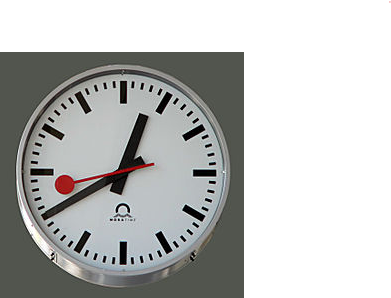
This is not just an ordinary clock though, we are going to build a clock that works in the same way as the Railway clocks works in Switzerland.
These clocks work in the following way:
The Clock waits for a signal from the master clock
When it gets the signal, it moves the minute hand on by one minute (and the hour hand if necessary)
then the second hand moves round once in about 58 seconds
It then waits for the signal again from the master clock.
This means that all the clocks on all the Stations are synchronised exactly.
In Computer speak this is called Event Driven Programming, where the code simply waits for an Event before doing anything.
So what’s the plan?
We need 4 Sprites
For the Clock Face
For the Hour Hand
For the Minute Hand
For the Second Hand
You can create them however you want but this is what the Swiss railway clocks look like and I will try and create something similar.
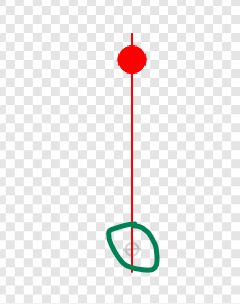
Remember one thing, when creating the Sprites make sure they are centred correctly.
So, the clock face should be perfectly centred and then the hands should be centred near one end something like this, I have highlighted where the centre is, with the green circle.
The code
Remember this will be event driven, so we will be using Broadcasts a lot. We will also have to calculate how far to move each hand, this means we will be using the number 360 a lot as that is one complete circle.
So just to let you know how far each hand should move:
The Second hand will move 360 degrees for each event.
The Minute hand will move 6 degrees for each event (360/60 minutes)
The Hour hand will move 0.5 degree for each event (360/60 minutes/ 12 hours)
The first event will be broadcast from the Stage:
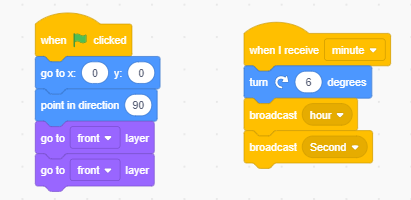
The Minute hand will receive this broadcast and move 6 degrees it will then broadcast another 2 events, one to the Hour hand and one to the second hand so they can move.
This is the code for the Minute hand which should be enough to work out the rest of the code as well.
The extra code above is to make sure the Minute hand starts in the correct position.
And one final thing which might be a little tricky, but I’ll leave it as a challenge for you, the Second hand should only take 58 seconds to go all the way around.
Great to be back. Here’s a video reviewing the content from week 1. It’s for those who missed the session or just want to refresh the content for themselves.
Hi everyone, hope you are all well. As you have probably heard by now, CoderDojo Athenry is starting up again with online sessions. We will have an information session on 07-Nov-20, but in the meantime, here are answers to some … Continue reading →
Hi folks. Inspired by Martha’s post for Explorers, I decided to do one for Modellers. We have a good number of sign-ups already, but if you haven’t expressed your interest yet, here’s a link to the form where you can do so.
Did you know that Blender can also be used as a video editor? Is there nothing it can’t do? (yes) Here’s a little look back at a few of our projects from last year to get your imagination going.
If there’s interest, we might do a little video editing this year, let me know if you like that idea.
Hi there everyone, I hope you are all keeping safe.
We are hoping to resume Coderdojo Athenry some time in November. For anybody who isn’t familiar with the Explorers group, here is a short video explaining what we do each week.
Hi folks, here’s the second part of our spaceship video project, as promised. This is our last official video for the year and I just want to take the opportunity to say thanks for being such a creative and fun group. It’s been a pleasure.
Hi folks. I may put up some content over the summer if I get time, but this is Part 1 of 2 of our last proper project this year.
We’re going to model a spaceship in this project (Part 1) and have it fly through space (Part 2).
Here are the video instructions:
Just after I stopped recording I remembered I’d forgotten to switch on “Bloom” which makes the engines glow properly. Make sure to switch this on as shown in the picture below!
A copy of my Blend file can be downloaded from here.
Hi everyone,
We completed our Mario game this week. We coded Mario so that he always floated down on to the wall. We added a fraction of a second of a wait so that it appears that he floats as he comes down. This also allows time for you to navigate left or right as needed.
We also introduced a more advanced concept, the Parallax effect, whereby objects further away appear to move slower than objects nearer. We coded mountains and a Sun to demonstrate this.