Week 4 Explorers – Ghostcatcher

Hello Everyone

Great to see so many of you there on Saturday, 77 Ninjas!. Hope you had a good time. And a special welcome to our new Ninjas.

This week we created a Ghostcatcher game. We used the paint editor in Scratch for the first time. As I said on Saturday, It makes things easier if you think in shapes.

PACMAN

Using the code we have learned so far, we moved the Ghostcatcher with the mouse and the Ghosts randomly. We also added some sound.

PACMAN2

We are going to continue on next week and improve this game, adding some Variables and some levels.

Here are this weeks notes in PDF. cda-s6-week_04-ghostcatcher.pdf

ModderDojo Athenry Topic 6: JavaScript Operators and ScriptCraftJS Drone Functions

Operators:

Operators in any programming language are used when you want to calculate something new: they operate on values. variables, or expressions to produce a new value.

Since ScriptCraft is built on the JavaScript langauge, it uses standard JavaScript operators. As it happens, many other programming languages (including C, C++ and Java) use the same operators or very similar ones.

JavaScript Operators

Drone Functions:

As we have seen before, in ScriptCraft you use a drone to do your building for you. The drone has functions that are part of it.

Here are some of the main drone functions that are useful when building your mods:

ScriptCraft Drone Functions

You can find lots more about these and other functions in the ScriptCraft API Reference: https://github.com/walterhiggins/ScriptCraft/blob/master/docs/API-Reference.md

Example: Build a Pyramid

This example is based on a very nice program writing by Ruaidhri from Coderdojo Athenry last year, updated slightly because some ScriptCraft commands have changed in the meantime.


// Copyright Ruaidhri from ModderDojo Athenry,
// slightly updated by Michael and Alex.
// Builds a pyramid with entrance and lights inside.

exports.pyramid = function()
{
echo('making a pyramid');
var d = new Drone(self); // 'self' means start drone beside me
d.up(1);

d.chkpt('begin');

var size=31;

// Make the walls
while (size > 0)
{
d.box0(blocks.sandstone,size,1,size);
d.right(1);
d.fwd(1);
d.up(1);
size=size-2;
}

// Entrance
d.move('begin');
d.right(15);
d.box(blocks.air,1,2,3);

// Lights inside
d.move('begin');
d.right(4);
d.fwd(4);
d.up(3);
d.turn(2);
var t = 0;
while (t<4)
{
d.hangtorch();
d.left(11);
d.hangtorch();
d.left(11);
d.turn(3);
t = t + 1;
}
d.move('begin');
}

Scratch Beginners Week 4 – A Better Ghost Catcher Game

This week we improved on Martha’s original Ghost Catcher game! The notes can be found on this website as CDA-S5-Challenge_04-BetterGhostCatcher.

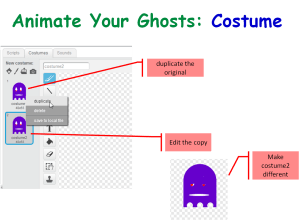
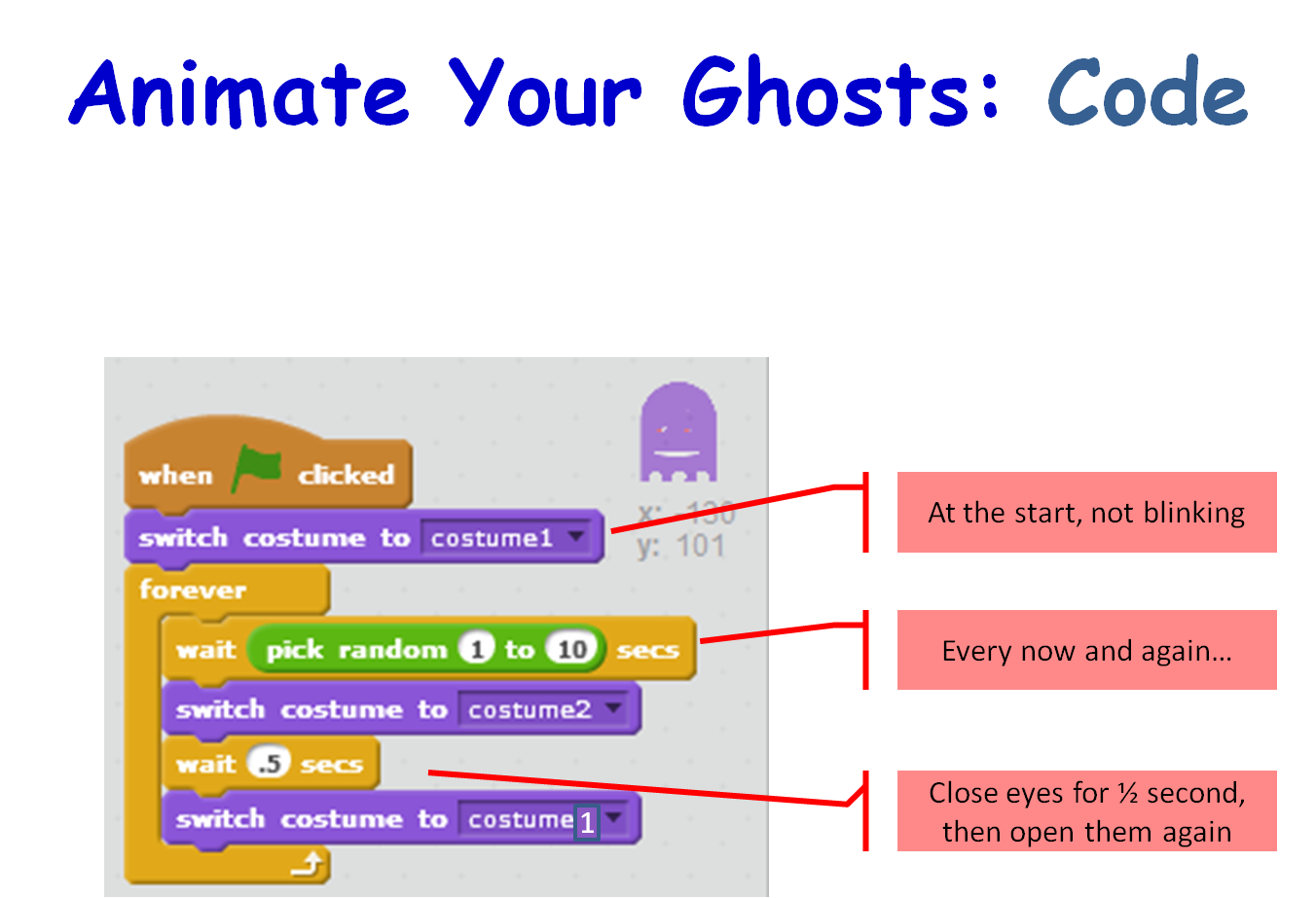
We animated our ghosts by creating a simple change costume script that runs forever,Season 5 Better ghostcatcher- animate ghost - costume

Season 5 Better ghostcatcher- animate ghost - Code

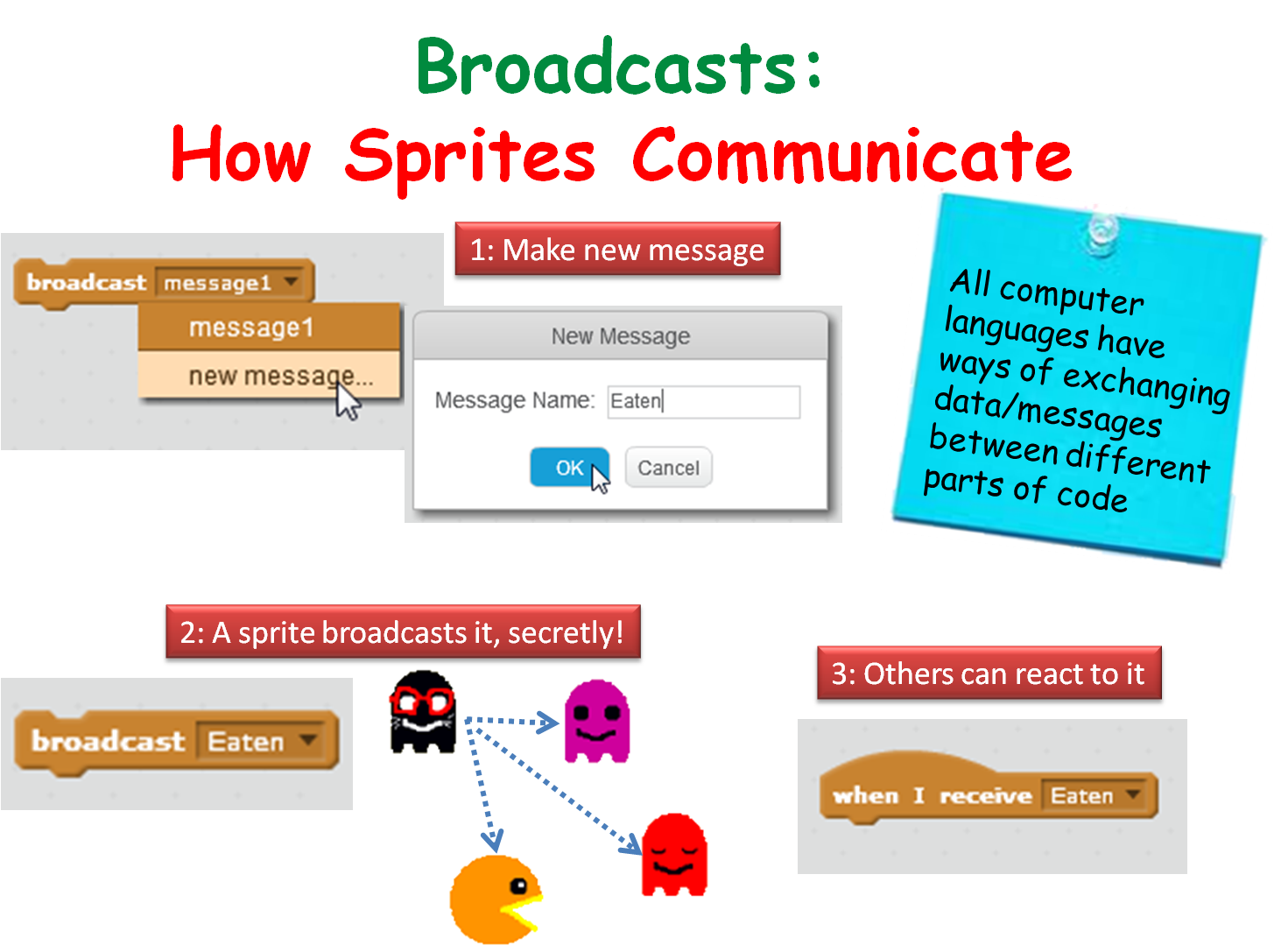
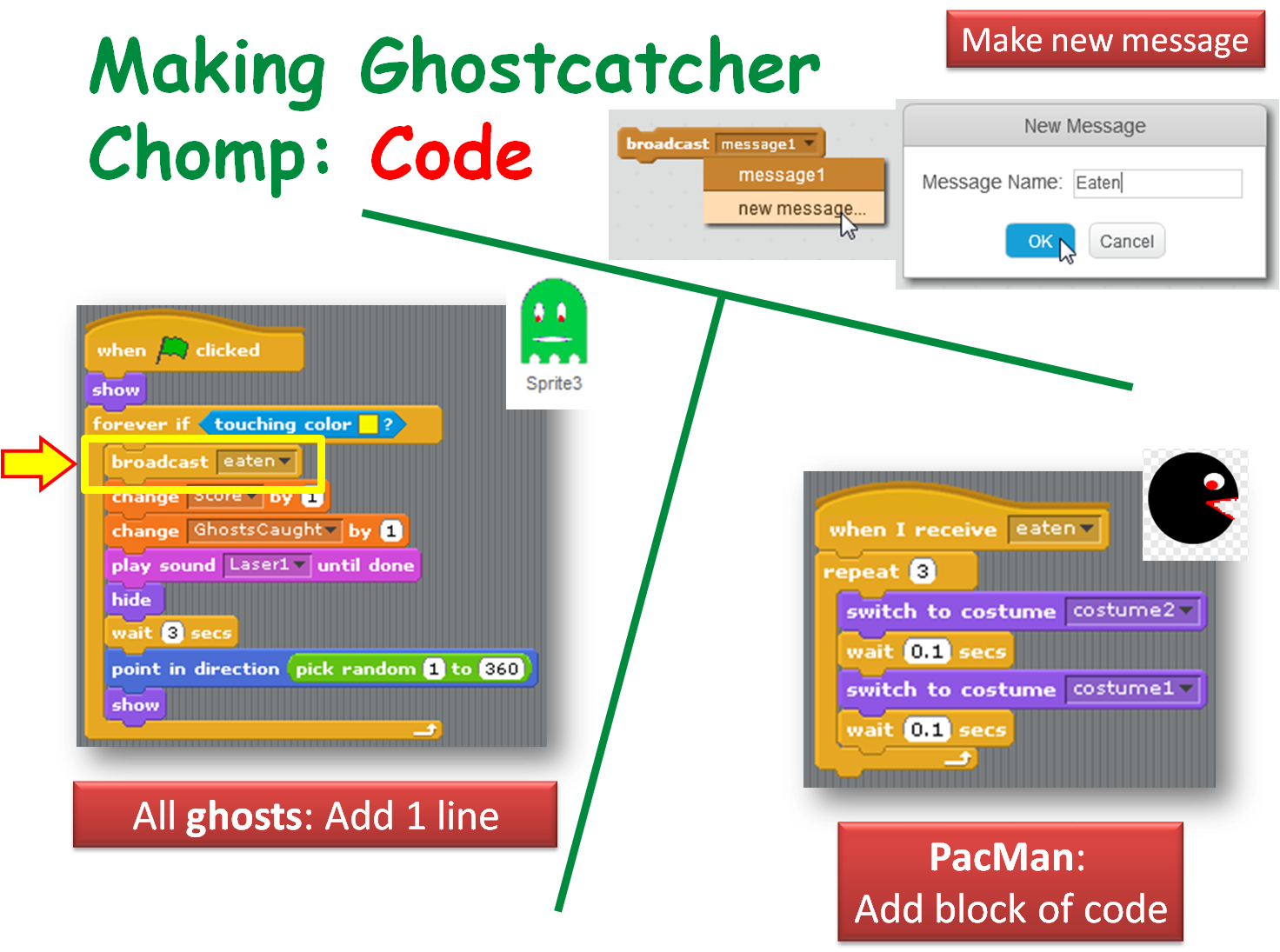
We made our ghosts broadcast a message when they are caught to make ghostcatcher (aka Bob) change his costume (Hint!: First, we made a new costume for Ghostcatcher Bob to make his mouth look closed!),

Season 5 Better ghostcatcher- broadcasts

Season 5 Better ghostcatcher- broadcasts- make ghostcatcher react

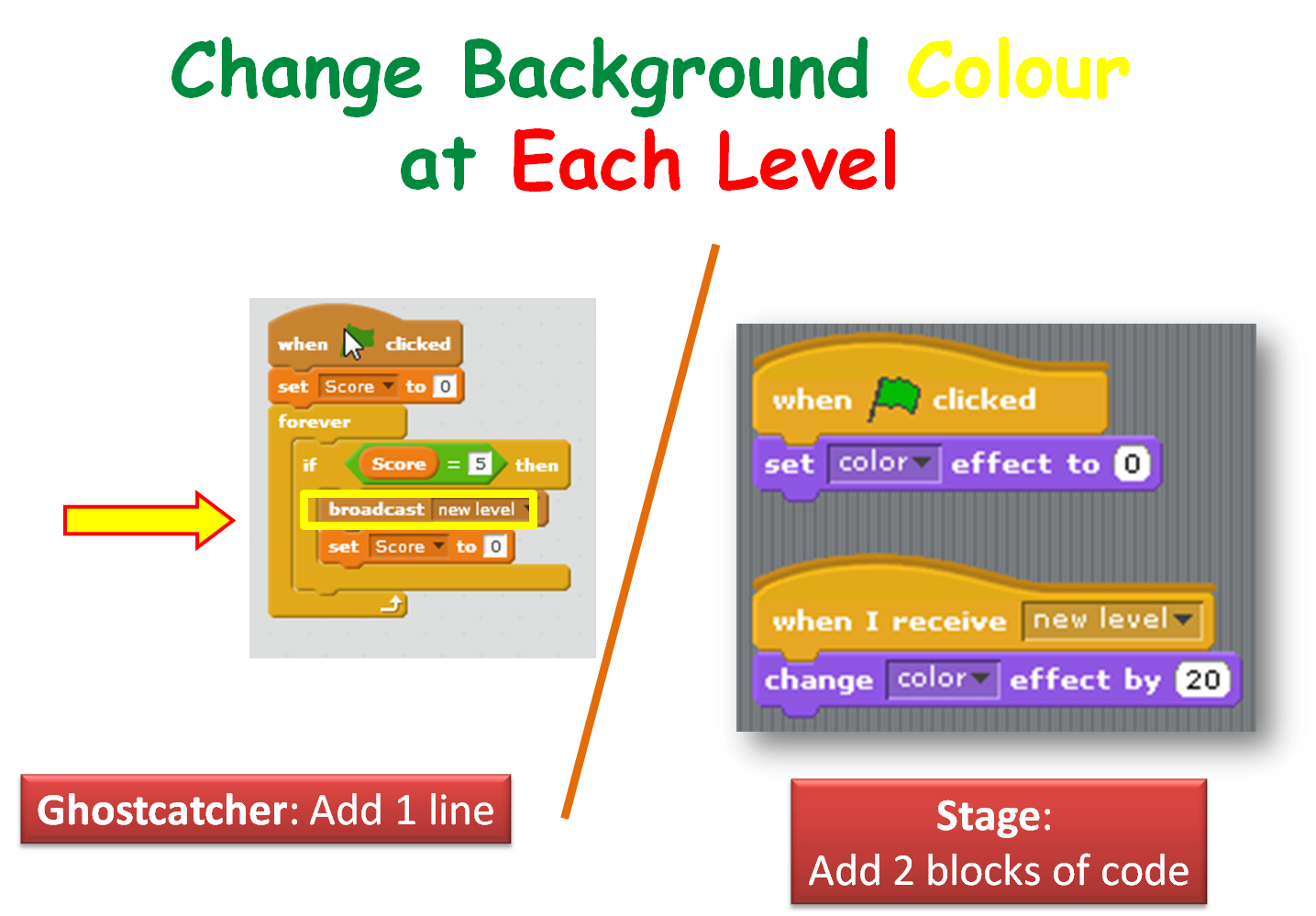
We also got Ghostcatcher Bob to broadcast a message that makes the stage change it’s background to each time a level is changed.

Season 5 Better ghostcatcher- broadcasts - use score var to chg background color

If you have any questions about all the variables, ghostscaught and speed, that you saw in my version of the program, please review the notes on this website for the previous week: CDA-S5-Week_03-Ghostcatcher.pdf. Check out the last few slides.

Thanks to Martha Fahy for all her notes so that we could really make huge progress with our Ghost Catcher game!

Have a very Happy Halloween and we will see ye all back on Saturday November 7th at 12.00!

Julie OBeirn

Python Games – Week 4: Lists and For Loops

We learned about some new concepts today in the Python Games group – multi-line strings, lists, for loops, methods, elif statements and the dictionary data type.

We had a quick look at the Hangman Game from Invent Your Own Computer Games with Python (http://inventwithpython.com/chapter9.html). We covered Lists which are a way of storing a number of values in one variable and had some fun writing code snippets mainly based around X-Factor. We looked at some new ways of working with strings called multi-line strings.  We also learned about new types of functions called methods and a new type of loop called a for loop. At the end of the session we started to get to grips with Pygame. Our code snippets are available here and my slides from today are here python session_4

ModderDojo Athenry Topic 6: JavaScript Operators and ScriptCraftJS Drone Functions

Our mods:

Download them here: https://cdathenry.wordpress.com/2013/11/10/modderdojo-athenry-our-scriptcraftjs-minecraft-mods/

Operators:

Operators in any programming language are used when you want to calculate something new: they operate on values. variables, or expressions to produce a new value.

Since ScriptCraftJS is built on the JavaScript langauge, it uses standard JavaScript operators. As it happens, many other programming languages (including C, C++ and Java) use the same operators or very similar ones.

JavaScript Operators

Drone Functions:

As we have seen before, in ScriptCraft you use a drone to do your building for you. The drone has functions that are part of it.

Here are some of the main drone functions that are useful when building your mods:

ScriptCraft Drone Functions

You can find lots more about these and other functions in the ScriptCraft API Reference:
https://github.com/walterhiggins/ScriptCraft/blob/master/docs/API-Reference.md

ModderDojo Topic 5: Moving from Scratch to JavaScript

GeneralFeaturesOfProgrammingLanguages

Reminder: JavaScript is a well-established programming language, mainly used in web development. ScriptCraft is a Minecraft mod that allows you to write JavaScript code for building structures in Minecraft and writing new Minecraft mods. (So it’s a mod for creating other mods.)

Steps 1 and 2: Try out ScriptCraft commands and write simple mods

Please look back to last week’s notes for now to do this: https://cdathenry.wordpress.com/2013/10/05/modderdojo-week-1-getting-started-with-scriptcraft-and-javascript/

Step 3: Comparing JavaScript to Scratch

Some people criticise Scratch as being “childish”, but I don’t agree. While it is designed so that even 8 year olds can use it, it is still has all of the key features of ‘adult’ programming languages, as listed in the image at the top of this post.

(Technically, any programming language with variables, decision and loops is Turing Complete.)

This means that, if you already know how to write a Scratch programs that use these features, you will be able to apply that knowledge to any other language, such as JavaScript. The syntax of JavaScript is different, but it uses the same computational thinking.

Variables-Operators

Loops

Decisions

Notes:

  • Even though they have basic ideas in common, every programming language has its own specific commands that relate to its purpose: Scratch is focused on 2D games and animations, while ScriptCraft is focused on operating inside Minecraft, and JavaScript generally is used for interactive websites.
  • the echo command that features in these slides is not a standard JavaScript command, it is just used in ScriptCraft to display things on your screen in Minecraft.  Everything else is standard JavaScript.

Scratch Advanced – Week 4 – Cryptography the Caesar Cipther

This week we created on of the most famous ciphers the Caesar Cipher. This cipher is named after the Roman emperor Julius Caesar.

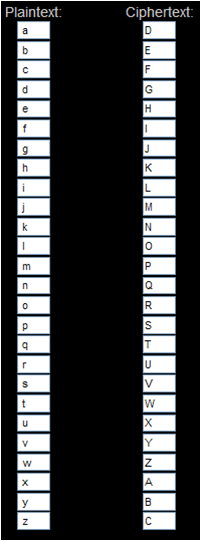
The Caesar cipher works by shifting each letter of the alphabet by a specific number.

In the example of the Caesar Cipher below the letters in the PlainText alphabet have been shifted by three places.

Cipher shift

The letter a becomes D, the letter g becomes J and so on.

Using a Caesar Cipher with an offset of three the words Coder Dojo Athenry would become FRGHU GRMR DWKHQUB

The notes for this session on how to create a Caesar Cipher using Scratch are here: Scratch Encryption project Ceasar Cipher

Scratch Beginners – Week 4, Animation

In this session we improved on our previous Ghostcatcher game by adding animation.

bigideas

We did this by switching between costumes. Rather than using sprites with various costumes already created, we drew our own.

animation

For the first time, we used the broadcast block, to communicate between different parts of the code.

broadcast

A PDF version of the notes from this weeks session can be found here: CDA-S3-Challenge04-BetterGhostCatcher.pdf

Python Beginners – Week 4: Adventure Game

This week we looked at creating a game from the beginning and at the steps we might go through to complete it. We looked at flowcharts and pseudocode and then we broke down the program into bite size pieces and wrote functions for these. We got about half way through this and hopefully we’ll complete it next week. Here is a screenshot of what we have completed so far.

screenshotHere are my slides from this week. python session4

Beginners Scratch – Challenge 4 – Create a GhostBuster Game!

This week, our lead mentor was Martha Madden, who blogs at kidswithskills.wordpress.com.

The challenge was to develop a game with a PacMan character, controlled by the mouse, who has to catch ghosts that move at random.

Coding concepts that we discussed included:

  1. Design of programs
  2. Loops
  3. Decisions
  4. Using the Paint Editor in Scratch

Here are the notes from the day (PDF): CDA-S2-Challenge04-GhostCatcher.pdf

If you would like us to send you the PowerPoint slides of my notes, get in touch via twitter or by leaving a comment.