ModderDojo Java Modding 2: Setting Up Your Development Environment

Previous post: ModderDojo Java Modding 1: Beginning Java Mods with Forge
Next post: ModderDojo Java Modding 3: Getting Started With Eclipse

My instructions are based on this post, but I had to update several aspects of them for Forge 1.7.2: http://www.minecraftforum.net/topic/1889606-162-minecraft-forge-modding-1-the-eclipse-workspace/

You need to download the following:

The steps to install the Forge Java modding environment are below.

To install Eclipse:

  • Eclipse does not have an installer: you just unzip and run it.
  • Create a folder C:\Eclipse, copy your Eclipse zip file into it, and extract it
  • In the sub-folder, find Eclipse.exe: make a link to it on your desktop
  • Start it up and make sure it works
  • We can write a first “Hello World” program: see below.

To install Forge: http://www.minecraftforge.net/wiki/Installation/Source

  • Extract the Forge .zip file to a new folder, for example C:\MinecraftForge
  • Open a cmd window

Use cd to change directory to the forge folder, e.g:
cd \MinecraftForge
Now run this command (followed by the second gradlew command, see below):
gradlew setupDecompWorkspace –refresh-dependencies

Let the installer download all necessary files. This takes 20-30 minutes. Watch out for errors!

  • It will download MCP (Minecraft Coders Pack) automatically, as well as libraries
  • It will then download assets. These are non-code elements of Minecraft, e.g. language files, music files, record audio, sounds and more. These are now stored in a folder called “assets” under the “.minecraft” folder.
  • Finally, it will begin decompiling the Minecraft source code. When finished, you will have a new folder inside your “forge” folder called “mcp”.
  • Finally, create an Eclipse workspace for Forge with this command:
    gradlew eclipse

Previous post: ModderDojo Java Modding 1: Beginning Java Mods with Forge
Next post: ModderDojo Java Modding 3: Getting Started With Eclipse

ModderDojo Java Modding 1: Beginning Java Mods with Forge

craftdiamonds

This is the first post in a series. The following posts will cover several steps:

Next Post: ModderDojo Java Modding 2: Setting Up Your Development Environment.

ModderDojo Athenry Week 7: Learning More about Functions

In recent weeks, we have been writing JavaScript functions to build MineCraft structures using ScriptCraftJS.

Download our mods here: https://cdathenry.wordpress.com/2013/11/10/modderdojo-athenry-our-scriptcraftjs-minecraft-mods/

This week, we spent a bit more time learning about functions, since they are an extremely important part of any programming language. Slides below.

Function Parameters

Default Values for Parameters

Multiple Functions in a Mod (1)

Multiple Functions in a Mod (2)

Helper Functions and Standalone Functions

Why Use Multiple Functions?

ModderDojo Athenry Week 6: Guidelines for Posting Mods

TheCastle

We are now sharing our ScriptCraftJS mods here: https://cdathenry.wordpress.com/2013/11/10/modderdojo-athenry-our-scriptcraftjs-minecraft-mods/

We will keep updating that post as members of the group finish new mods.  Anybody anywhere can download our mods: when they click on the mod’s picture, they will get a link to download it from Dropbox.

Here are some guidelines for posting your mods:

  • Send the mod code and a picture of what it looks like to coderdojoathenry@gmail.com
  • Put a comment at the top with:
    • Your first name (e.g. “Michael from CoderDojo Athenry”) or your Minecraft handle: to look after your privacy online, never post your full name or other identifying information
    • A one-line description of what the mod does
    • If your mod has parameters, what they are for and what values work best
  • Put code near the top to set default parameters, e.g.:
    width = width || 10;
    This means: Set width to be equal to its current value, or if it is currently undefined, set it to 10
  • Check that your code looks fairly neat:
    • Use indentation: good spaces at the start of each line to line up the code
    • Include comments to explain things
    • Avoid commented-out code or code that does nothing
  • Test your code carefully and inspect its results to make sure it works as expected!


ModderDojo Athenry: Our ScriptCraftJS Minecraft Mods

This is a list of Minecraft ScriptCraft mods that we have built in ModderDojo, which is part of CoderDojo Athenry. Contact us on Twitter at @coderdojoathenr.

All of these mods run on a CraftBukkit server and use Walter Higgins’ excellent ScriptCraftJS framework.

To download a mod, click on the image. Then copy the file into a folder inside the js-plugins folder, which you should be able to find under your ScriptCraft folder after installing ScriptCraftJS and running it.

All of these mods are open-source: you are welcome to download them, use them and modify them, but you must give credit to the original authors.

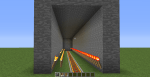
Rail Tunnel by Harry and Ivan: 2013-12-07_12.55.17

/js railer( )
A rail tunnel that can be placed underground. Uploaded 7 Dec 2013.

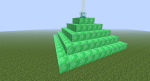
Beacon by Richard: 2013-11-30_12.47.36

/js beacon2( )
Makes a pyramid of emerald with a beacon on top. Uploaded 7 Dec 2013.

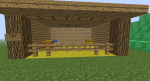
Stable by Richard: 2013-11-30_12.47.15

/js stable( )
Makes a detailed stable. Uploaded 7 Dec 2013.

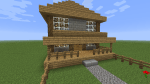
Stone Farmhouse by Oisin: 2013-12-07_12.29.31

/js stonehouse( )
Makes a house of stone with garden and rooms inside. Uploaded 7 Dec 2013.

Iron House by Eoin: 2013-12-07_12.36.40

/js ironhouse( )
Makes a single iron house. Uploaded 7 Dec 2013.

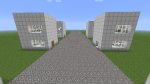
Iron Street by Eoin: 2013-12-07_12.25.59

/js ironstreet( )
Makes a street with 6 iron houses. Required ironhouse() to be installed f irst. Uploaded 7 Dec 2013.

Pumpkin Patch by Mikey: pumpkin

/js pumpkin( )
Makes a Portable Productive Planted Pumpkin Patch. Uploaded 28 Nov 2013.

Apartment by Luke: apartment1

/js apartment(floors, width)
Multi-storey apartment with furniture on each floor. Parameters: floors (e.g. 10), width  (7 is best). Uploaded 23 Nov 2013.

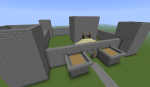
The Castle by Conor: TheCastle

/js thecastle(floors, width)
Large castle with outer walls and keep. Parameters: number of floors in the keep (e.g. 3); width of the castle (e.g. 40). Uploaded 17 Nov 2013.

Surprise by Ruaidhri: surprise

/js surprise( )
To find out what this does, run it or read the code. Just add flint and steel! Uploaded 28 Nov 2013.

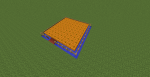
City Block by Ruaidhri: Citye

/js citye( )
Sky scrapers arranged in two rows with a road. Uploaded 17 Nov 2013.

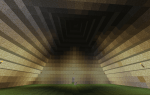
Pyramid by Ruaidhri: PyrimidInside

/js pyramid( )
Pyramid with door and lights inside.  Uploaded 11 Nov 2013.

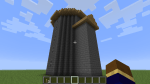
Wizard Tower by Conor: 2013-11-10_10.45.39

/js wizardtower(floors, width)
Round tower with side room. Parameters: number of floors (e.g. 6); width of tower (e.g. 10). Uploaded 11 Nov 2013.

Train Tunnel by Luke: Tunnel1

/js traintunnel( )
Tunnel with tracks and lanterns.  Uploaded 11 Nov 2013..

More to follow!

ModderDojo Week 5: Continuing to Build Complex Structure Mods in Minecraft

2013-11-10_10.45.39

This week, we continued to work on our structure mods in ScriptCraftJS. Our plan is to build a whole set of mods that between them can be used to create a town/city.

Meanwhile, Eli in the group is working on Java-based modding and will help everyone else get started with it when we all move onto that topic later.

Some of the structures people in the group are working on:

  • A block of apartments
  • A street with skyscrapers
  • A castle
  • An iron house
  • A stable
  • A tennis court / soccer pitch
  • A subway
  • A giant face!

The picture with this week’s post shows a Wizard’s Tower built by Conor in the ModderDojo group.

Along the way, we will get practice of:

  • Turning ideas into designs and turning designs into code
  • Debugging programs when the result doesn’t match the design
  • Using variables, calculations, decisions and loops
  • Sharing code for others to download and reuse

Practical notes:

  • During development and testing, you can end up with lots of incomplete structures that slow down your CraftBukkit server. A simple fix is to delete your world:
    • Stop your CraftBukkit server
    • Open the CraftBukkit folder on your computer: in it you will see folders called world and possibly world_nether and world_the_end delete them all
    • While you are at it, edit server.properties in the CraftBukkit folder to make your new world superflat, write level-type=flat and you could also change other properties such as spawn-monsters=false
    • Restart your CraftBukkit folder to create a new, empty world
    • Re-run your scripts to recreate structures that you want
  • Read the ScriptCraftJS API reference to see what commands you can use for your structures: https://github.com/walterhiggins/ScriptCraft/blob/master/docs/api.md

Our Mods:

We have started to post mods here: https://cdathenry.wordpress.com/2013/11/10/modderdojo-athenry-our-scriptcraftjs-minecraft-mods/

We will add more as our modders finish them and make them available for posting. Stay tuned!