Week 6 – Explorers– Finishing off our Ghostcatcher game

Hi everyone,

We finished off our Ghostbusters game this week, there are no new notes, last weeks notes contain all the code you will need. I hope you will continue with your game that you started on Saturday, I would love to see them all when we come back after our Halloween break. Here is a link to the Cheat Sheets I gave out if anyone wants them. cheatsheet.pdf


See you all on the 5th of November

Martha

02


Week 5 – Explorers– Improved Ghostcatcher game

Hi again everyone,

This week we improved on our Ghostcatcher game from last week.

We introduced a new concepts which we haven’t used before, animation and next week we will start another new concept which is broadcasting.

Using a simple technique of changing between costumes and having a waiting time we can animate our Sprites. In our case, we animated the Ghosts so they were blinking or sticking out their tongue. You could of course use this technique to have a sprite look like they are walking etc.

animation

Hope you all enjoyed the session and we will be using animation and broadcasting over the next couple of months.

Here are this weeks notes in PDF  cda-s6-week_05-betterghostcatcher.pdf

Hope to see you all again next week

Martha

Week 4 Explorers – Ghostcatcher

Hello Everyone

Great to see so many of you there on Saturday, 77 Ninjas!. Hope you had a good time. And a special welcome to our new Ninjas.

This week we created a Ghostcatcher game. We used the paint editor in Scratch for the first time. As I said on Saturday, It makes things easier if you think in shapes.
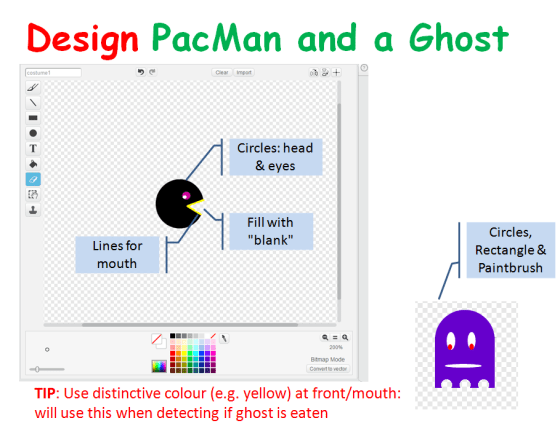
PACMAN

Using the code we have learned so far, we moved the Ghostcatcher with the mouse and the Ghosts randomly. We also added some sound.

PACMAN2

We are going to continue on next week and improve this game, adding some Variables and some levels.

Here are this weeks notes in PDF. cda-s6-week_04-ghostcatcher.pdf

Explorers – Building on our first game

Hi everyone,

Great to see you all there on Saturday. This weeks starting point was our game from last week. We wanted to add extra functionality. We added code to the Snowflake so that something happened when the Penguin touched it. Most people added some sound.

sensing

We also made our first variable. We did this so that we could keep track of our score. Using this score we also could add code to make something happen when you reached a certain score and win the game. Again here we added a sound and switched backgrounds.

variable

We learned and used a lot of new code this week and we will see over the coming weeks how we can incorporate it into many different types of games.

Why don’t you try using all the code you have learned so far to create your own game.

yourgame

See you all next week!

Here are the notes from todays session in PDF cda-s5-week_03-firstgame-part2.pdf

Explorers – Writing Commands to move sprites

Hi everyone,

We had a great crowd for our first session in our Explorers group. A big welcome to all our new Ninja’s and of course a special welcome back to our younger Ninja’s from last year, who are still with us.

Thank you all for coming and for your patience while we got everyone sorted out with downloading Scratch 2.

We started today with our first game, as well as learning how to write commands to move our sprites, we took a brief look at the interface for Scratch 2.

sprites

We also took a first look at some fundamental concepts that we will be using throughout the year. Today we looked at the X and Y axis as well as the number of degrees in a circle.

axixdegrees


Here are the presentation slides from the day, in PDF format: cda-s6-week_02-firstgame.pdf

I hope you all enjoyed today and hope to see you all again over the next couple of weeks!


Martha

Week 3 – Scratch Beginners – Ghostcatcher

Hello Everyone

Great to see so many of you there on Saturday, 85 Ninjas!. Hope you had a good time. And a special welcome to our new Ninjas.

This week we created a Ghostcatcher game. We used the paint editor in Scratch for the first time. As I said on Saturday, It makes things easier if you think in shapes.

PACMAN

Using the code we have learned so far, we moved the Ghostcatcher with the mouse and the Ghosts randomly. We also added sounded and score.
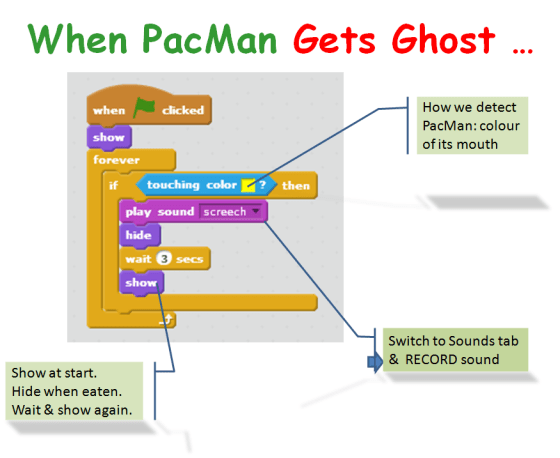
PACMAN2

For those of you who would like to add more complexity, I have a couple of ideas at the end of the notes. Give it a go and if you need any help, just ask one of the mentors at the beginning of the next session.

From next week the Scratch Beginners Group will be given by Julie. I won’t be too far away, so you will see me around! We have a new session this year called Unity. It is a games platform and we expect a large number of the kids will take it so I am going to help out in that room with Kieran.

A big THANK YOU to Julie for taking over for me.

Here are this weeks notes in PDF. CDA-S5-Week_03-Ghostcatcher.pdf

Week 2 – Scratch Beginners – Building on our first game

Hi everyone,

Great to see so many of you there on Saturday. This weeks starting point was our game from last week. We wanted to add extra functionality. We added code to the Heart so that something happened when the Hippo touched it. Most people added some sound.

hippo

sensing

We also made our first variable. We did this so that we could keep track of our score. Using this score we also could add code to make something happen when you reached a certain score and win the game. Again here we added a sound and switched backgrounds.

variable

We learned and used a lot of new code this week and we will see over the coming weeks how we can incorporate it into many different types of games.

Why don’t you try using all the code we have used so far to create your own game. We will take time at the beginning of next weeks session to look at any games that people want to show us.

yourgame

See you all next week!

Here are the notes from todays session in PDF CDA-S5-Week_02-FirstGame-Part2.pdf

Scratch Beginners – Week 1- Writing Commands to move sprites

Hello everyone,

We had a great crowd for our first session today in Scratch beginners. A big welcome to all our new Ninja’s and of course a special welcome back to our younger Ninja’s from last year, who are still with us.I forgot to take some pictures of the big crowd but we had up on 100 Ninja’s signed in to our Scratch Beginners session alone today.

Thank you all for coming and for your patience while we got everyone sorted out with downloading Scratch 2.

We started today with our first game, as well as learning how to write commands to move our sprites, we took a brief look at the interface for Scratch 2.

sprites

We also took a first look at some fundamental concepts that we will be using throughout the year. Today we looked at the X and Y axis as well as the number of degrees in a circle.

axixdegrees


Here are the presentation slides from the day, in PDF format: CDA-S5-Week_01-FirstGame.pdf

I hope you all enjoyed today and hope to see you all again over the next couple of weeks!


Martha

Summer Project- Athenry Castle in Minecraft

2015-08-30_16.17.51

A lot of you had a chance to see the Minecraft Project that some of our Ninjas worked on over the Summer weeks in Athenry Castle a couple of weeks ago.

As part of heritage week, Ruaidhrí, Eiblinn, Eoin, Darragh and Luke built a 13th century replica of Athenry Castle in Minecraft.

Athenry Castle Minecrafters

I promised a link to download the World and the Mods used, so here is a link to Dropbox where you will find all the files.

https://www.dropbox.com/sh/tfz50etxnwkzg1w/AACPCpWDNmazTJAK7yoM_uwYa?dl=0

See you all Saturday! (September 19th)

Martha

Week 5 – 2015 – Scratch Beginners

Hello everyone.

Good to see everyone there on Saturday. We made a game called Wipeout similar to on old game called Breakout.

wipeout

We used a number of important coding concepts again this week, loops and decisions, Variables, broadcasting, etc.

concepts

Yesterday during class, we didn’t have time to add the Lives and the Scores but I am hoping everyone will try it themselves at home. We have done it many times now and I am sure you are well able to do it. Try it first on your own but I have put my game up on the scratch website so you can take a look at it if you get stuck. Here is a link Wipeout Game

No Coderdojo Athenry for the next two weeks but I hope to see you all back on the 7th of March.

Enjoy the break

Martha