Python Beginners- Week 6: Lists

Today the Python group began looking at the Hangman Game from Invent Your Own Computer Games with Python (http://inventwithpython.com/chapter9.html). There are many new concepts in this game so we are going to spend the next few weeks looking at these.

We looked at Lists which are a way of storing a number of values in one variable. We had some fun writing code snippets mainly based around X-Factor. They are available here https://www.dropbox.com/sh/ax43g3recnn02p6/Cat_QexogU

We looked at some new ways of working with strings such as multi-line strings.  We also learned about new types of functions called methods.

Next week we will be looking at a new type of loop called a for loop.

Here are my slides from today. python session6
Scratch Advanced – Week 5 – Cracking the Caesar Cipther

This week we began the task of cracking the following codeed message.

XUFHJ YMJ KNSFQ KWTSYNJW. YMJXJ FWJ YMJ ATDFLJX TK YMJ XYFWXMNU JSYJWUWNXJ. NYX HTSYNSZNSL RNXXNTS YT JCUQTWJ XYWFSLJ SJB BTWQIX, YT XJJP TZY SJB QNKJ FSI SJB HNANQNEFYNTSX, YT GTQIQD LT BMJWJ ST TSJ MFX LTSJ GJKTWJ.

All we know is this message is written in English. To crack this code we will use some common features of the English language.

  1. In the coded mesage look for single letter words. These words probably map to a or I
  2. In the coded message look for the most common three letter words. These words are the, and
  3. in the coded message look at the spelling of any other small word to see if we can figure out their original form.

How to crack Ceasar Cipher

The following link was the hand out provided to everyone. Each person used this handout to work through each stage of the decryption.

Can you decrypt this message (pupils notes)

The teachers handouts is available at the following link. This handout provides detailed steps of how to work through decrypting the message.

Can you decrypt this message (teachers notes)

Scratch Advanced – Week 4 – Cryptography the Caesar Cipther

This week we created on of the most famous ciphers the Caesar Cipher. This cipher is named after the Roman emperor Julius Caesar.

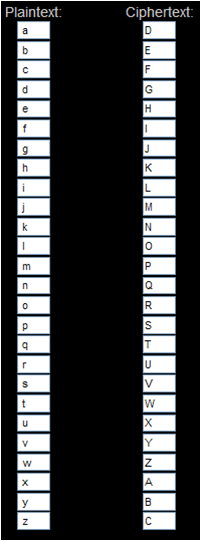
The Caesar cipher works by shifting each letter of the alphabet by a specific number.

In the example of the Caesar Cipher below the letters in the PlainText alphabet have been shifted by three places.

Cipher shift

The letter a becomes D, the letter g becomes J and so on.

Using a Caesar Cipher with an offset of three the words Coder Dojo Athenry would become FRGHU GRMR DWKHQUB

The notes for this session on how to create a Caesar Cipher using Scratch are here: Scratch Encryption project Ceasar Cipher

Python Beginners- Week 5: Adventure Game and Comparing Python Functions to Scratch Blocks

Today we finished our adventure game. Here is the source for it.

</pre>
#This is my adventure game

import time

def scene1():
 print('You are standing on a trail in a forrest')
 print('Before you the trail splits in two')
 print('Which way will you go right or left?''\n')
def makeChoice():
 choice = ''
 while choice != '1' and choice != '2':
 print('Press 1 followed by enter to choose the first option')
 print('Press 2 followed by enter to choose the second option')
 choice = input()
 return choice

def scene2A():
 print('\n''You come to a stream with bridge')
 print('You can cross and follow the trail that leads from the bridge')
 print('or follow the trail that leads along the nearside of the river''\n')

def scene2B():
 print('\n''you come to a steep hill')
 print('you can climb over the hill')
 print('or you can follow the trail which leads around it','\n')

def goodEnd():
 print('You travel along until you hear people''\n')
 time.sleep(1)
 print('They sound like they are having fun''\n')
 time.sleep(1)
 print('You suddenly see them and realise it\'s your friends having a picnic')
 print ('they share their food and drinks with you and you have a great time')

def badEnd():
 print('You travel along''\n')
 time.sleep(1)
 print ('on and on''\n')
 time.sleep(1)
 print('you have no idea where you are''\n')
 time.sleep(1)
 print('suddenly you realise you are back where you started')
#main program starts here
playAgain = 'yes'
while playAgain == 'yes' or playAgain == 'y':

scene1()

#use the makeChoice function to get
 #the player to decide which way to go
 firstChoice = makeChoice()

#this if else statement will show the next
 #scene based on the players choice
 if firstChoice == '1':
 scene2A()
 else:
 scene2B()

secondChoice = makeChoice()

#this if else statement will show the next
 #scene based on the players choice
 if secondChoice == '1':
 goodEnd()
 else:
 badEnd()

print('Do you want to play again? (yes or no)')
 playAgain = input()

We also took a look at Snap which is an extended re-implementation of Scratch that allows us to build our own blocks. Snap is available at http://snap.berkeley.edu/. We compared our Python code to a similar Snap script.

Capture4

We compared Python functions to Scratch blocks and made a few blocks of our own using Snap. Here are my slides from today. python session5

Python Beginners – Week 4: Adventure Game

This week we looked at creating a game from the beginning and at the steps we might go through to complete it. We looked at flowcharts and pseudocode and then we broke down the program into bite size pieces and wrote functions for these. We got about half way through this and hopefully we’ll complete it next week. Here is a screenshot of what we have completed so far.

screenshotHere are my slides from this week. python session4

Scratch Advanced – Week 3 – Cryptography

Hope everyone enjoyed last week.

This week we began a series of sessions on Cryptography. We began by demonstrating why we might use Cryptography. What is Cyrptography

What created a Scratch project to Encrypt a single word or sentence using a Reverse Cipher. Notes for this Scratch project are at: Scratch Project Notes (Reverse Cipher)

We then improved the Scratch project to Decrypt the same word or sentence back to its original form.

We discussed the limitations of a Reverse Cipher and began the introduction of the next session where we will be creating a Scratch program to Encrypt and Decrypt a word or sentence using one of the most famous ciphers the “Caesar Cipher”. Named after the Roman figure Julius Caesar.

Python Beginners – Week 3: Functions

This week the Python group looked at Functions, Escape Characters and Boolean Operators. We also started to rewrite the Dragon’s Realm game which we will continue with after the break. Don’t forget to look at chapters 5 and 6 of “Invent Your Own Computer Games with Python” http://inventwithpython.com/chapter5.html . Here are my slides from today- python session3

Python Beginners-Week 2: Our First Real Game

We had a good turn out at the python group again today. We did a lot of typing which some of the younger Ninjas found hard going. We won’t be doing that much again for a few weeks. We did a number guessing game which contained some concepts which are used in most computer programs. Our number guessing game is explained in chapter four of “Invent Your Own Computer Games with Python” by Al Sweigart http://inventwithpython.com/chapter4.html

Scratch Advanced – Week 2 – Lets finish the Calculator.

Hope everyone enjoyed last week.

This week we are going to use a drawing application Paint.net or msPaint, whichever people prefer to use to finish the Calculator off properly.

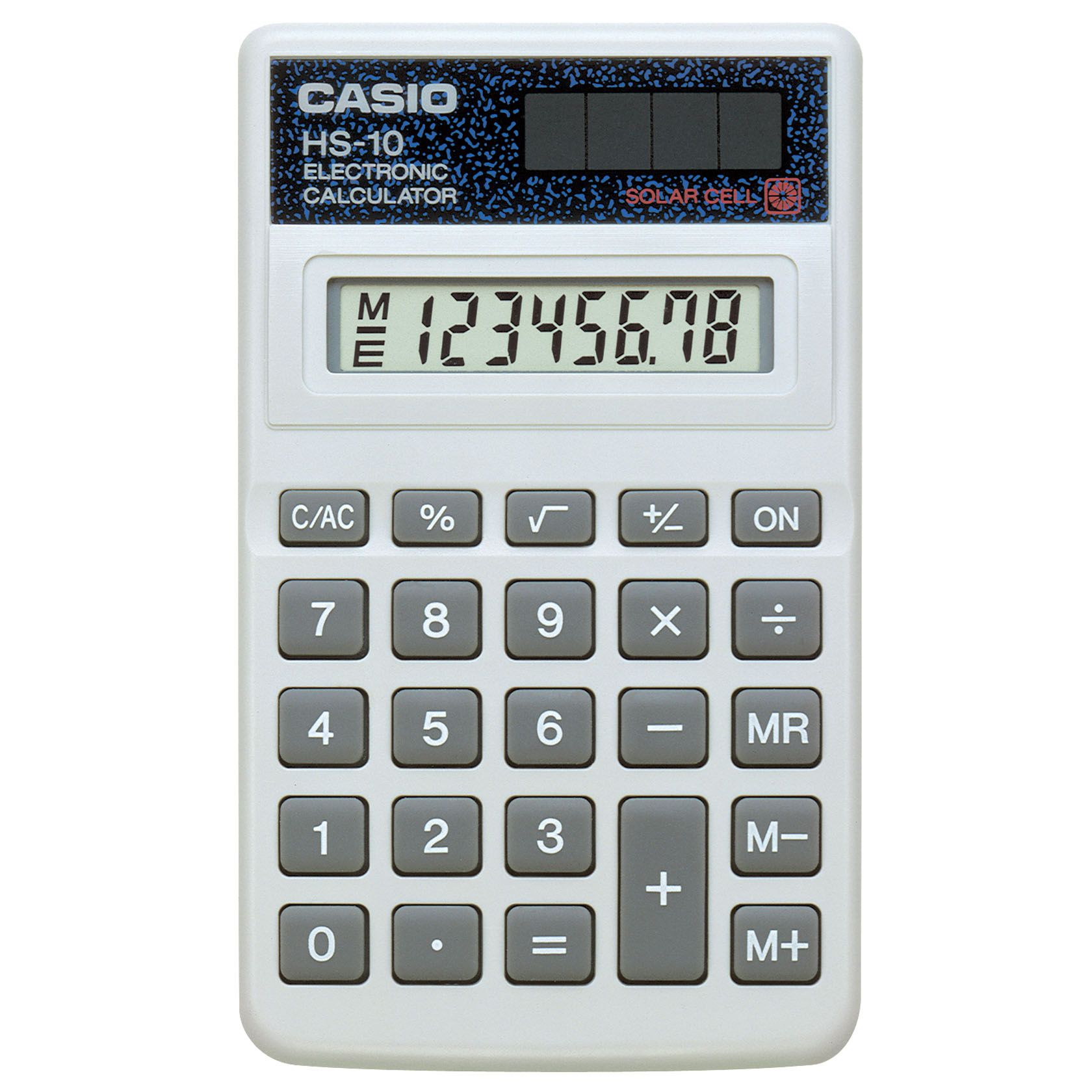
What we need to do is set the Background in the Calculator to a picture of a real calculator, something like this one…

Image


And then using Paint.net or any other graphics tool we are going to cut out the different numbers and save them all of to seperate files and then use these files as the Sprites.

You should end up with loads of these…

Image        Image

Do one for each number, one for +, -, X and divide. Oh and don’t forget the dot 🙂

If any one is feeling adventurous we might even try and do something with Memory.

Python Beginners-Week 1

We had a slow start to the Python session due to Wi-Fi and installation issues. However once we got moving we managed to cover variables including strings, math operators and inputs and outputs.
Ninjas are encouraged to read the first three chapters of Invent Your Own Computer Games with Python by Al Sweigart, which is available at http://inventwithpython.com/chapters/ .
Next week we will be looking at loops and decisions in a number guessing game and comparing it to a similar scratch program.
guess

Here are my slides from Week-1
session1slides