This week we looked at code for the bare bones of a race car game.
We started off by just moving a block around the screen and then rotating it. Then we figured out how to drive it around the screen.
Finally, we looked at how to give the impression of movement to our car sprite by scrolling the track around behind it.
For next week I want the Python group to look at Scratch Beginners week 2 and week 3 as we are going to attempt the same thing in Pygame.
You can find our code from this week here.
Week 3, 2014 Scratch Beginners- Scrolling Backgrounds Contd
Hi everyone,
We completed our Mario game this week. We coded Mario so that he always floated down on to the wall. We added a fraction of a second of a wait so that it appears that he floats as he comes down. This also allows time for you to navigate left or right as needed.
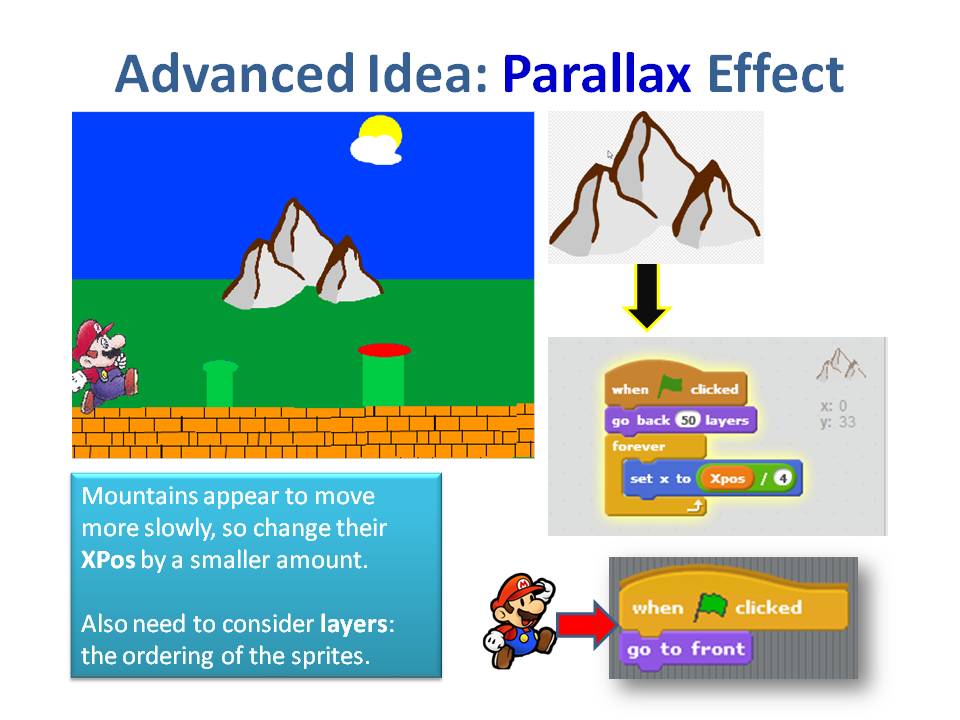
We also introduced a more advanced concept, the Parallax effect, whereby objects further away appear to move slower than objects nearer. We coded mountains and a Sun to demonstrate this.
Next week, everyone is going to start on there own games, using the code and concepts we have learnt over the last couple of weeks, so bring your imagination with you.
You will a full version of the my notes in pdf form here.CDA-S3-Challenge09-Scrolling.pdf
See you all next week
Martha
Website Development Week 3
Hi All,
This week the notes are mostly a refresher because a lot of ground has been covered in the last two weeks and I want to give a chance to anybody who wants to start learning HTML a chance to catch up. The notes just recap what we have done so far and also explain why it’s not a good idea to use Microsoft Word to make our HTML files! The notes also show that there are some excellent websites on the internet for learning HTML. You can type the HTML on one side, and see what kind of page this code creates on the other. This is super for experimenting with the different HTML tags so give it a go! When I went around to the classes this week some people did mention to me that they were interested in learning HTML, remember if you ever have any questions feel free to email me or talk to me at the Coderdojo every Saturday!
James
Python Beginners – Space Defender
Today in the Python group we looked at how a few simple changes can change the look and feel of a game. Our space Defender game uses code recycled from last weeks Bunnies And Badgers game combined with a few new sprites to make a completely new game. We also looked at how to use Geometry when moving sprites around the screen.
movex=math.cos(angle_z)*10
movey=math.sin(angle_z)*10
xpos+=movex
ypos-=movey
The above code calculates how many pixels the x and y coordinates of our sprite needs to be changed for it to move 10 pixels in the direction of angle_z. You can learn more about Sin and Cos here.
Python Beginners – Bunnies and Badgers
Sorry for being a little late putting this up. This week in the Python group we worked on an online tutorial which is available at Beginning Game Programming for Teens with Python. If you copy the folder Bunnies_and_Badgers from Dropbox here onto your own computer it will make getting started a little bit easier.
Week 7 – 2015 Scratch Beginners – Scrolling Backgrounds
Hi everyone,
Thank you all for coming Saturday on such a nice day and such a busy day of sport as well!
We started our Mario game, where we will use scrolling of objects in the background to achieve movement rather than making Mario move.

It can be a difficult concept to grasp for the younger ones, but we will go through it again next week before we continue on with the game.
Rather than putting up the notes from this week, I will wait until we have the game finished before putting up the completed notes.
I have however, put the game (as far as we did today) on the Scratch Website http://www.scratch.mit.edu. Login with the User name coderdojodathenry and password xxxxxxx123 and you will be able to download the game if you weren’t here this week or have a look at the code to get your own game work working.
https://wordpress.com/post/40558549/912
See you all next week, when we will make Shrink and add some more scrolling sprites!
Martha
Website Development 2 – Links, Paragraphs, Headings and Images!
Hi everybody!
This weeks notes are all about putting headings, paragraphs, links and images on our webpages! Have a look at the notes and play around with the new tags that you can learn from them. If you have any questions just send me an email! My email address is on the last slide of this weeks notes. I am going to be at Gairmscol Mhuire during Coderdojo on Saturdays so you can ask me questions there too!
Here is a link to this weeks notes!
Happy Coding,
James
Web Development 1 – Getting started with HTML
Hi all, the Web Development stream starts this week. It will run alongside the other streams so you can still learn Scratch, Python or Minecraft Modding on Saturdays and spend a small amount of time learning HTML during the week. HTML is fun and the thing we need most is ideas about how webpages should look or ideas about what to put on them! We can then work together to translate these ideas in to webpages! If you are interested have a look at my presentation on getting started with HTML!
ModderDojo Java Modding 6: Creating Our First Mod – Adding A Crafting Recipe
Previous post: ModderDojo Java Modding 5: Creating Our First Mod – The Basic Code
Note: the instructions at this link are good but things have changed a bit for Forge 1.7: http://www.minecraftforge.net/wiki/Crafting_and_Smelting
Different types of mods require different types of code. One of the easiest type of mod to add is a crafting recipe. We will write one to turn some dirt into diamonds.
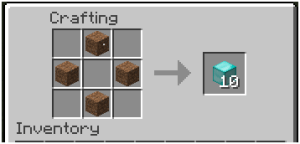
The code for this goes into the init function:
What this does:
- Create a new ItemStack called dirtStack with a single dirt block
- Create a new ItemStack called diamonds10 with 10 diamond blocks
- Add a new recipe to the game that will produce this stack of 10 diamonds, when you lay out the dirt in the shape specified: x in the shape is where the dirt blocks have to go.
We can also have shapeless recipes (where it doesn’t matter where you put blocks), which are even simpler to write:
GameRegistry.addShapelessRecipe(
new ItemStack(Items.diamond, 6), new ItemStack(Blocks.dirt));
This second one creates a stack of 6 diamonds from a single block of dirt.
Previous post: ModderDojo Java Modding 5: Creating Our First Mod – The Basic Code
This concludes this series of posts on getting started with Java Modding, from ModderDojo Athenry.
Week 1, 2014 Scratch Beginners – Storytelling
We had a great turnout today for our first session of 2014. A very special welcome to our 14 new ninjas who joined us for their first coding session today. I hope you enjoyed your first visit to Coderdojo Athenry.
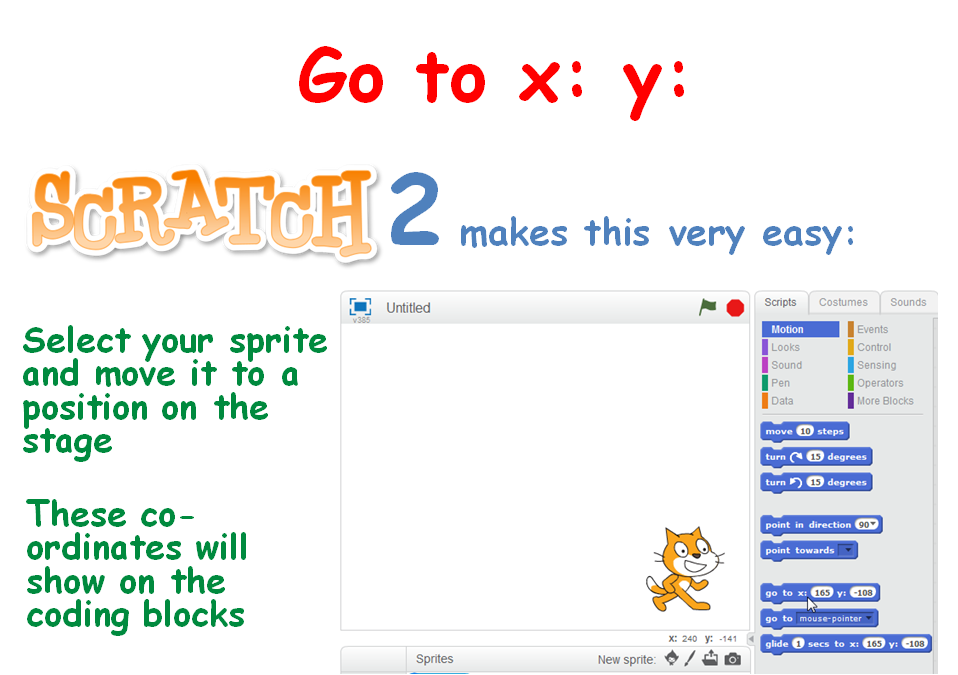
To ease everyone back in (including myself) we took a look at doing some storytelling. This involved again learning about the X, Y position of the stage, some movement of the sprites using the Glide command and of course testing our code to ensure that our timings were correct.
We look forward to seeing you all next week, when we will be using scrolling backgrounds.
The PDF version of todays session are available to download here: CDA-S3-Challenge08-Storiestelling.pdf
Martha