Advancers – Plan for Clock.

This weeks challenge is to build a working clock.

This is not just an ordinary clock though, we are going to build a clock that works in the same way as the Railway clocks works in Switzerland.

These clocks work in the following way:

  • The Clock waits for a signal from the master clock
  • When it gets the signal, it moves the minute hand on by one minute (and the hour hand if necessary)
  • then the second hand moves round once in about 58 seconds
  • It then waits for the signal again from the master clock.

This means that all the clocks on all the Stations are synchronised exactly.

In Computer speak this is called Event Driven Programming, where the code simply waits for an Event before doing anything.

So what’s the plan?

We need 4 Sprites

  1. For the Clock Face
  2. For the Hour Hand
  3. For the Minute Hand
  4. For the Second Hand

You can create them however you want but this is what the Swiss railway clocks look like and I will try and create something similar.
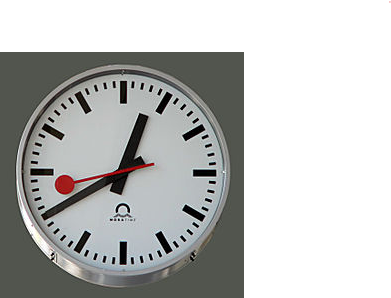
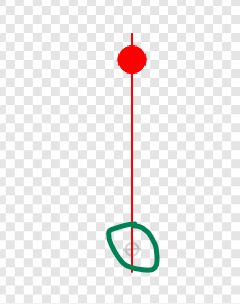
Remember one thing, when creating the Sprites make sure they are centred correctly.

So, the clock face should be perfectly centred and then the hands should be centred near one end something like this, I have highlighted where the centre is, with the green circle.
The code

Remember this will be event driven, so we will be using Broadcasts a lot. We will also have to calculate how far to move each hand, this means we will be using the number 360 a lot as that is one complete circle.

So just to let you know how far each hand should move:

  • The Second hand will move 360 degrees for each event.
  • The Minute hand will move 6 degrees for each event (360/60 minutes)
  • The Hour hand will move 0.5 degree for each event (360/60 minutes/ 12 hours)

The first event will be broadcast from the Stage:

The Minute hand will receive this broadcast and move 6 degrees it will then broadcast another 2 events, one to the Hour hand and one to the second hand so they can move.

This is the code for the Minute hand which should be enough to work out the rest of the code as well.
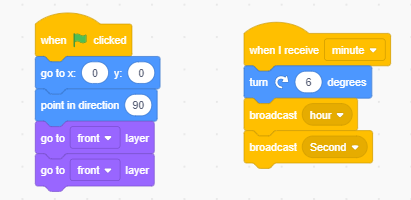
The extra code above is to make sure the Minute hand starts in the correct position.

And one final thing which might be a little tricky, but I’ll leave it as a challenge for you, the Second hand should only take 58 seconds to go all the way around.
CoderDojo Athenry Information Session 07-Nov-2020

Hello again everyone.

It was great to speak to you all last Saturday.

Here are some notes with information all about CoderDojo Athenry in PDF form.

Here’s a quick recap of everyone’s notes;

Martha told us all about the Explorers group, you can contact Martha at Martha@coderdojoathenry.onmicrosoft.com and you can find her slides here.

Oliver spoke about the Advancers group and you can contact Oliver at Oliver@coderdojoathenry.onmicrosoft.com

I talked about the Bodgers group, you contact me at Declan@coderdojoathenry.onmicrosoft.com and you can read all about the Bodgers group here.

Kieran then spoke about the Modellers group. Here is his presentation.

Kieran can be contacted at Kieran@coderdojoathenry.onmicrosoft.com.

Finally Michael spoke about the Hacker Group which will be starting in the new year. Here are his slides

Mike’s email is, yes you guessed it is, Mike@coderdojoathenry.onmicrosoft.com

We will be posting information for our first session next Saturday in the next day or two, so keep an eye out for that.

Looking forward to seeing you all again next Saturday.

Declan and the CoderDojo Athenry Mentors

Modellers Online Sessions

Hi folks. Inspired by Martha’s post for Explorers, I decided to do one for Modellers. We have a good number of sign-ups already, but if you haven’t expressed your interest yet, here’s a link to the form where you can do so.

Did you know that Blender can also be used as a video editor? Is there nothing it can’t do? (yes) Here’s a little look back at a few of our projects from last year to get your imagination going.

If there’s interest, we might do a little video editing this year, let me know if you like that idea.

Really looking forward to getting back to things!

All the best,

Kieran

Online Explorers Session

Hi there everyone, I hope you are all keeping safe.

We are hoping to resume Coderdojo Athenry some time in November. For anybody who isn’t familiar with the Explorers group, here is a short video explaining what we do each week.

Explorers Video

Here is a link to a form to show your interested in participating.

Hope to to you all (virtually soon)

Stay safe, wear a mask and wash your hands!

Martha

Modelers – Video 7

Hi folks, here’s the second part of our spaceship video project, as promised. This is our last official video for the year and I just want to take the opportunity to say thanks for being such a creative and fun group. It’s been a pleasure.

Click here if you haven’t done Part 1 yet.

In this video we introduce a few new things:

  1. Rendering a video instead of a static image
  2. Using a “follow path” constraint to move an object along a pre-defined path
  3. Using a “track to” constraint to keep a camera pointing at a target
  4. The impact of the camera’s focal length
  5. Importing items from another Blender file

Here are the video instructions, they’re long at about 50mins, so take them in a few sections if you need to:

You’re going to need an image I prepared to texture the warp tunnel, it’s below. Just right-click on it and save it as space.png.

The blend file can be downloaded from here.

Have a lovely summer!

Modelers – Video 6

Hi folks. I may put up some content over the summer if I get time, but this is Part 1 of 2 of our last proper project this year.

We’re going to model a spaceship in this project (Part 1) and have it fly through space (Part 2).

Here are the video instructions:

Just after I stopped recording I remembered I’d forgotten to switch on “Bloom” which makes the engines glow properly. Make sure to switch this on as shown in the picture below!

Annotation 2020-05-16 171323

A copy of my Blend file can be downloaded from here.

Modelers – Video 5

Hi folks, in this video I build and rig a humanoid figure and show how to pose it. I also say “not too terrible” a lot.

This is something that I’d hoped we’d get too all year and I’m glad that I’ve a chance to show it to you here. I hope you’ll have a go with it. Those more artistic than I am may make a better looking human figure, with a bit of luck.

My blender file can be downloaded from here.

If you manage this and would like to push it further, maybe challenge yourself to see if you can remember how to UV unwrap and texture paint the model? I’d love to see someone give that a go.

Take care of yourselves and I hope to do one or two more videos before we break for the summer.