2016 Christmas Party and Show & Tell at CoderDojo Athenry

This slideshow requires JavaScript.

Here are photos from our Christmas party and Show & Tell day at CoderDojo Athenry on 10 December 2016.

It was really impressive to see the things that our young people had built and created. There was also a great Robot Duels session, organised by mentor Declan in the Bodgers group: Bodgers – Robot Duels At CoderDojo Athenry

We are very grateful to our supporters in the community around Athenry:

  • Clarin College and Principal Ciaran Folan, who are so generous with their space every week
  • Galway & Roscommon Education & Training Board, who provide us with an annual Youth Club Grant
  • Medtronic and Declan Fox, who have provided us with a grant linked to Declan’s volunteering
  • Hewlett Packard Enterprise and Mark Davis, who provide us with loaner laptops
  • Boston Scientific and Kevin Madden, who provided us with the loan of three 3D printers for the semester
  • Supermacs and Joyces, both of whom gave us generous deals on the food for the Christmas party

And of course we are eternally grateful to our wonderful mentors, and to the parents who come along with their children every week. Thank you!

We look forward to seeing you all in the New Year!

slide10

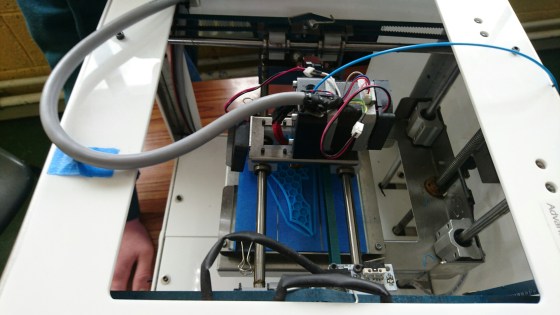
Hackers – Getting started with 3D printers

3dprinter

At the Hackers group, we started learning how to use 3D printers this week. 3D printers are a fantastic technology for turning 3D computer models into physical objects. They are also impressively inexpensive, with the Arduino-based Materia 101 printer that we are using costing about €600.

Thanks a million to Kevin Madden who joined the group to show us how to use 3D printers. Thanks also to his employer, Boston Scientific, who have loaned three 3D printers to us and are also covering the cost of the plastic “ink” used in them. Thanks also to Kevin’s colleague Cathal Egan of Boston Scientific, who initially offered the printers to us.

Here are Kevin’s notes on how to set up a 3D printer: 3d-printer-setup (PDF)

Here are the configuration files needed: https://www.dropbox.com/s/6otj5ok7i00ikds/Slic3r-Materia101-Settings.zip?dl=0

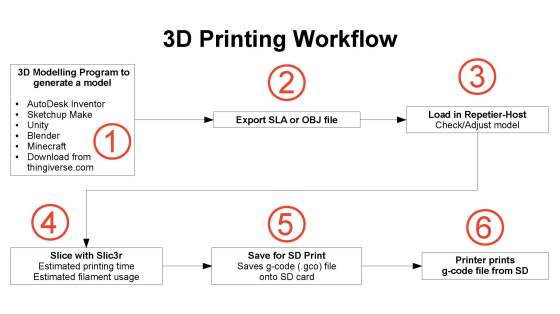
And here also is a diagram Kevin prepared, showing the 3D printing workflow:

3d-printing-workflow

At our next session, we will look at how to do some 3D modelling to create objects we can print. Should be fun!

Beginner’s scratch – Creating your own projects!

It is belt awarding time at Athenry Coder Dojo! We are really excited to see what everyone is going to come up with this year. In previous years, we have had great projects that use many of the core principles of programming that we have been teaching since the beginning of the year. Here is a list:

  1. MOTION – controlling the movement of a SPRITE by the keyboard, the mouse or randomly by the computer,
  2. LOOPS – using forever or limited repeat blocks to keep something going,
  3. VARIABLES – saving a value in computer memory where the computer can pick it up and use it or change it when necessary,
  4. DECISION blocks – Using IF or IF/THEN blocks to decide if something should happen or not,
  5. BROADCASTS – sending out a message to trigger a reaction in another part of the program,
  6. ANIMATION – using costume edits and changes within loops to make it seem as though a sprite is moving.

You don’t need to use all of the above principles in your project, but we mentors need to know that you understand them in order to let you move up to the next level – Advanced Scratch. While we are helping you with your projects, we will be reinforcing the principles, so it will be fun and easy! The day of the awarding of belts, we will ask you questions on your project while you are demonstrating it.

You must be present on belt award day  to show us your projects. If you don’t get the belt you want, don’t worry! There is always the next belt award session and we love having you at Coder Dojo Athenry.

Here are some of the questions we might ask at the belt awards session:

1.Which block you would use to make the sprite speak?

2.How would you change the way your sprite looks?

3.How would you make a sprite move?

4.Can you show where you have used a loop block?

5.Can you show where you have used animation or sound?

6.Can you show us where you have used an IF block?

7.What blocks would you use to check if your sprite hit something?

8.How do you share a program online?

9.Show where you have used a variable or how would you create a new variable?

10.Show where you have used a broadcast or how would you create a new broadcast?

Here are some ideas for projects:

Squash Game

Control a bat to hit a ball

Ball bounces off wall on the other side

Game over when you miss 5 times

ABC Game – letters falling from the sky!

Sprites with A/B/C fall from random start point

Press A/B/C key to stop them

Keep score of how many you stop

DodgeBall –

Have Scratch cat avoid the flying beachballs while he is trying to grab a mouse

Use the arrow keys to control scratch cat and have three or four beachballs fly around randomly

If the cat gets touched by a ball make him lose strength/fade but he gets stronger if he touches a fish.

Use a broadcast to change the backdrop wen he gets his score to ten or to zero.

Good luck and be sure to ask questions! We love to help!

Julie

Scratch Beginners – Challenge 14 – Create a Piano

This week and part of last week we created a piano! The initial keyboard looked like this:
cda_s5_challenge_14_piano_keys

Each white and black key is a separate SPRITE. We began by drawing the white Middle C SPRITE which has two costumes. The first costume is white and the 2nd is a different colour (you choose) that flashes up when the SPRITE is CLICKED. This helps us to see which sprite is responding to the click.

Continue reading

Brenda and John Romero, renowned game developers, speaking at CoderDojo Athenry on Saturday 9 April 2016

romeros

We are very excited to announce that Brenda and John Romero, who between them have been involved in developing exceptional games such as Doom, Quake, Tom Clancy’s Ghost Recon, and Dungeons & Dragons, will be at CoderDojo Athenry on Saturday 9 April 2016. They will be speaking to us about their extensive experience as leading game developers. They will be joined by their 11-year old son Donovan, who has also started developing games.

Brenda and John have recently moved to Galway from the West Coast USA, and are currently in the process of establishing a game studio, called Romero Games, in Galway. Their brief biographies are below.

Regular attendees at CoderDojo Athenry are welcome to bring a friend if they wish. These talks should be really fascinating for our budding coders and game designers in CoderDojo Athenry, and inspirational for boys and girls alike!

PS: Huge credit to Kieran (lead mentor of the Unity stream) for organising this!


Brenda Romero 

Brenda is a game designer, artist, academic, and Fulbright Fellow. She has been in the games industry since the early 1980s. Her credits include such notable games series as Tom Clancy’s Ghost Recon, Wizardary and Dungeons & Dragons.  She’s previously sat on board of the International Game Developers Association (IGDA) and chaired several Special Interest Groups (SIGs) including one representing Women in Games. 

John Romero

John is best known as the founder of Id software. An exceptional programmer and game designer, he is the inventor of the “deathmatch”. His best known games include such timeless classics as Commander Keen, Wolfenstein 3D, Doom and Quake each of which broke new ground, both in technical and gameplay terms and even spawned new genres.

Additional 

John and Brenda are currently in the process of establishing a game studio, called Romero Games, in Galway. Their son Donovan, also visiting us, is writing a game with the help of his Dad and friends and will hopefully be demonstrating it on the day.


ModderDojo 2016: Adding a Crafting Recipe in Scriptcraft

craftdiamonds

In a post from last year, we saw how to create crafting recipes in Java modding:

https://cdathenry.wordpress.com/2014/01/19/modderdojo-java-modding-6-creating-our-first-mod-adding-a-crafting-recipe/

It is also possible to do the same thing in Scriptcraft. Here is the code for a dirt to diamonds recipe in Scriptcraft:

Note: write the code in a file called something like “recipe1.js” and put it in the same folder as your other Scriptcraft mod (a sub-folder of scriptcraft – plugins). Note that this is the entire code – it does NOT go inside a function definition.

[code language="javascript"]
// Scriptcraft recipe for dirt to diamonds
var recipes = require('recipes');
var items = require('items'); 

// Here is the recipe: result from ingredients in a shape.
var dirt2diamond = {result: items.diamondBlock(10),
                    ingredients: {D: items.dirt(1)},
                    shape: [ ' D ',
                             'D D',
                             ' D ' ]};

// add the recipe to  the server
recipes.add(dirt2diamond);
[/code]

The code is reasonably easy to understand, I think. The result is a stack of 10 diamondBlock items, there is a single ingredient which is a dirt block that we indicate with a variable ‘D’, and they are arranged in a diamond shape. I have put in extra line breaks to make the shape clearer, but this is not necessary.

You can have more than one ingredient. Here is another example:

[code language="javascript"]
// A second recipe:
// diamond block made with a diagonal line of 2 dirt , 1 cobblestone, and 2 dirt
var recipe2 = {result: items.diamondBlock(1),
               ingredients: {D: items.dirt(2), C: items.cobblestone(1)},
               shape: [ 'D  ', ' C ', '  D' ]};
// add the recipe to  the server
recipes.add(recipe2);
[/code]

Beginner’s Scratch Challenge13 Easter Egg Painting Fun

This week I decided to make a game that gives the user choices. In order to decorate the egg, we give the user a few choices of colours and stickers to put on the Easter Egg and the user must click on the colour and sticker they like. We had to import sprite images from the internet, draw some of our own sprites from scratch and get sprites from the library. In the beginning after the green flag is clicked, I used the SAY block to give instructions that disappeared after 10 seconds.cda-s5-challenge_13-decorate_an_egg-stage_with_say

We found an EGG, CHICK and BUNNY cartoon image on the internet and saved them to an image file on our desktop. I clicked the Add Sprite From File and found these images on my desktop and added them as new SPRITES. I then cleaned up the background of these sprites and made it transparent.

I drew a Spot SPRITE that I moved over on top of my egg to make it look good and I drew a Stripe SPRITE that roughly fell on top of the egg. You can move, shrink and grow each of these sprites so that they look OK on the egg. Now we have to get the BUTTON SPRITES on the side and the PAINT BALL SPRITES on the bottom. I started with one button that I found in the library and imported it. I changed it’s colour and wrote the word SPOTS on it in it’s costume editor using the T button. Here are what my sprites looked like:cda-s5-challenge_13-decorate_an_egg-sprites

The basic idea is that the BUTTON SPRITES (on the side) and the PAINT SPRITES (on the bottom) send a BROADCAST when CLICKED.Here is the script for the SPOTS BUTTON. That’s all there is. 
cda-s5-challenge_13-decorate_an_egg-SPOTS_button

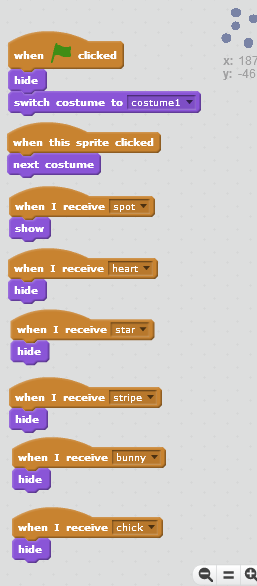
And the STICKER SPRITES (the chick, bunny, spots and stripes) respond to each BUTTON broadcast by SHOWing or HIDEing. As each sticker called that one SHOWS and the others all HIDE. Here, this is the script for the SPOTS SPRITE. See how there is only one SHOW block under the WHEN I RECEIVE SPOTS sprite. This SPOTS SPRITE will only SHOW when the SPOTS BUTTON is clicked and sends out the broadcast SPOTS. When any other sticker button is pressed, it will hide.cda-s5-challenge_13-decorate_an_egg-dots_script

The CHICK SPRITE will look exactly like this, except that the SHOW block will be under the WHEN I RECEIVE CHICK block! The PAINT BALL SPRITES do the exact same thing. They send out a broadcast, when clicked, that tells what colour the user picked. The SAY block helps let people know what to do.cda-s5-challenge_13-decorate_an_egg-orange_paint_ball

The EGG must now react to the broadcast. We need to add a new the EGG SPRITE costume that matches the colour of the paint ball and rename the costume to orange. After I added the new costume, I put the WHEN I RECEIVE orange, CHANGE COSTUME TO ORANGE. The same happens for each other coloured PAINT BALL SPRITE.cda-s5-challenge_13-decorate_an_egg-egg_scriptAs you add buttons for other decorations on the egg, create or import the decoration and then script them as we have done above for the SPOTS. My final project is on the SCRATCH.MIT.EDU website. Search for projects for the username:cdathenry1516. I will share it so you can play, change the scripts or downlod it to your own computer. Have fun!

Julie

Information About Coolest Projects 2016

AboutCoolestProjects.jpg

At the start of the session on Saturday 27 Feb, we had an information session about the CoderDojo Coolest Projects contest.

I think it is well worthwhile to consider entering. There are multiple categories and the event is very impressive and interesting.

Special thanks to Aliadh who spoke very well about her experience at Coolest Projects last year.

The notes are here: AboutCoolestProjects.pdf

ModderDojo 2016: Planning a Large Collaborative Mod

DSC_0132

On Saturday, following on from the general information session about Coolest Projects, we started planning a large collaborative mod in the JavaScript/Scriptcraft ModderDojo stream.

We used my favourite planning and design tool – a big whiteboard and a couple of markers.

As the image above shows, we first identified what kinds of things we are already able to make, and we used these as a startpoint for brainstorming some ideas that could build on our capabilities. Finally, we reviewed some of our brainstormed ideas to identify some common threads and in particular some kinds of capabilities we don’t have – things that we will have to learn how to do in future weeks.

For example, we now know that we need to learn about event-driven programming, creating recipes, creating NPCs, creating new block types, and maybe generating biomes. Alex and I will help you to figure out some of these ideas in future weeks.

Since attendance was low, we did not finish the planning and make a final decision about what the theme of our mod is, since we would like more people’s input. But we have made a great start!

Reminder: on Saturday 5 March, there will be no ModderDojo stream as both Alex and I happen to be travelling.