Explorers – Maths Game

Welcome back everyone and Happy New Year

We had a great day in Coder Dojo on Saturday! We did a huge amount of work developing a maths game in the Explorers group.CDA-S5-Challenge_10-Maths game-how to

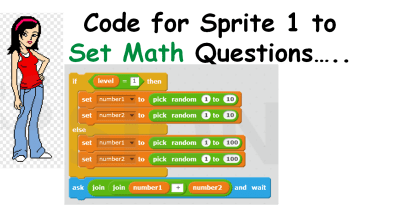
  1. The player picks a level of difficulty and the computer chooses 2 random numbers to add (subtract or multiply- whichever you choose!) together and show the numbers to the player. For this we needed 2 SPRITES and 4 VARIABLES called SCORE, LEVEL, NUMBER1 and NUMBER2 as well as 2 BACKDROPS. CDA-S5-Challenge_10-Maths game-ask questions1CDA-S5-Challenge_10-Maths game-ask questions
  2. The player then has to enter an answer to the equation and the computer tells them whether they are wrong or right. CDA-S5-Challenge_10-Maths game-decisions alternative end
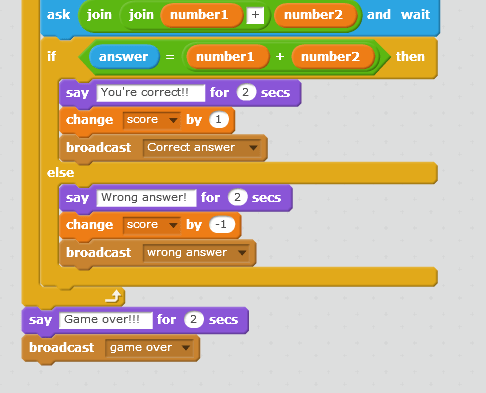
  3. We repeated the ask/answer questions 5 or 10 times.

We didn’t get to finish our game but we will next before we start learning Paint.net

See can you figure it out for yourself:

We will have a second sprite who reacted positively to correct answers BROADCAST and negatively to wrong answers BROADCAST. You can use whatever sprites you like and change their look whatever way you like.CDA-S5-Challenge_10-Maths game-sprite 2After all the questions were asked we will have  the 1st Sprite SAY – Game Over! and BROADCAST Game over so that the backdrop changed and music played. There are two ways to change the backdrop- see below!CDA-S5-Challenge_10-Maths game-alt backdrop CDA-S5-Challenge_10-Maths game-backdropCan you improve our game??! Can you figure out how to subtract or multiply instead of add? Can you get the computer to add three numbers together or give the user 3 level options like: easy, medium or hard?

The notes for the Maths Game are here:  cda-s6-week_1_17-mathsgame.pdf

See you all next week and don’t forget to Download Paint.net at         WWW.GETPAINT.NET

Martha
Advancers: Scratch Platform Engine – Week 1

This week was quite busy in the Advancers group.

Talk on Coolest Projects

  • Oliver gave a talk on the “Coolest projects” and many of us are planning on targetting it this year –
    • the deadlines are Mid-March for submission of ideas and Mid-June to attend the event itself!
    • Mark and Oliver are going to dedicate the last 30 min of each week to helping people with their projects.

Platform Engine

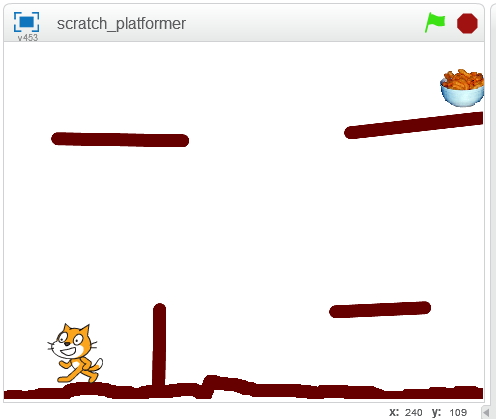
We started a platform Engine and got most of the code done – next week we’ll finish up the engine (not much code, honest!) and see what it would take to make it into games.  A Platform Engine is something that’s useful in lots of types of games or interactive adventures – be they mario-style or escape-room style, etc.  Once we have this platform engine done, we can easily apply it to other cases.  Think about ideas for platformers for your coolest project!

platform_week1

Things we got working:

  1. Gravity so the player falls
  2. Stopping when we hit the ground
  3. Not falling “into” the ground
  4. Walking along bumpy ground
  5. Not walking over bumps that are too high (like walls)
  6. Jumping

Things we didn’t get working (yet):

  1. “popping” up over walls
  2. Animating our walk
  3. Snagging on edges
  4. Scores, lives, etc.

Next week we can look at the above to see how we might do it, and also what it might take to make it look pretty, add a loading screen, etc.

The full code for today is below (click to view large):

Code from Week 1

Code from Week 1

We will finish this next week and make a game out of it!  You can download the project from here

Bodgers – Reaction Game

reaction_bb.pngHi Everybody

This week we finished coding our Reaction Game. We then had Reaction Game tournament congratulations to Darragh our winner. I have a few slides from today which are available here reaction and you can also check out our code on Dropbox here.

For the next few weeks we will be building an Attendance/Clock In machine using our Laptops. You will need a version of Python 3, if you don’t have it installed you can download it from here.

See you all next week.

Congratulations to Alaidh Fox and Roy Flaherty on their BT Young Scientist Projects!

Huge congratulations to members of CoderDojo Athenry who participated in the BT Young Scientists Exhibition 2017 recently!

Alaidh Fox, a junior mentor at CoderDojo Athenry, and her friend Deirdre Hughes entered The Hox Project – Using RFID technology to advance medicine, which supports elderly and visually impaired people to take medication safely, with an audio device that can read labels and a separate wristband containing a patient’s entire medical history.

Roy Flaherty from CoderDojo Athenry, with his friend Gavin McGinley, entered the Arcade Cabinet project that brings new life to classic video games through the use of the Raspberry Pi and an Arduino-driven joystick.

If anybody else was also there, please let us know and send me a photo so we can post it.

These two teams did exceptionally well:

  • Roy and Gavin won First Place in the Junior Technology category
  • Alaidh and Deirdre won First Place place Intermediate Technology category and also won of the HPRA (Health Products Regulatory Authority) Award

Well done! We are all very proud of you at CoderDojo Athenry!

CoderDojo Athenry Resumes on 21 Jan 2017

happy-new-year-2017s

Happy New Year 2017 from the CoderDojo Athenry mentors!

CoderDojo Athenry resumes on 21 January 2017 (1 week later than usual). We have lots of great tech and coding projects activities planned for 2017.

New members are always welcome, so feel free to bring a friend along. And we have some laptops for loan, so you don’t need to one to join in.

As always, we will be based in Clarin College Athenry from 12:00 to 2pm on Saturdays. More information here: https://coderdojoathenry.org/about/