Scratch Advanced – Challenge 17 – Time

Time

Questions.

How do we measure it?

Why are there 60 minutes in an Hour?   Why are there 24 Hours in a Day?

Why are there 365 Days in a Year?

Answers.

We have to go back in History to find out why we 60 in time quite a lot. It is thanks to the Babylonians that we have the modern day usage of 60 seconds in a minute and 60 minutes in an hour and even 360 degrees in a circle (60 x 6)

The reason that they used 60 is because it can be divided by a lot of different numbers, for example:

60 /  1 = 60

60 /  2 = 30

60 /  3 = 20

60 /  4 = 15

60 /  5 = 12

60 /  6 = 10

60 / 10 =  6

60 / 12 =  5

60 / 15 =  4

60 / 20 =  3

60 / 30 =  2

60 / 60 =  1

And for the 24 Hours in a Day, we have to thank the Egyptians who came up with that idea. They actually used 12 for Day time and 12 for Night time. But it wasn’t till a lot later that each of these 12 parts became the same length of time.

So what is a day? Well as most of you know it is the time it takes for the earth to turn round once on it’s axis.

This isn’t strictly true though  as it only takes the earth 23hr and 56 minutes to spin once, the extra four minutes are taken up by turning to face the sun properly again.

So you should strictly say that 24 hours is the time it takes the Earth to face the Sun again, when you measure from Noon on one day to Noon on the next day.

And finally 365 days in the year, again this is something that we all know, it’s the number of days that it takes for the Earth to travel once around the Sun.

We have an Experiment we can do here as well.

If the Sun is the size of a Football, how big is the Earth and how far away will it be to be in scale?

And just out of interest here are some other planets years:

Mercury 88 days

Venus 224 days

Mars 687 days

Jupiter 4331 days

Saturn 10832 days

Uranus 307999 days

Neptune 60190 days

and finally poor old Pluto 90520 days, which is roughly 248 Earth Years.

So what does all this have to do with Computers, well all Computers have a clock and calendar in them to tell the time, so we are going to build one in Scratch, this will hopefully demonstrate how something that we take for granted and don’t even think about very much can become quite complex when you try and convert it into a Computer program.

Some of the things that you will have to think about:

1. The days in each month are not the same.

2. The hour hand does two circuits of the clock, the minute and second only one before the next thing changes.

3. Leap years. This is a fun one.

4. Daylight Savings Time (DST) When does it happen and which way do the clocks go?

We will need a few Sprites:

1. Second Hand

2. Minute Hand

3. Hour Hand

4. Clock Face

5. Day of Month

6. Month

7. Year

Now for the coding. Although we think of time in 60 minutes and 12 hours, all the hands on the clock actually need to turn through 360 degrees, so it is easier to code with that in mind rather than 60 seconds for example.

So, if you have your sprites setup, you will need some variables to store the position of each hand. Once you have those, you can put the code together, something  like this to initialise all your variables:
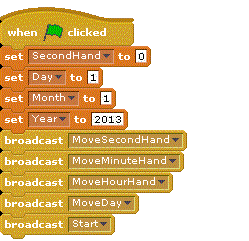
GreenFlag


And then as you can see I am broadcasting Start which contains the main code like this:
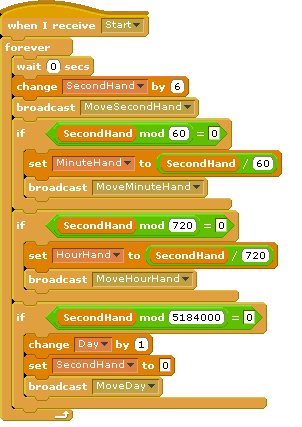
Start


And for each of the hands,  something like this should be enough:


The +90 is because Scratch has 0 degrees pointing LEFT, not UP!
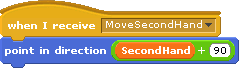
SecondHand


The full Scratch project has been uploaded to the Scratch WebSite as well, for those of you who want to cheat :).

Intermediate Scratch – Challenge 15 – Create a Rock-Paper-Scissors Game for 1 or 2 Players!

CDA-S2-Challenge15-RockPaperScissorsThis week’s challenge is to create a game of Rock-Paper-Scissors.

This week, you can choose to either create a 2-player networked game with a friend, or if you don’t feel like doing networking, you can write a 1-player version where you play against the computer. It’s up to you!

This challenge makes use of the networking ideas that we have covered in recent weeks, when writing a network Chat program and when writing 2-player Pong.

The big ideas behind today’s challenge are:

  1. How to design a 1-player or 2-player program
  2. Using variables  for exchange of data between computers and to pick random numbers
  3. Using broadcasts to sync parts of the game

Here are the presentation slides from the day, in PDF format: CDA-S2-Challenge15-RockPaperScissors.pdf

Next time, we will help ninjas to work on their own games.

If you would like me to send you these slides in PowerPoint format, feel free to get in touch on Twitter or via the comments!

Intermediate Scratch – Challenge 14 – Build a Network Pong Game!

CDA-S2-Challenge14-NetworkPongThis week’s challenge is to build a 2-player networked Pong game.

This challenge made use of the networking ideas that we covered when writing a network Chat program and previously when we learned about networking.

The big ideas behind this challenge were:

  1. Design of a networked program
  2. Division of labour: there are two programs running on two computers, and we have to decide which is which
  3. Using variables  for exchange of data

Here are the presentation slides from the day, in PDF format: CDA-S2-Challenge14-NetworkPong.pdf

If you would like me to send you these slides in PowerPoint format, feel free to get in touch on Twitter or via the comments!

Beginners/Intermediate Scratch – Challenge 13 – Learn about the Raspberry Pi

CDA-S2-Challenge13-RaspberryPi-Demo

This week in CoderDojo Athenry, the other streams joined us at the start, as we began with a demo of the Raspberry Pi, a really interesting low-cost computer that has been brought out in the last year. It only costs about €30 for a basic one, to which you add a power supply (many mobile phone ones work on it), an SD card (instead of a hard drive), a keyboard and mouse, and connect it to your TV to get started.

We saw it running Scratch and Python programs, and a couple of them were passed around the room for everyone to examine.

We took the opportunity to learn about the main components in a desktop PC: how to identify them and what the function of each one is. We also saw the equivalent components in the Raspberry Pi.

After that, we returned to Mesh networking and the Chatty program that we started a couple of weeks ago, that not everyone had finished.

Here are my notes from the day (PDF format): CDA-S2-Challenge13-RaspberryPi-Demo.pdf

Ninjas who had finished the Chatty program and wanted to do more did work on a 2-player Rock-Paper-Scissors program. We didn’t have notes for this, but I showed the code and it is posted here: http://scratch.mit.edu/projects/cdathenry/3077050  (This is code for one of the players. Similar code is needed for the other one.)

If you would like a copy of my slides in PowerPoint format, get in touch via Twitter or the comments.

Intermediate Scratch – Challenge 12 – 2-Player Network Guessing Game

CDA-S2-Challenge12-2Player-GuessingGame

This week in CoderDojo Athenry, we continued to play with networking in Scratch.

As we learned last week, you can set up a Mesh network in Scratch so that Scratch programs running on two different computers can exchange information with each other. This week, we used those ideas in combination with our simple guessing game from Challenge 2, to create a 2-player network guessing game.

Since we have new members who have just joined us in the past week, they could focus on the one-player version while more experienced members could work on the networking aspect.

The big ideas behind this challenge were:

  1. Design of a 2-player game (need two programs with different roles and different code)
  2. Communications on the network using variables
  3. Broadcasts across the network
  4. Loops and Decisions: fundamental coding concepts

Here are my notes from the day (PDF format): CDA-S2-Challenge12-2Player-GuessingGame.pdf

Here are my versions of the game for both players:

  • GuessNumberNetwork: this is the one that plays the ‘guess a number game’ when the other one (the ‘boss’) chooses the number
  • GuessNumberNetwork-Boss: this is the one that allows you choose the number and then communicates with the other one that plays

Note that you must download these (they won’t run on the Scratch website) and enable Mesh networking as described in the notes for them to work.

If you would like a copy of my slides in PowerPoint format, get in touch via Twitter or the comments.

Intermediate Scratch – Challenge 11 – Learn About Networking

CDA-S2-Challenge11-NetworkChatThese are the notes from our first week of 2013 in CoderDojo Athenry.

This was a really exciting new challenge: to learn about how computers communicate with each other, and apply these ideas to setting up Meshing in Scratch so that Scratch programs running on two different computers can exchange information with each other.

The big ideas behind this challenge were:

  1. How networks work
  2. Communications between programs running on two different computers
  3. Variables (used for exchange of data).

We started to apply these ideas to build a multi-player, multi-computer chat game. We will extend this next week and move on to other networked games. Stay tuned!

Here are my notes from the day (PDF format): CDA-S2-Challenge11-NetworkChat

Here is my version of the chat program: http://scratch.mit.edu/projects/cdathenry/2591598 (note that you need a separate version for each person in the chat, and you have to have enabled Mesh networking as described in the notes.)

If you would like a copy of my slides in PowerPoint format, get in touch via Twitter or the comments.