Advancers – Week 4 (2023-2024)

Snake

This week we attempted to recreate the old Nokia game of Snake.

We created:

The Snake – This could move around the screen and across the screen edges.
The Tail – This followed the Snake around the screen, wherever the Snake went, the tail would follow.
An Eraser – This followed the Tail rubbing it out, so it stayed the same length all the time.

We still need to complete the following:

The Bug – This will appear on the screen randomly for the Snake to eat. Eating the Bug will increase the length of the Tail.
Score – A simple scoring variable to keep track of how many Bugs we eat.
Music – Some annoying music to play during the Game, it has to be annoying!

I have uploaded 2 versions of the Game to the Scratch Web Site:
ClassVersion-Incomplete – This is from Saturday where we didn’t quite finish everything
ClassVersion-Complete – This is a complete version which has The Bug, The Score and annoying Music.

You can find them both here:

https://scratch.mit.edu/studios/33944393

If you need to log in, use the following details:
Username : athenryadvancers
Password : Advancers (don’t forget the uppercase “A”)
This is an image from the completed version.

Creators – Week 4

This week we first created a crate:

This used many of the same techniques as the barrel last week.

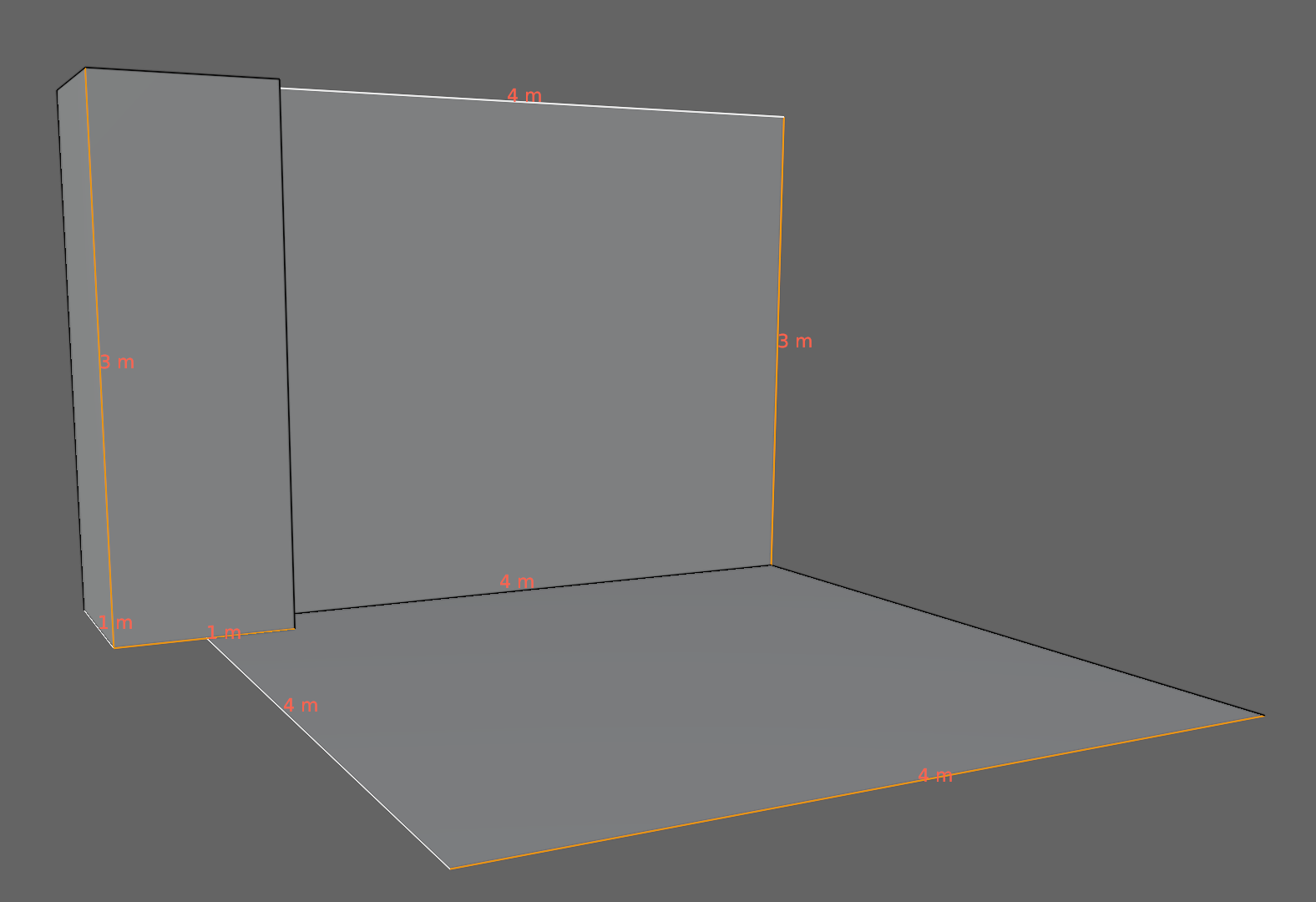
We then started with a plan for our dungeon pieces. As long we we stick to these generic dimensions for floor, pillar and wall pieces, we can mix and match and everything will slot together easily:

Our file for today can be downloaded from here.

Creators – Week 3

This week we started Blender in earnest and created our first model, a wooden barrel with metal rings. The file is available here. You need to be a member of the Creators’ Teams group to download it, so let me know next week if you aren’t yet a member and I can get you added.

For those catching-up, Blender can be downloaded through the Windows App Store or from https://www.blender.org/download/.

You can review Blender basics using these videos:

Bodgers – Week 2

Hi everyone, it was great to see you all last Saturday.

We worked on a car collision game here is our worksheet:

You can find the images for this game along with images for next week’s game here: https://www.dropbox.com/scl/fo/znirpob0ywen2kzwbgf6k/h?rlkey=ykhlgf8lbr4i35lu3ed8mrbrs&dl=0

Looking forward to seeing you all again next Saturday.

Declan and Kevin

Creators – Week 2

This week we looked some game designs from our ninjas. We ended with four:

  1. Duty to Defend – A tank-based flag-defence game played in first-person.
  2. Monster POV – Play as a monster defending a dungeon against hero characters. Isometric viewpoint.
  3. Red Panda’s Shopping – An exploration and collection game with puzzle elements.
  4. Gardening Simulator – Grow and harvest plants in a top-down game to earn money and unlock new seeds and areas

A vote was held and the winner was Monster POV!

We’ve asked ninjas this week to find some visual references for the look-and-feel of the game (given that it’ll be low-poly) and also to consider some lore or story that would enhance the game and inform the creation process.

We downloaded and installed the latest Blender from here: https://www.blender.org/download/

We looked at some of the most basic Blender commands. I handed out copies of the Blender Infographic which can also be found here: https://www.giudansky.com/illustration/infographics/blender-map

Next week we will look at building some environmental building blocks using Blender. To suit our selected game, these will be dungeon elements.

Advancers – Week 1 (2023-2024)

Welcome back everyone.

We started off this year with the Spirals Project.

We could specify how many lines the code should draw, how many sides the Spiral should have and then finally how many extra degrees we should turn before drawing the next line.

I have uploaded 2 versions of this project to the Scratch Website, you can get all the code and also play with them online.

ClassVersion-Spirals – This is the one we ended up with where it creates the early universe.
ClassVersion-SingleSpiral – This is the one that we started with, where you can choose the different values.

Go to:

https://www.scratch.mit.edu//

And then you can sign in with the following details, don’t forget the uppercase “A” on the password:

Username : AthenryAdvancers
Password : Advancers

Once you are connected you can go to “My Stuff” and then select the 2023-2024 Studio.